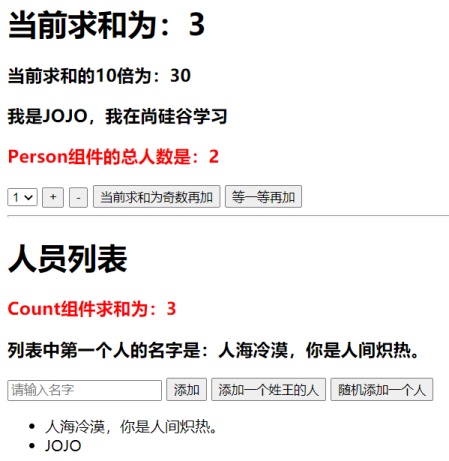
3 Vuex
3.1 理解 Vuex
3.1.1 Vuex 是什么
- 概念:专门在
Vue中实现集中式状态(数据)管理的一个Vue插件,对Vue应用中多个组件的共享状态进行集中式的管理(读/写),也是一种组件间通信的方式,且适用于任意组件间通信
Vuex Github地址
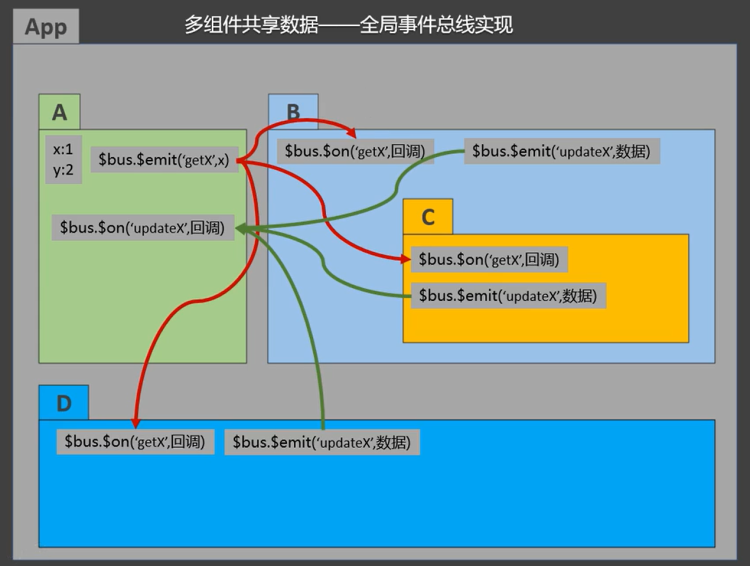
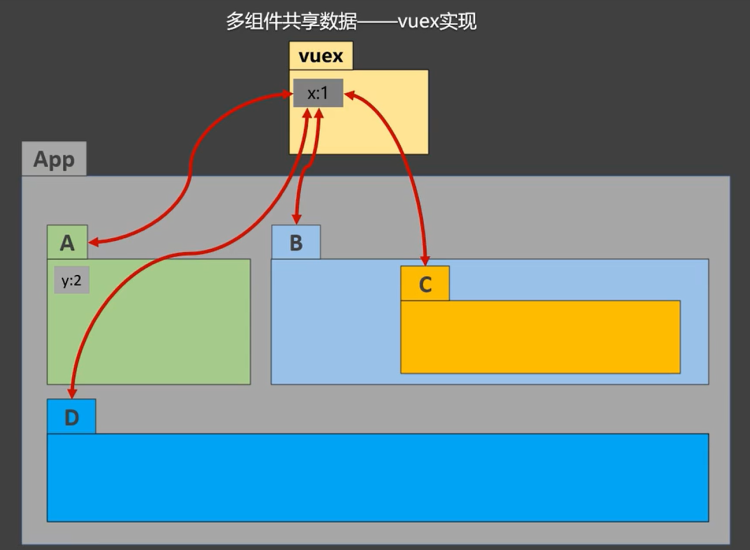
3.1.2 什么时候使用 Vuex
- 多个组件依赖于同一状态
- 来自不同组件的行为需要变更同一状态
3.1.3 Vuex 工作原理图
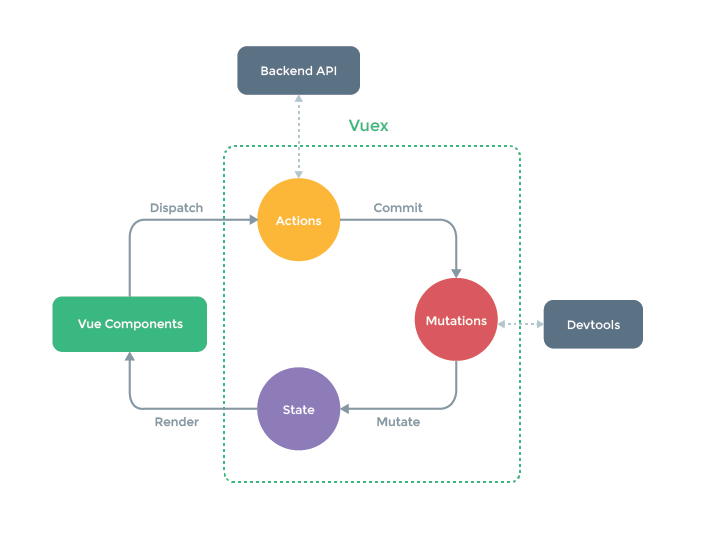
3.2 求和案例
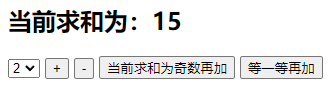
3.2.1 使用纯 vue 编写
Count.vue:
1
2
3
4
5
6
7
8
9
10
11
12
13
14
15
16
17
18
19
20
21
22
23
24
25
26
27
28
29
30
31
32
33
34
35
36
37
38
39
40
41
42
43
44
45
46
47
48
49
50
| <template>
<div>
<h1>当前求和为:{{sum}}</h1>
<select v-model.number="n">
<option value="1">1</option>
<option value="2">2</option>
<option value="3">3</option>
</select>
<button @click="increment">+</button>
<button @click="decrement">-</button>
<button @click="incrementOdd">当前求和为奇数再加</button>
<button @click="incrementWait">等一等再加</button>
</div>
</template>
<script>
export default {
name: 'Count',
data() {
return {
n: 1, //用户选择的数字
sum: 0 //当前的和
}
},
methods: {
increment() {
this.sum += this.n
},
decrement() {
this.sum -= this.n
},
incrementOdd() {
if (this.sum % 2) {
this.sum += this.n
}
},
incrementWait() {
setTimeout(() => {
this.sum += this.n
}, 500)
},
},
}
</script>
<style lang="css">
button {
margin-left: 5px;
}
</style>
|
App.vue:
1
2
3
4
5
6
7
8
9
10
11
12
13
14
| <template>
<div>
<Count/>
</div>
</template>
<script>
import Count from './components/Count'
export default {
name: 'App',
components: {Count},
}
</script>
|
3.2.2 搭建 Vuex 环境
下载安装vuex npm i vuex
创建src/store/index.js该文件用于创建Vuex中最为核心的store
1
2
3
4
5
6
7
8
9
10
11
12
13
14
15
| import Vue from 'vue'
import Vuex from 'vuex'
Vue.use(Vuex)
const actions = {}
const mutations = {}
const state = {}
export default new Vuex.Store({
actions,
mutations,
state,
})
|
在src/main.js中创建vm时传入store配置项
1
2
3
4
5
6
7
8
9
10
11
12
13
14
| import Vue from 'vue'
import App from './App.vue'
import store from './store'
Vue.config.productionTip = false
new Vue({
el: '#app',
render: h => h(App),
store,
beforeCreate() {
Vue.prototype.$bus = this
}
})
|
3.2.3 使用 Vuex 编写
Vuex的基本使用
- 初始化数据
state,配置actions、mutations,操作文件store.js
- 组件中读取
vuex中的数据$store.state.数据
- 组件中修改
vuex中的数据$store.dispatch('action中的方法名',数据)或 $store.commit('mutations中的方法名',数据)
- 若没有网络请求或其他业务逻辑,组件中也可越过
actions,即不写dispatch,直接编写commit
src/store/index.js:
1
2
3
4
5
6
7
8
9
10
11
12
13
14
15
16
17
18
19
20
21
22
23
24
25
26
27
28
29
30
31
32
33
34
35
36
37
38
39
40
41
42
43
44
45
46
47
48
49
50
51
52
|
import Vue from 'vue'
import Vuex from 'vuex'
Vue.use(Vuex)
const actions = {
jiaOdd(context, value) {
console.log('actions中的jiaOdd被调用了')
if (context.state.sum % 2) {
context.commit('JIA', value)
}
},
jiaWait(context, value) {
console.log('actions中的jiaWait被调用了')
setTimeout(() => {
context.commit('JIA', value)
}, 500)
}
}
const mutations = {
JIA(state, value) {
console.log('mutations中的JIA被调用了')
state.sum += value
},
JIAN(state, value) {
console.log('mutations中的JIAN被调用了')
state.sum -= value
}
}
const state = {
sum: 0
}
export default new Vuex.Store({
actions,
mutations,
state,
})
|
src/components/Count.vue:
1
2
3
4
5
6
7
8
9
10
11
12
13
14
15
16
17
18
19
20
21
22
23
24
25
26
27
28
29
30
31
32
33
34
35
36
37
38
39
40
41
42
43
44
45
46
47
48
| <template>
<div>
<h1>当前求和为:{{$store.state.sum}}</h1>
<select v-model.number="n">
<option value="1">1</option>
<option value="2">2</option>
<option value="3">3</option>
</select>
<button @click="increment">+</button>
<button @click="decrement">-</button>
<button @click="incrementOdd">当前求和为奇数再加</button>
<button @click="incrementWait">等一等再加</button>
</div>
</template>
<script>
export default {
name: 'Count',
data() {
return {
n: 1, //用户选择的数字
}
},
methods: {
increment() {
this.$store.commit('JIA', this.n)
},
decrement() {
this.$store.commit('JIAN', this.n)
},
incrementOdd() {
this.$store.dispatch('jiaOdd', this.n)
},
incrementWait() {
this.$store.dispatch('jiaWait', this.n)
},
},
mounted() {
console.log('Count', this)
},
}
</script>
<style lang="css">
button {
margin-left: 5px;
}
</style>
|
App.vue
1
2
3
4
5
6
7
8
9
10
11
12
13
14
15
16
17
| <template>
<div>
<Count/>
</div>
</template>
<script>
import Count from './components/Count'
export default {
name: 'App',
components: {Count},
mounted() {
// console.log('App',this)
},
}
</script>
|
3.3 getters 配置项
概念:当state中的数据需要经过加工后再使用时,可以使用getters加工,相当于全局计算属性
在store.js中追加getters配置
1
2
3
4
5
6
7
8
9
10
11
| const getters = {
bigSum(state){
return state.sum * 10
}
}
export default new Vuex.Store({
......
getters
})
|
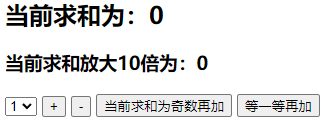
组件中读取数据$store.getters.bigSum
src/store/index.js
1
2
3
4
5
6
7
8
9
10
11
12
13
14
15
16
17
18
19
20
21
22
23
24
25
26
27
28
29
30
31
32
33
34
35
36
37
38
39
40
41
42
43
44
45
46
47
48
49
50
51
52
53
54
55
56
57
58
59
|
import Vue from 'vue'
import Vuex from 'vuex'
Vue.use(Vuex)
const actions = {
jiaOdd(context, value) {
console.log('actions中的jiaOdd被调用了')
if (context.state.sum % 2) {
context.commit('JIA', value)
}
},
jiaWait(context, value) {
console.log('actions中的jiaWait被调用了')
setTimeout(() => {
context.commit('JIA', value)
}, 500)
}
}
const mutations = {
JIA(state, value) {
console.log('mutations中的JIA被调用了')
state.sum += value
},
JIAN(state, value) {
console.log('mutations中的JIAN被调用了')
state.sum -= value
}
}
const state = {
sum: 0
}
const getters = {
bigSum(state) {
return state.sum * 10
}
}
export default new Vuex.Store({
actions,
mutations,
state,
getters
})
|
App.vue
1
2
3
4
5
6
7
8
9
10
11
12
13
14
15
16
17
18
19
20
21
22
23
24
25
26
27
28
29
30
31
32
33
34
35
36
37
38
39
40
41
42
43
44
45
46
47
48
49
| <template>
<div>
<h1>当前求和为:{{$store.state.sum}}</h1>
<h3>当前求和放大10倍为:{{$store.getters.bigSum}}</h3>
<select v-model.number="n">
<option value="1">1</option>
<option value="2">2</option>
<option value="3">3</option>
</select>
<button @click="increment">+</button>
<button @click="decrement">-</button>
<button @click="incrementOdd">当前求和为奇数再加</button>
<button @click="incrementWait">等一等再加</button>
</div>
</template>
<script>
export default {
name: 'Count',
data() {
return {
n: 1, //用户选择的数字
}
},
methods: {
increment() {
this.$store.commit('JIA', this.n)
},
decrement() {
this.$store.commit('JIAN', this.n)
},
incrementOdd() {
this.$store.dispatch('jiaOdd', this.n)
},
incrementWait() {
this.$store.dispatch('jiaWait', this.n)
},
},
mounted() {
console.log('Count', this.$store)
},
}
</script>
<style lang="css">
button {
margin-left: 5px;
}
</style>
|
3.4 四个 map 方法的使用
mapState方法:用于帮助映射state中的数据为计算属性
1
2
3
4
5
6
7
8
9
10
| computed: {
...
mapState({sum: 'sum', school: 'school', subject: 'subject'}),
...
mapState(['sum', 'school', 'subject']),
}
,
|
mapGetters方法:用于帮助映射getters中的数据为计算属性
1
2
3
4
5
6
7
8
9
10
| computed: {
...
mapGetters({bigSum: 'bigSum'}),
...
mapGetters(['bigSum'])
}
,
|
mapActions方法:用于帮助生成与actions对话的方法,即包含$store.dispatch(xxx)的函数
1
2
3
4
5
6
7
8
9
| methods:{
...
mapActions({incrementOdd: 'jiaOdd', incrementWait: 'jiaWait'})
...
mapActions(['jiaOdd', 'jiaWait'])
}
|
mapMutations方法:用于帮助生成与mutations对话的方法,即包含$store.commit(xxx)的函数
1
2
3
4
5
6
7
8
9
| methods:{
...
mapMutations({increment: 'JIA', decrement: 'JIAN'}),
...
mapMutations(['JIA', 'JIAN']),
}
|
注意:mapActions与mapMutations使用时,若需要传递参数需要:
在模板中绑定事件时传递好参数,否则参数是事件对象
Count.vue
1
2
3
4
5
6
7
8
9
10
11
12
13
14
15
16
17
18
19
20
21
22
23
24
25
26
27
28
29
30
31
32
33
34
35
36
37
38
39
40
41
42
43
44
45
46
47
48
49
50
51
52
53
54
55
56
57
58
59
60
61
62
63
64
65
66
67
68
69
70
71
72
73
74
75
76
77
78
79
80
81
82
83
84
85
86
87
| <template>
<div>
<h1>当前求和为:{{sum}}</h1>
<h3>当前求和放大10倍为:{{bigSum}}</h3>
<h3>我在{{school}},学习{{subject}}</h3>
<select v-model.number="n">
<option value="1">1</option>
<option value="2">2</option>
<option value="3">3</option>
</select>
<button @click="increment(n)">+</button>
<button @click="decrement(n)">-</button>
<button @click="incrementOdd(n)">当前求和为奇数再加</button>
<button @click="incrementWait(n)">等一等再加</button>
</div>
</template>
<script>
import {mapState, mapGetters, mapMutations, mapActions} from 'vuex'
export default {
name: 'Count',
data() {
return {
n: 1, //用户选择的数字
}
},
computed: {
//借助mapState生成计算属性,从state中读取数据。(对象写法)
// ...mapState({he:'sum',xuexiao:'school',xueke:'subject'}),
//借助mapState生成计算属性,从state中读取数据。(数组写法)
...mapState(['sum', 'school', 'subject']),
/* ******************************************************************** */
//借助mapGetters生成计算属性,从getters中读取数据。(对象写法)
// ...mapGetters({bigSum:'bigSum'})
//借助mapGetters生成计算属性,从getters中读取数据。(数组写法)
...mapGetters(['bigSum'])
},
methods: {
//程序员亲自写方法
/* increment(){
this.$store.commit('JIA',this.n)
},
decrement(){
this.$store.commit('JIAN',this.n)
}, */
//借助mapMutations生成对应的方法,方法中会调用commit去联系mutations(对象写法)
...mapMutations({increment: 'JIA', decrement: 'JIAN'}),
//借助mapMutations生成对应的方法,方法中会调用commit去联系mutations(数组写法)
// ...mapMutations(['JIA','JIAN']),
/* ************************************************* */
//程序员亲自写方法
/* incrementOdd(){
this.$store.dispatch('jiaOdd',this.n)
},
incrementWait(){
this.$store.dispatch('jiaWait',this.n)
}, */
//借助mapActions生成对应的方法,方法中会调用dispatch去联系actions(对象写法)
...mapActions({incrementOdd: 'jiaOdd', incrementWait: 'jiaWait'})
//借助mapActions生成对应的方法,方法中会调用dispatch去联系actions(数组写法)
// ...mapActions(['jiaOdd','jiaWait'])
},
mounted() {
const x = mapState({he: 'sum', xuexiao: 'school', xueke: 'subject'})
console.log(x)
},
}
</script>
<style lang="css">
button {
margin-left: 5px;
}
</style>
|
3.5 多组件共享数据案例
index.js
1
2
3
4
5
6
7
8
9
10
11
12
13
14
15
16
17
18
19
20
21
22
23
24
25
26
27
28
29
30
31
32
33
34
35
36
37
38
39
40
41
42
43
44
45
46
47
48
49
50
51
52
53
54
55
56
57
58
59
60
61
62
63
64
65
66
67
68
|
import Vue from 'vue'
import Vuex from 'vuex'
Vue.use(Vuex)
const actions = {
jiaOdd(context, value) {
console.log('actions中的jiaOdd被调用了')
if (context.state.sum % 2) {
context.commit('JIA', value)
}
},
jiaWait(context, value) {
console.log('actions中的jiaWait被调用了')
setTimeout(() => {
context.commit('JIA', value)
}, 500)
}
}
const mutations = {
JIA(state, value) {
console.log('mutations中的JIA被调用了')
state.sum += value
},
JIAN(state, value) {
console.log('mutations中的JIAN被调用了')
state.sum -= value
},
ADD_PERSON(state, value) {
console.log('mutations中的ADD_PERSON被调用了')
state.personList.unshift(value)
}
}
const state = {
sum: 0,
school: '尚硅谷',
subject: '前端',
personList: [
{id: '001', name: '张三'}
]
}
const getters = {
bigSum(state) {
return state.sum * 10
}
}
export default new Vuex.Store({
actions,
mutations,
state,
getters
})
|
main.js
1
2
3
4
5
6
7
8
9
10
11
12
13
14
15
16
17
18
19
20
21
22
23
24
|
import Vue from 'vue'
import App from './App.vue'
import vueResource from 'vue-resource'
import store from './store'
Vue.config.productionTip = false
Vue.use(vueResource)
new Vue({
el: '#app',
render: h => h(App),
store,
beforeCreate() {
Vue.prototype.$bus = this
}
})
|
Count.vue
1
2
3
4
5
6
7
8
9
10
11
12
13
14
15
16
17
18
19
20
21
22
23
24
25
26
27
28
29
30
31
32
33
34
35
36
37
38
39
40
41
42
43
44
45
46
47
48
49
50
51
52
53
| <template>
<div>
<h1>当前求和为:{{sum}}</h1>
<h3>当前求和放大10倍为:{{bigSum}}</h3>
<h3>我在{{school}},学习{{subject}}</h3>
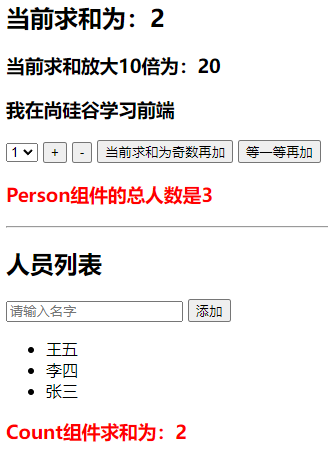
<h3 style="color:red">Person组件的总人数是:{{personList.length}}</h3>
<select v-model.number="n">
<option value="1">1</option>
<option value="2">2</option>
<option value="3">3</option>
</select>
<button @click="increment(n)">+</button>
<button @click="decrement(n)">-</button>
<button @click="incrementOdd(n)">当前求和为奇数再加</button>
<button @click="incrementWait(n)">等一等再加</button>
</div>
</template>
<script>
import {mapState, mapGetters, mapMutations, mapActions} from 'vuex'
export default {
name: 'Count',
data() {
return {
n: 1, //用户选择的数字
}
},
computed: {
//借助mapState生成计算属性,从state中读取数据。(数组写法)
...mapState(['sum', 'school', 'subject', 'personList']),
//借助mapGetters生成计算属性,从getters中读取数据。(数组写法)
...mapGetters(['bigSum'])
},
methods: {
//借助mapMutations生成对应的方法,方法中会调用commit去联系mutations(对象写法)
...mapMutations({increment: 'JIA', decrement: 'JIAN'}),
//借助mapActions生成对应的方法,方法中会调用dispatch去联系actions(对象写法)
...mapActions({incrementOdd: 'jiaOdd', incrementWait: 'jiaWait'})
},
mounted() {
// const x = mapState({he:'sum',xuexiao:'school',xueke:'subject'})
// console.log(x)
},
}
</script>
<style lang="css">
button {
margin-left: 5px;
}
</style>
|
Person.vue
1
2
3
4
5
6
7
8
9
10
11
12
13
14
15
16
17
18
19
20
21
22
23
24
25
26
27
28
29
30
31
32
33
34
35
36
37
38
39
40
| <template>
<div>
<h1>人员列表</h1>
<h3 style="color:red">Count组件求和为:{{sum}}</h3>
<input type="text" placeholder="请输入名字" v-model="name">
<button @click="add">添加</button>
<ul>
<li v-for="p in personList" :key="p.id">{{p.name}}</li>
</ul>
</div>
</template>
<script>
import {nanoid} from 'nanoid'
export default {
name: 'Person',
data() {
return {
name: ''
}
},
computed: {
personList() {
return this.$store.state.personList
},
sum() {
return this.$store.state.sum
}
},
methods: {
add() {
const personObj = {id: nanoid(), name: this.name}
this.$store.commit('ADD_PERSON', personObj)
this.name = ''
}
},
}
</script>
|
App.vue
1
2
3
4
5
6
7
8
9
10
11
12
13
14
15
16
17
18
19
20
| <template>
<div>
<Count/>
<hr>
<Person/>
</div>
</template>
<script>
import Count from './components/Count'
import Person from './components/Person'
export default {
name: 'App',
components: {Count, Person},
mounted() {
// console.log('App',this)
},
}
</script>
|
3.6 模块化+命名空间
目的:让代码更好维护,让多种数据分类更加明确
修改store.js
为了解决不同模块命名冲突的问题,将不同模块的namespaced: true,之后在不同页面中引入getter actions mutations
时,需要加上所属的模块名
1
2
3
4
5
6
7
8
9
10
11
12
13
14
15
16
17
18
19
20
21
22
23
| const countAbout = {
namespaced: true,
state: {x:1},
mutations: { ... },
actions: { ... },
getters: {
bigSum(state){ return state.sum * 10 }
}
}
const personAbout = {
namespaced: true,
state: { ... },
mutations: { ... },
actions: { ... }
}
const store = new Vuex.Store({
modules: {
countAbout,
personAbout
}
})
|
开启命名空间后,组件中读取state数据
1
2
3
4
|
this.$store.state.personAbout.list
...mapState('countAbout',['sum','school','subject']),
|
开启命名空间后,组件中读取getters数据
1
2
3
4
|
this.$store.getters['personAbout/firstPersonName']
...mapGetters('countAbout',['bigSum'])
|
开启命名空间后,组件中调用dispatch
1
2
3
4
|
this.$store.dispatch('personAbout/addPersonWang',person)
...mapActions('countAbout',{incrementOdd:'jiaOdd',incrementWait:'jiaWait'})
|
开启命名空间后,组件中调用commit
1
2
3
4
|
this.$store.commit('personAbout/ADD_PERSON',person)
...mapMutations('countAbout',{increment:'JIA',decrement:'JIAN'}),
|
index.js
1
2
3
4
5
6
7
8
9
10
11
12
13
14
15
16
|
import Vue from 'vue'
import Vuex from 'vuex'
import countOptions from './count'
import personOptions from './person'
Vue.use(Vuex)
export default new Vuex.Store({
modules: {
countAbout: countOptions,
personAbout: personOptions
}
})
|
count.js
1
2
3
4
5
6
7
8
9
10
11
12
13
14
15
16
17
18
19
20
21
22
23
24
25
26
27
28
29
30
31
32
33
34
35
36
37
38
|
export default {
namespaced: true,
actions: {
jiaOdd(context, value) {
console.log('actions中的jiaOdd被调用了')
if (context.state.sum % 2) {
context.commit('JIA', value)
}
},
jiaWait(context, value) {
console.log('actions中的jiaWait被调用了')
setTimeout(() => {
context.commit('JIA', value)
}, 500)
}
},
mutations: {
JIA(state, value) {
console.log('mutations中的JIA被调用了')
state.sum += value
},
JIAN(state, value) {
console.log('mutations中的JIAN被调用了')
state.sum -= value
},
},
state: {
sum: 0,
school: '尚硅谷',
subject: '前端',
},
getters: {
bigSum(state) {
return state.sum * 10
}
},
}
|
person.js
1
2
3
4
5
6
7
8
9
10
11
12
13
14
15
16
17
18
19
20
21
22
23
24
25
26
27
28
29
30
31
32
33
34
35
36
37
38
39
40
41
42
|
import axios from 'axios'
import {nanoid} from 'nanoid'
export default {
namespaced: true,
actions: {
addPersonWang(context, value) {
if (value.name.indexOf('王') === 0) {
context.commit('ADD_PERSON', value)
} else {
alert('添加的人必须姓王!')
}
},
addPersonServer(context) {
axios.get('https://api.uixsj.cn/hitokoto/get?type=social').then(
response => {
context.commit('ADD_PERSON', {id: nanoid(), name: response.data})
},
error => {
alert(error.message)
}
)
}
},
mutations: {
ADD_PERSON(state, value) {
console.log('mutations中的ADD_PERSON被调用了')
state.personList.unshift(value)
}
},
state: {
personList: [
{id: '001', name: '张三'}
]
},
getters: {
firstPersonName(state) {
return state.personList[0].name
}
},
}
|
Count.vue
1
2
3
4
5
6
7
8
9
10
11
12
13
14
15
16
17
18
19
20
21
22
23
24
25
26
27
28
29
30
31
32
33
34
35
36
37
38
39
40
41
42
43
44
45
46
47
48
49
50
51
52
| <template>
<div>
<h1>当前求和为:{{sum}}</h1>
<h3>当前求和放大10倍为:{{bigSum}}</h3>
<h3>我在{{school}},学习{{subject}}</h3>
<h3 style="color:red">Person组件的总人数是:{{personList.length}}</h3>
<select v-model.number="n">
<option value="1">1</option>
<option value="2">2</option>
<option value="3">3</option>
</select>
<button @click="increment(n)">+</button>
<button @click="decrement(n)">-</button>
<button @click="incrementOdd(n)">当前求和为奇数再加</button>
<button @click="incrementWait(n)">等一等再加</button>
</div>
</template>
<script>
import {mapState, mapGetters, mapMutations, mapActions} from 'vuex'
export default {
name: 'Count',
data() {
return {
n: 1, //用户选择的数字
}
},
computed: {
//借助mapState生成计算属性,从state中读取数据。(数组写法)
...mapState('countAbout', ['sum', 'school', 'subject']),
...mapState('personAbout', ['personList']),
//借助mapGetters生成计算属性,从getters中读取数据。(数组写法)
...mapGetters('countAbout', ['bigSum'])
},
methods: {
//借助mapMutations生成对应的方法,方法中会调用commit去联系mutations(对象写法)
...mapMutations('countAbout', {increment: 'JIA', decrement: 'JIAN'}),
//借助mapActions生成对应的方法,方法中会调用dispatch去联系actions(对象写法)
...mapActions('countAbout', {incrementOdd: 'jiaOdd', incrementWait: 'jiaWait'})
},
mounted() {
console.log(this.$store)
},
}
</script>
<style lang="css">
button {
margin-left: 5px;
}
</style>
|
Person.vue
1
2
3
4
5
6
7
8
9
10
11
12
13
14
15
16
17
18
19
20
21
22
23
24
25
26
27
28
29
30
31
32
33
34
35
36
37
38
39
40
41
42
43
44
45
46
47
48
49
50
51
52
53
| <template>
<div>
<h1>人员列表</h1>
<h3 style="color:red">Count组件求和为:{{sum}}</h3>
<h3>列表中第一个人的名字是:{{firstPersonName}}</h3>
<input type="text" placeholder="请输入名字" v-model="name">
<button @click="add">添加</button>
<button @click="addWang">添加一个姓王的人</button>
<button @click="addPersonServer">添加一个人,名字随机</button>
<ul>
<li v-for="p in personList" :key="p.id">{{p.name}}</li>
</ul>
</div>
</template>
<script>
import {nanoid} from 'nanoid'
export default {
name: 'Person',
data() {
return {
name: ''
}
},
computed: {
personList() {
return this.$store.state.personAbout.personList
},
sum() {
return this.$store.state.countAbout.sum
},
firstPersonName() {
return this.$store.getters['personAbout/firstPersonName']
}
},
methods: {
add() {
const personObj = {id: nanoid(), name: this.name}
this.$store.commit('personAbout/ADD_PERSON', personObj)
this.name = ''
},
addWang() {
const personObj = {id: nanoid(), name: this.name}
this.$store.dispatch('personAbout/addPersonWang', personObj)
this.name = ''
},
addPersonServer() {
this.$store.dispatch('personAbout/addPersonServer')
}
},
}
</script>
|
App.vue
1
2
3
4
5
6
7
8
9
10
11
12
13
14
15
16
17
18
19
20
21
| <template>
<div>
<Count/>
<hr>
<Person/>
</div>
</template>
<script>
import Count from './components/Count'
import Person from './components/Person'
export default {
name: 'App',
components: {Count, Person},
mounted() {
// console.log('App',this)
},
}
</script>
|