2 Vue2 2.1 初始化脚手架 2.1.1 说明
Vue脚手架是Vue官方提供的标准化开发工具(开发平台)最新的版本是 4.x
文档 VueCLI
目前已经 Vue CLI已经被弃用了,Vue官方开发并推荐Vite
2.1.2 具体步骤
如果下载缓慢请配置npm淘宝镜像npm config set registry http://registry.npm.taobao.org
全局安装 @vue/cli npm install -g @vue/cli
切换到创建项目的目录,使用命令创建项目vue create xxx
选择使用vue的版本
启动项目npm run serve
打包项目npm run build
暂停项目 Ctrl+C
Vue脚手架隐藏了所有webpack相关的配置,若想查看具体的webpack配置,请执行vue inspect > output.js
2.1.3 脚手架文件结构 1 2 3 4 5 6 7 8 9 10 11 12 13 14 15 16 17 .文件目录 ├── node_modules ├── public │ ├── favicon.ico: 页签图标 │ └── index.html: 主页面 ├── src │ ├── assets: 存放静态资源 │ │ └── logo.png │ │── component: 存放组件 │ │ └── HelloWorld.vue │ │── App.vue: 汇总所有组件 │ └── main.js: 入口文件 ├── .gitignore: git版本管制忽略的配置 ├── babel.config.js: babel的配置文件 ├── package.json: 应用包配置文件 ├── README.md: 应用描述文件 └── package-lock.json: 包版本控制文件
public/index.html
1 2 3 4 5 6 7 8 9 10 11 12 13 14 15 16 17 18 19 20 21 22 23 24 25 26 27 28 <!DOCTYPE html > <html lang ="" > <head > <meta charset ="UTF-8" > <meta http-equiv ="X-UA-Compatible" content ="IE=edge" > <meta name ="viewport" content ="width=device-width, initial-scale=1.0" > <link rel ="icon" href ="<%= BASE_URL %>favicon.ico" > <title > <%= htmlWebpackPlugin.options.title %></title > </head > <body > <noscript > <strong > We're sorry but <%= htmlWebpackPlugin.options.title %> doesn't work properly without JavaScript enabled. Please enable it to continue.</strong > </noscript > <div id ="app" > </div > </body > </html >
src/main.js
1 2 3 4 5 6 7 8 9 10 11 import Vue from 'vue' import App from './App.vue' Vue .config .productionTip = false new Vue ({ el :'#app' , render : h =>h (App ), })
src/App.vue
1 2 3 4 5 6 7 8 9 10 11 12 13 14 15 16 17 18 <template> <div> <img src="./assets/logo.png" alt=""> <School></School> <Student></Student> </div> </template> <script> // 引入组件 import School from './components/School.vue' import Student from './components/Student.vue' export default { name:'App', components:{ School, Student } } </script>
src/components/School.vue
1 2 3 4 5 6 7 8 9 10 11 12 13 14 15 16 17 18 19 20 21 22 23 24 <template> <div class="demo"> <h2>学校名称:{{ name }}</h2> <h2>学校地址:{{ address }}</h2> <button @click="showName">点我提示学校名</button> </div> </template> <script> export default { name: "School", data() { return { name: "UESTC", address: "成都", }; }, methods: {showName() {alert(this.name);},}, }; </script> <style> .demo {background-color: orange;} </style>
src/components/Student.vue
1 2 3 4 5 6 7 8 9 10 11 12 13 14 15 16 17 18 19 20 21 22 23 24 <template> <div class="demo"> <h2>学校名称:{{ name }}</h2> <h2>学校地址:{{ address }}</h2> <button @click="showName">点我提示学校名</button> </div> </template> <script> export default { name: "School", data() { return { name: "UESTC", address: "成都", }; }, methods: {showName() {alert(this.name);},}, }; </script> <style> .demo {background-color: orange;} </style>
2.1.4 render 函数 1 2 3 4 5 6 7 8 9 10 11 12 13 14 15 import Vue from 'vue' import App from './App.vue' Vue .config .productionTip = false new Vue ({ el :'#app' , render : h =>h (App ), })
2.1.5 关于不同版本的函数
vue.js与vue.runtime.xxx.js的区别
vue.js 是完整版的Vue,包含:核心功能+模板解析器vue.runtime.xxx.js 是运行版的Vue,只包含核心功能,没有模板解析器esm 就是 ES6 module
因为 vue.runtime.xxx.js 没有模板解析器,所以不能使用template配置项,需要使用render函数接收到的createElement函数去指定具体内容
2.1.6 vue.config.js 配置文件
vue inspect > output.js可以查看到Vue脚手架的默认配置使用vue.config.js可以对脚手架进行个性化定制,和package.json同级目录,详见 配置参考Vue CLI
1 2 3 4 5 6 7 8 module .exports = { pages : { index : { entry : 'src/index/main.js' } }, lineOnSave : false }
2.1.7 综合代码 main.js
1 2 3 4 5 6 7 8 9 10 11 12 13 14 15 16 17 18 19 20 21 22 23 24 25 26 27 28 29 30 31 import Vue from 'vue' import App from './App.vue' Vue .config .productionTip = false new Vue ({ el :'#app' , render : h =>h (App ), })
App.vue
1 2 3 4 5 6 7 8 9 10 11 12 13 14 15 16 17 18 19 20 21 22 <template> <div> <img src="./assets/logo.png" alt="logo"> <School></School> <Student></Student> </div> </template> <script> //引入组件 import School from './components/School' import Student from './components/Student' export default { name:'App', components:{ School, Student } } </script>
School.vue
1 2 3 4 5 6 7 8 9 10 11 12 13 14 15 16 17 18 19 20 21 22 23 24 25 26 27 28 29 30 <template> <div class="demo"> <h2>学校名称:{{name}}</h2> <h2>学校地址:{{address}}</h2> <button @click="showName">点我提示学校名</button> </div> </template> <script> export default { name:'School', data(){ return { name:'尚硅谷', address:'北京昌平' } }, methods: { showName(){ alert(this.name) } }, } </script> <style> .demo{ background-color: orange; } </style>
Student.vue
1 2 3 4 5 6 7 8 9 10 11 12 13 14 15 16 17 18 19 <template> <div> <h2>学生姓名:{{name}}</h2> <h2>学生年龄:{{age}}</h2> </div> </template> <script> export default { name:'Student', data(){ return { name:'张三', age:18 } } } </script>
2.2 ref 属性 refid的替代者)
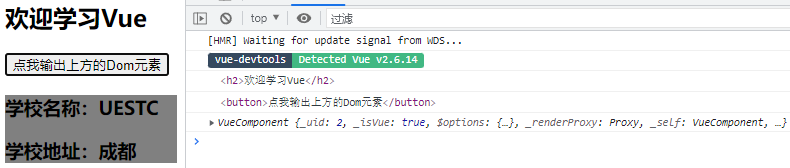
应用在html标签上获取的是真实DOM元素,应用在组件标签上获取的是组件实例对象vc
使用方式
打标识:<h1 ref="xxx"></h1>或<School ref="xxx"></School>
获取:this.$refs.xxx
School.vue
1
2
3
4
5
6
7
8
9
10
11
12
13
14
15
16
17
18
19
20
21
22
23
24
<template> <div class="school"> <h2>学校名称:{{name}}</h2> <h2>学校地址:{{address}}</h2> </div> </template> <script> export default { name:'School', data() { return { name:'尚硅谷', address:'北京·昌平' } }, } </script> <style> .school{ background-color: gray; } </style>
App.vue
1 2 3 4 5 6 7 8 9 10 11 12 13 14 15 16 17 18 19 20 21 22 23 24 25 26 27 28 29 30 <template> <div> <h1 v-text="msg" ref="title"></h1> <button ref="btn" @click="showDOM">点我输出上方的DOM元素</button> <School ref="sch"/> </div> </template> <script> //引入School组件 import School from './components/School' export default { name:'App', components:{School}, data() { return { msg:'欢迎学习Vue!' } }, methods: { showDOM(){ console.log(this.$refs.title) //真实DOM元素 console.log(this.$refs.btn) //真实DOM元素 console.log(this.$refs.sch) //School组件的实例对象(vc) } }, } </script>
2.3 props 配置项 props 让组件接收外部传过来的数据
传递数据<Demo name="xxx" :age="18"/>这里age前加:,通过v-bind使得里面的18是数字
接收数据
第一种方式(只接收)props:['name', 'age']
第二种方式(限制类型)props:{name:String, age:Number}
第三种方式(限制类型、限制必要性、指定默认值)
使用方式:
1 2 3 4 5 6 7 props : { name : { type : String , required : true , default : 'cess' } }
Student.vue
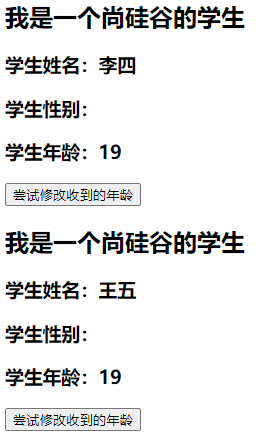
1 2 3 4 5 6 7 8 9 10 11 12 13 14 15 16 17 18 19 20 21 22 23 24 25 26 27 28 29 30 31 32 33 34 35 36 37 38 39 40 41 42 43 44 45 46 47 48 49 50 51 52 <template> <div> <h1>{{msg}}</h1> <h2>学生姓名:{{name}}</h2> <h2>学生性别:{{sex}}</h2> <h2>学生年龄:{{myAge+1}}</h2> <button @click="updateAge">尝试修改收到的年龄</button> </div> </template> <script> export default { name:'Student', data() { console.log(this) return { msg:'我是一个尚硅谷的学生', myAge:this.age } }, methods: { updateAge(){ this.myAge++ } }, //简单声明接收 // props:['name','age','sex'] //接收的同时对数据进行类型限制 /* props:{ name:String, age:Number, sex:String } */ //接收的同时对数据:进行类型限制+默认值的指定+必要性的限制 props:{ name:{ type:String, //name的类型是字符串 required:true, //name是必要的 }, age:{ type:Number, default:99 //默认值 }, sex:{ type:String, required:true } } } </script>
App.vue
1 2 3 4 5 6 7 8 9 10 11 12 13 14 15 <template> <div> <Student name="李四" sex="女" :age="18"/> </div> </template> <script> import Student from './components/Student' export default { name:'App', components:{Student} } </script>
2.4 mixin 混入
功能:可以把多个组件共用的配置提取成一个混入对象
使用方式
定义混入
1 2 3 4 5 const mixin = { data ( methods : {....} .... }
功能:可以把多个组件共用的配置提取成一个混入对象
使用混入
全局混入Vue.mixin(xxx)
局部混入mixins:['xxx']
备注
组件和混入对象含有同名选项时,这些选项将以恰当的方式进行“合并”,在发生冲突时以组件优先
1 2 3 4 5 6 7 8 9 10 11 12 13 14 15 16 17 18 19 20 21 22 var mixin = { data : function ( return { message : 'hello' , foo : 'abc' } } } new Vue ({ mixins : [mixin], data () { return { message : 'goodbye' , bar : 'def' } }, created () { console .log (this .$data ) } })
同名生命周期钩子将合并为一个数组,因此都将被调用。另外,混入对象的钩子将在组件自身钩子之前调用
1 2 3 4 5 6 7 8 9 10 11 12 13 14 15 var mixin = { created () { console .log ('混入对象的钩子被调用' ) } } new Vue ({ mixins : [mixin], created () { console .log ('组件钩子被调用' ) } })
mixin.js
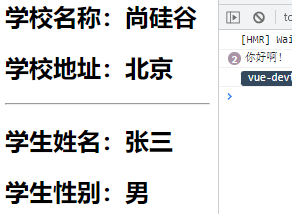
1 2 3 4 5 6 7 8 9 10 11 12 13 14 15 16 17 18 export const hunhe = { methods : { showName ( alert (this .name ) } }, mounted ( console .log ('你好啊!' ) }, } export const hunhe2 = { data ( return { x :100 , y :200 } }, }
main.js
1 2 3 4 5 6 7 8 9 10 11 12 13 14 15 16 17 18 import Vue from 'vue' import App from './App.vue' import {hunhe,hunhe2} from './mixin' Vue .config .productionTip = false Vue .mixin (hunhe)Vue .mixin (hunhe2)new Vue ({ el :'#app' , render : h =>h (App ) })
Student.vue
1 2 3 4 5 6 7 8 9 10 11 12 13 14 15 16 17 18 19 20 21 <template> <div> <h2 @click="showName">学生姓名:{{name}}</h2> <h2>学生性别:{{sex}}</h2> </div> </template> <script> // import {hunhe,hunhe2} from '../mixin' export default { name:'Student', data() { return { name:'张三', sex:'男' } }, // mixins:[hunhe,hunhe2] } </script>
School.vue
1 2 3 4 5 6 7 8 9 10 11 12 13 14 15 16 17 18 19 20 21 22 23 <template> <div> <h2 @click="showName">学校名称:{{name}}</h2> <h2>学校地址:{{address}}</h2> </div> </template> <script> //引入一个hunhe // import {hunhe,hunhe2} from '../mixin' export default { name:'School', data() { return { name:'尚硅谷', address:'北京', x:666 } }, // mixins:[hunhe,hunhe2], } </script>
App.vue
1 2 3 4 5 6 7 8 9 10 11 12 13 14 15 16 17 18 <template> <div> <School/> <hr> <Student/> </div> </template> <script> import School from './components/School' import Student from './components/Student' export default { name:'App', components:{School,Student} } </script>
2.5 plugin 插件
功能:用于增强Vue
本质:包含install方法的一个对象,install的第一个参数是Vue,第二个以后的参数是插件使用者传递的数据
定义插件(见下 src/plugin.js)
使用插件:Vue.use()
plugin.js
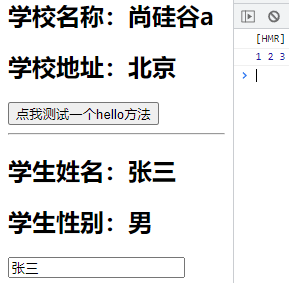
1 2 3 4 5 6 7 8 9 10 11 12 13 14 15 16 17 18 19 20 21 22 23 24 25 26 27 28 29 30 31 32 33 34 35 36 37 38 export default { install (Vue,x,y,z ){ console .log (x,y,z) Vue .filter ('mySlice' ,function (value ){ return value.slice (0 ,4 ) }) Vue .directive ('fbind' ,{ bind (element,binding ){ element.value = binding.value }, inserted (element,binding ){ element.focus () }, update (element,binding ){ element.value = binding.value } }) Vue .mixin ({ data ( return { x :100 , y :200 } }, }) Vue .prototype hello = ()=> {alert ('你好啊' )} } }
main.js
1 2 3 4 5 6 7 8 9 10 11 12 13 14 15 16 import Vue from 'vue' import App from './App.vue' import plugins from './plugins' Vue .config .productionTip = false Vue .use (plugins,1 ,2 ,3 )new Vue ({ el :'#app' , render : h =>h (App ) })
Student.vue
1 2 3 4 5 6 7 8 9 10 11 12 13 14 15 16 17 18 19 <template> <div> <h2>学生姓名:{{name}}</h2> <h2>学生性别:{{sex}}</h2> <input type="text" v-fbind:value="name"> </div> </template> <script> export default { name:'Student', data() { return { name:'张三', sex:'男' } }, } </script>
School.vue
1 2 3 4 5 6 7 8 9 10 11 12 13 14 15 16 17 18 19 20 21 22 23 24 <template> <div> <h2>学校名称:{{name | mySlice}}</h2> <h2>学校地址:{{address}}</h2> <button @click="test">点我测试一个hello方法</button> </div> </template> <script> export default { name:'School', data() { return { name:'尚硅谷atguigu', address:'北京', } }, methods: { test(){ this.hello() } }, } </script>
App.vue
1 2 3 4 5 6 7 8 9 10 11 12 13 14 15 16 17 18 <template> <div> <School/> <hr> <Student/> </div> </template> <script> import School from './components/School' import Student from './components/Student' export default { name:'App', components:{School,Student} } </script>
2.6 scoped样式
作用:让样式在局部生效,防止冲突
写法:<style scoped>
Vue2中的webpack并没有安装最新版,导致有些插件也不能默认安装最新版,如 npm i less-loader@7,而不是最新版
Student.vue
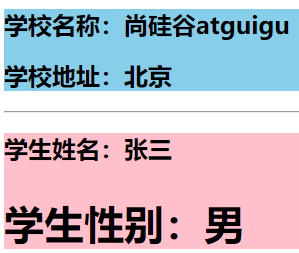
1 2 3 4 5 6 7 8 9 10 11 12 13 14 15 16 17 18 19 20 21 22 23 24 25 26 27 28 <template> <div class="demo"> <h2 class="title">学生姓名:{{name}}</h2> <h2 class="atguigu">学生性别:{{sex}}</h2> </div> </template> <script> export default { name:'Student', data() { return { name:'张三', sex:'男' } } } </script> <style lang="less" scoped> .demo{ background-color: pink; .atguigu{ font-size: 40px; } } </style>
School.vue
1 2 3 4 5 6 7 8 9 10 11 12 13 14 15 16 17 18 19 20 21 22 23 24 <template> <div class="demo"> <h2 class="title">学校名称:{{name}}</h2> <h2>学校地址:{{address}}</h2> </div> </template> <script> export default { name:'School', data() { return { name:'尚硅谷atguigu', address:'北京', } } } </script> <style scoped> .demo{ background-color: skyblue; } </style>
App.vue
1 2 3 4 5 6 7 8 9 10 11 12 13 14 15 16 17 18 19 20 21 22 23 24 <template> <div> <h1 class="title">你好啊</h1> <School/> <Student/> </div> </template> <script> import Student from './components/Student' import School from './components/School' export default { name:'App', components:{School,Student} } </script> <style scoped> .title{ color: red; } </style>
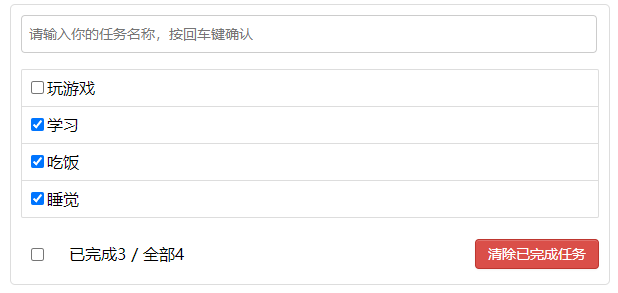
2.7 Todo-List 案例 组件化编码流程
拆分静态组件:组件要按照功能点拆分,命名不要与html元素冲突
实现动态组件:考虑好数据的存放位置,数据是一个组件在用,还是一些组件在用
一个组件在用:放在组件自身即可
一些组件在用:放在他们共同的父组件上(状态提升)
实现交互:从绑定事件开始
props适用于
父组件 ==> 子组件 通信
子组件 ==> 父组件 通信(要求父组件先给子组件一个函数)
使用v-model时要切记:v-model绑定的值不能是props传过来的值,因为props是不可以修改的
props传过来的若是对象类型的值,修改对象中的属性时Vue不会报错,但不推荐这样做
MyHeader.vue
1 2 3 4 5 6 7 8 9 10 11 12 13 14 15 16 17 18 19 20 21 22 23 24 25 26 27 28 29 30 31 32 33 34 35 36 37 38 39 40 41 42 43 44 45 46 47 48 49 50 <template> <div class="todo-header"> <input type="text" placeholder="请输入你的任务名称,按回车键确认" v-model="title" @keyup.enter="add"/> </div> </template> <script> import {nanoid} from 'nanoid' export default { name:'MyHeader', //接收从App传递过来的addTodo props:['addTodo'], data() { return { //收集用户输入的title title:'' } }, methods: { add(){ //校验数据 if(!this.title.trim()) return alert('输入不能为空') //将用户的输入包装成一个todo对象 const todoObj = {id:nanoid(),title:this.title,done:false} //通知App组件去添加一个todo对象 this.addTodo(todoObj) //清空输入 this.title = '' } }, } </script> <style scoped> /*header*/ .todo-header input { width: 560px; height: 28px; font-size: 14px; border: 1px solid #ccc; border-radius: 4px; padding: 4px 7px; } .todo-header input:focus { outline: none; border-color: rgba(82, 168, 236, 0.8); box-shadow: inset 0 1px 1px rgba(0, 0, 0, 0.075), 0 0 8px rgba(82, 168, 236, 0.6); } </style>
MyItem.vue
1 2 3 4 5 6 7 8 9 10 11 12 13 14 15 16 17 18 19 20 21 22 23 24 25 26 27 28 29 30 31 32 33 34 35 36 37 38 39 40 41 42 43 44 45 46 47 48 49 50 51 52 53 54 55 56 57 58 59 60 61 62 63 64 65 66 67 68 69 70 71 72 73 74 75 76 77 78 <template> <li> <label> <input type="checkbox" :checked="todo.done" @change="handleCheck(todo.id)"/> <!-- 如下代码也能实现功能,但是不太推荐,因为有点违反原则,因为修改了props --> <!-- <input type="checkbox" v-model="todo.done"/> --> <span>{{todo.title}}</span> </label> <button class="btn btn-danger" @click="handleDelete(todo.id)">删除</button> </li> </template> <script> export default { name:'MyItem', //声明接收todo、checkTodo、deleteTodo props:['todo','checkTodo','deleteTodo'], methods: { //勾选or取消勾选 handleCheck(id){ //通知App组件将对应的todo对象的done值取反 this.checkTodo(id) }, //删除 handleDelete(id){ if(confirm('确定删除吗?')){ //通知App组件将对应的todo对象删除 this.deleteTodo(id) } } }, } </script> <style scoped> /*item*/ li { list-style: none; height: 36px; line-height: 36px; padding: 0 5px; border-bottom: 1px solid #ddd; } li label { float: left; cursor: pointer; } li label li input { vertical-align: middle; margin-right: 6px; position: relative; top: -1px; } li button { float: right; display: none; margin-top: 3px; } li:before { content: initial; } li:last-child { border-bottom: none; } li:hover{ background-color: #ddd; } li:hover button{ display: block; } </style>
MyList.vue
1 2 3 4 5 6 7 8 9 10 11 12 13 14 15 16 17 18 19 20 21 22 23 24 25 26 27 28 29 30 31 32 33 34 35 36 37 38 39 40 41 <template> <ul class="todo-main"> <MyItem v-for="todoObj in todos" :key="todoObj.id" :todo="todoObj" :checkTodo="checkTodo" :deleteTodo="deleteTodo" /> </ul> </template> <script> import MyItem from './MyItem' export default { name:'MyList', components:{MyItem}, //声明接收App传递过来的数据,其中todos是自己用的,checkTodo和deleteTodo是给子组件MyItem用的 props:['todos','checkTodo','deleteTodo'] } </script> <style scoped> /*main*/ .todo-main { margin-left: 0px; border: 1px solid #ddd; border-radius: 2px; padding: 0px; } .todo-empty { height: 40px; line-height: 40px; border: 1px solid #ddd; border-radius: 2px; padding-left: 5px; margin-top: 10px; } </style>
MyFooter.vue
1 2 3 4 5 6 7 8 9 10 11 12 13 14 15 16 17 18 19 20 21 22 23 24 25 26 27 28 29 30 31 32 33 34 35 36 37 38 39 40 41 42 43 44 45 46 47 48 49 50 51 52 53 54 55 56 57 58 59 60 61 62 63 64 65 66 67 68 69 70 71 72 73 74 75 76 77 78 79 80 81 82 83 <template> <div class="todo-footer" v-show="total"> <label> <!-- <input type="checkbox" :checked="isAll" @change="checkAll"/> --> <input type="checkbox" v-model="isAll"/> </label> <span> <span>已完成{{doneTotal}}</span> / 全部{{total}} </span> <button class="btn btn-danger" @click="clearAll">清除已完成任务</button> </div> </template> <script> export default { name:'MyFooter', props:['todos','checkAllTodo','clearAllTodo'], computed: { //总数 total(){ return this.todos.length }, //已完成数 doneTotal(){ //此处使用reduce方法做条件统计 /* const x = this.todos.reduce((pre,current)=>{ console.log('@',pre,current) return pre + (current.done ? 1 : 0) },0) */ //简写 return this.todos.reduce((pre,todo)=> pre + (todo.done ? 1 : 0) ,0) }, //控制全选框 isAll:{ //全选框是否勾选 get(){ return this.doneTotal === this.total && this.total > 0 }, //isAll被修改时set被调用 set(value){ this.checkAllTodo(value) } } }, methods: { /* checkAll(e){ this.checkAllTodo(e.target.checked) } */ //清空所有已完成 clearAll(){ this.clearAllTodo() } }, } </script> <style scoped> /*footer*/ .todo-footer { height: 40px; line-height: 40px; padding-left: 6px; margin-top: 5px; } .todo-footer label { display: inline-block; margin-right: 20px; cursor: pointer; } .todo-footer label input { position: relative; top: -1px; vertical-align: middle; margin-right: 5px; } .todo-footer button { float: right; margin-top: 5px; } </style>
App.vue
1 2 3 4 5 6 7 8 9 10 11 12 13 14 15 16 17 18 19 20 21 22 23 24 25 26 27 28 29 30 31 32 33 34 35 36 37 38 39 40 41 42 43 44 45 46 47 48 49 50 51 52 53 54 55 56 57 58 59 60 61 62 63 64 65 66 67 68 69 70 71 72 73 74 75 76 77 78 79 80 81 82 83 84 85 86 87 88 89 90 91 92 93 94 95 96 97 98 99 100 101 <template> <div id="root"> <div class="todo-container"> <div class="todo-wrap"> <MyHeader :addTodo="addTodo"/> <MyList :todos="todos" :checkTodo="checkTodo" :deleteTodo="deleteTodo"/> <MyFooter :todos="todos" :checkAllTodo="checkAllTodo" :clearAllTodo="clearAllTodo"/> </div> </div> </div> </template> <script> import MyHeader from './components/MyHeader' import MyList from './components/MyList' import MyFooter from './components/MyFooter.vue' export default { name:'App', components:{MyHeader,MyList,MyFooter}, data() { return { //由于todos是MyHeader组件和MyFooter组件都在使用,所以放在App中(状态提升) todos:[ {id:'001',title:'抽烟',done:true}, {id:'002',title:'喝酒',done:false}, {id:'003',title:'开车',done:true} ] } }, methods: { //添加一个todo addTodo(todoObj){ this.todos.unshift(todoObj) }, //勾选or取消勾选一个todo checkTodo(id){ this.todos.forEach((todo)=>{ if(todo.id === id) todo.done = !todo.done }) }, //删除一个todo deleteTodo(id){ this.todos = this.todos.filter( todo => todo.id !== id ) }, //全选or取消全选 checkAllTodo(done){ this.todos.forEach((todo)=>{ todo.done = done }) }, //清除所有已经完成的todo clearAllTodo(){ this.todos = this.todos.filter((todo)=>{ return !todo.done }) } } } </script> <style> /*base*/ body { background: #fff; } .btn { display: inline-block; padding: 4px 12px; margin-bottom: 0; font-size: 14px; line-height: 20px; text-align: center; vertical-align: middle; cursor: pointer; box-shadow: inset 0 1px 0 rgba(255, 255, 255, 0.2), 0 1px 2px rgba(0, 0, 0, 0.05); border-radius: 4px; } .btn-danger { color: #fff; background-color: #da4f49; border: 1px solid #bd362f; } .btn-danger:hover { color: #fff; background-color: #bd362f; } .btn:focus { outline: none; } .todo-container { width: 600px; margin: 0 auto; } .todo-container .todo-wrap { padding: 10px; border: 1px solid #ddd; border-radius: 5px; } </style>
2.8 WebStorage 2.8.1 WebStorage 存储内容大小一般支持 5MB 左右(不同浏览器可能还不一样)
浏览器端通过Window.sessionStorage和Window.localStorage属性来实现本地存储机制
相关API
xxxStorage.setItem('key', 'value')xxxStorage.getItem('key')xxxStorage.removeItem('key')xxxStorage.clear()
备注
SessionStorage存储的内容会随着浏览器窗口关闭而消失LocalStorage存储的内容,需要手动清除才会消失xxxStorage.getItem(xxx)如果 xxx 对应的 value 获取不到,那么getItem()的返回值是nullJSON.parse(null)的结果依然是null
localStorage.html
1 2 3 4 5 6 7 8 9 10 11 12 13 14 15 16 17 18 19 20 21 22 23 24 25 26 27 28 29 30 31 32 33 34 35 36 37 38 39 <!DOCTYPE html > <html > <head > <meta charset ="UTF-8" /> <title > localStorage</title > </head > <body > <h2 > localStorage</h2 > <button onclick ="saveData()" > 点我保存一个数据</button > <button onclick ="readData()" > 点我读取一个数据</button > <button onclick ="deleteData()" > 点我删除一个数据</button > <button onclick ="deleteAllData()" > 点我清空一个数据</button > <script type ="text/javascript" > let p = {name :'张三' ,age :18 } function saveData ( localStorage .setItem ('msg' ,'hello!!!' ) localStorage .setItem ('msg2' ,666 ) localStorage .setItem ('person' ,JSON .stringify (p)) } function readData ( console .log (localStorage .getItem ('msg' )) console .log (localStorage .getItem ('msg2' )) const result = localStorage .getItem ('person' ) console .log (JSON .parse (result)) } function deleteData ( localStorage .removeItem ('msg2' ) } function deleteAllData ( localStorage .clear () } </script > </body > </html >
sessionStorage.html
1 2 3 4 5 6 7 8 9 10 11 12 13 14 15 16 17 18 19 20 21 22 23 24 25 26 27 28 29 30 31 32 33 34 35 36 37 38 39 <!DOCTYPE html > <html > <head > <meta charset ="UTF-8" /> <title > sessionStorage</title > </head > <body > <h2 > sessionStorage</h2 > <button onclick ="saveData()" > 点我保存一个数据</button > <button onclick ="readData()" > 点我读取一个数据</button > <button onclick ="deleteData()" > 点我删除一个数据</button > <button onclick ="deleteAllData()" > 点我清空一个数据</button > <script type ="text/javascript" > let p = {name :'张三' ,age :18 } function saveData ( sessionStorage .setItem ('msg' ,'hello!!!' ) sessionStorage .setItem ('msg2' ,666 ) sessionStorage .setItem ('person' ,JSON .stringify (p)) } function readData ( console .log (sessionStorage .getItem ('msg' )) console .log (sessionStorage .getItem ('msg2' )) const result = sessionStorage .getItem ('person' ) console .log (JSON .parse (result)) } function deleteData ( sessionStorage .removeItem ('msg2' ) } function deleteAllData ( sessionStorage .clear () } </script > </body > </html >
2.8.2 使用本地存储优化Todo-List App.vue
1 2 3 4 5 6 7 8 9 10 11 12 13 14 15 16 17 18 19 20 21 22 23 24 25 26 27 28 29 30 31 32 33 34 35 36 37 38 39 40 41 42 43 44 45 46 47 48 49 50 51 52 53 54 55 56 57 58 59 60 61 62 63 64 65 66 67 68 69 70 71 72 73 74 75 76 77 78 79 80 81 82 83 84 85 86 87 88 89 90 91 92 93 94 95 96 97 98 99 100 101 102 103 104 <template> <div id="root"> <div class="todo-container"> <div class="todo-wrap"> <MyHeader :addTodo="addTodo"/> <MyList :todos="todos" :checkTodo="checkTodo" :deleteTodo="deleteTodo"/> <MyFooter :todos="todos" :checkAllTodo="checkAllTodo" :clearAllTodo="clearAllTodo"/> </div> </div> </div> </template> <script> import MyHeader from './components/MyHeader' import MyList from './components/MyList' import MyFooter from './components/MyFooter.vue' export default { name:'App', components:{MyHeader,MyList,MyFooter}, data() { return { //由于todos是MyHeader组件和MyFooter组件都在使用,所以放在App中(状态提升) todos:JSON.parse(localStorage.getItem('todos')) || [] } }, methods: { //添加一个todo addTodo(todoObj){ this.todos.unshift(todoObj) }, //勾选or取消勾选一个todo checkTodo(id){ this.todos.forEach((todo)=>{ if(todo.id === id) todo.done = !todo.done }) }, //删除一个todo deleteTodo(id){ this.todos = this.todos.filter( todo => todo.id !== id ) }, //全选or取消全选 checkAllTodo(done){ this.todos.forEach((todo)=>{ todo.done = done }) }, //清除所有已经完成的todo clearAllTodo(){ this.todos = this.todos.filter((todo)=>{ return !todo.done }) } }, watch: { todos:{ deep:true, handler(value){ localStorage.setItem('todos',JSON.stringify(value)) } } }, } </script> <style> /*base*/ body { background: #fff; } .btn { display: inline-block; padding: 4px 12px; margin-bottom: 0; font-size: 14px; line-height: 20px; text-align: center; vertical-align: middle; cursor: pointer; box-shadow: inset 0 1px 0 rgba(255, 255, 255, 0.2), 0 1px 2px rgba(0, 0, 0, 0.05); border-radius: 4px; } .btn-danger { color: #fff; background-color: #da4f49; border: 1px solid #bd362f; } .btn-danger:hover { color: #fff; background-color: #bd362f; } .btn:focus { outline: none; } .todo-container { width: 600px; margin: 0 auto; } .todo-container .todo-wrap { padding: 10px; border: 1px solid #ddd; border-radius: 5px; } </style>
2.9 组件的自定义事件 2.9.1 组件的自定义事件
一种组件间通信的方式,适用于:子组件 ===> 父组件
使用场景:子组件 想给父组件 传数据,那么就要在父组件中给子组件绑定自定义事件 (事件的回调在A中)
绑定自定义事件
第一种方式,在父组件中<Demo @事件名="方法"/>或<Demo v-on:事件名="方法"/>
第二种方式,在父组件中this.$refs.demo.$on('事件名',方法)
1 2 3 4 5 <Demo ref="demo" /> ...... mounted ( this .$refs .demo .$on('atguigu' ,this .test ) }
若想让自定义事件只能触发一次,可以使用once修饰符,或$once方法
自定义事件this.$emit('事件名',数据)
解绑自定义事件this.$off('事件名')
组件上也可以绑定原生DOM事件,需要使用native修饰符 @click.native="show"上面绑定自定义事件,即使绑定的是原生事件也会被认为是自定义的,需要加native,加了后就将此事件给组件的根元素
注意:通过this.$refs.xxx.$on('事件名',回调函数)绑定自定义事件时,回调函数要么配置在methods中,要么用箭头函数,否则 this 指向会出问题
School.vue
1 2 3 4 5 6 7 8 9 10 11 12 13 14 15 16 17 18 19 20 21 22 23 24 25 26 27 28 29 30 31 32 <template> <div class="school"> <h2>学校名称:{{name}}</h2> <h2>学校地址:{{address}}</h2> <button @click="sendSchoolName">把学校名给App</button> </div> </template> <script> export default { name:'School', props:['getSchoolName'], data() { return { name:'尚硅谷', address:'北京', } }, methods: { sendSchoolName(){ this.getSchoolName(this.name) } }, } </script> <style scoped> .school{ background-color: skyblue; padding: 5px; } </style>
Student.vue
1 2 3 4 5 6 7 8 9 10 11 12 13 14 15 16 17 18 19 20 21 22 23 24 25 26 27 28 29 30 31 32 33 34 35 36 37 38 39 40 41 42 43 44 45 46 47 48 49 50 51 52 53 <template> <div class="student"> <h2>学生姓名:{{name}}</h2> <h2>学生性别:{{sex}}</h2> <h2>当前求和为:{{number}}</h2> <button @click="add">点我number++</button> <button @click="sendStudentlName">把学生名给App</button> <button @click="unbind">解绑atguigu事件</button> <button @click="death">销毁当前Student组件的实例(vc)</button> </div> </template> <script> export default { name:'Student', data() { return { name:'张三', sex:'男', number:0 } }, methods: { add(){ console.log('add回调被调用了') this.number++ }, sendStudentlName(){ //触发Student组件实例身上的atguigu事件 this.$emit('atguigu',this.name,666,888,900) // this.$emit('demo') // this.$emit('click') }, unbind(){ this.$off('atguigu') //解绑一个自定义事件 // this.$off(['atguigu','demo']) //解绑多个自定义事件 // this.$off() //解绑所有的自定义事件 }, death(){ this.$destroy() //销毁了当前Student组件的实例,销毁后所有Student实例的自定义事件全都不奏效。 } }, } </script> <style lang="less" scoped> .student{ background-color: pink; padding: 5px; margin-top: 30px; } </style>
App.vue
1 2 3 4 5 6 7 8 9 10 11 12 13 14 15 16 17 18 19 20 21 22 23 24 25 26 27 28 29 30 31 32 33 34 35 36 37 38 39 40 41 42 43 44 45 46 47 48 49 50 51 52 53 54 55 56 <template> <div class="app"> <h1>{{msg}},学生姓名是:{{studentName}}</h1> <!-- 通过父组件给子组件传递函数类型的props实现:子给父传递数据 --> <School :getSchoolName="getSchoolName"/> <!-- 通过父组件给子组件绑定一个自定义事件实现:子给父传递数据(第一种写法,使用@或v-on) --> <!-- <Student @atguigu="getStudentName" @demo="m1"/> --> <!-- 通过父组件给子组件绑定一个自定义事件实现:子给父传递数据(第二种写法,使用ref) --> <Student ref="student" @click.native="show"/> </div> </template> <script> import Student from './components/Student' import School from './components/School' export default { name:'App', components:{School,Student}, data() { return { msg:'你好啊!', studentName:'' } }, methods: { getSchoolName(name){ console.log('App收到了学校名:',name) }, getStudentName(name,...params){ console.log('App收到了学生名:',name,params) this.studentName = name }, m1(){ console.log('demo事件被触发了!') }, show(){ alert(123) } }, mounted() { this.$refs.student.$on('atguigu',this.getStudentName) //绑定自定义事件 // this.$refs.student.$once('atguigu',this.getStudentName) //绑定自定义事件(一次性) }, } </script> <style scoped> .app{ background-color: gray; padding: 5px; } </style>
2.9.2 使用自定义事件优化Todo-List MyHeader.vue
1 2 3 4 5 6 7 8 9 10 11 12 13 14 15 16 17 18 19 20 21 22 23 24 25 26 27 28 29 30 31 32 33 34 35 36 37 38 39 40 41 42 43 44 45 46 47 48 <template> <div class="todo-header"> <input type="text" placeholder="请输入你的任务名称,按回车键确认" v-model="title" @keyup.enter="add"/> </div> </template> <script> import {nanoid} from 'nanoid' export default { name:'MyHeader', data() { return { //收集用户输入的title title:'' } }, methods: { add(){ //校验数据 if(!this.title.trim()) return alert('输入不能为空') //将用户的输入包装成一个todo对象 const todoObj = {id:nanoid(),title:this.title,done:false} //通知App组件去添加一个todo对象 this.$emit('addTodo',todoObj,1,2,3) //清空输入 this.title = '' } }, } </script> <style scoped> /*header*/ .todo-header input { width: 560px; height: 28px; font-size: 14px; border: 1px solid #ccc; border-radius: 4px; padding: 4px 7px; } .todo-header input:focus { outline: none; border-color: rgba(82, 168, 236, 0.8); box-shadow: inset 0 1px 1px rgba(0, 0, 0, 0.075), 0 0 8px rgba(82, 168, 236, 0.6); } </style>
MyFooter.vue
1 2 3 4 5 6 7 8 9 10 11 12 13 14 15 16 17 18 19 20 21 22 23 24 25 26 27 28 29 30 31 32 33 34 35 36 37 38 39 40 41 42 43 44 45 46 47 48 49 50 51 52 53 54 55 56 57 58 59 60 61 62 63 64 65 66 67 68 69 70 71 72 73 74 75 76 77 78 79 80 81 82 83 84 85 <template> <div class="todo-footer" v-show="total"> <label> <!-- <input type="checkbox" :checked="isAll" @change="checkAll"/> --> <input type="checkbox" v-model="isAll"/> </label> <span> <span>已完成{{doneTotal}}</span> / 全部{{total}} </span> <button class="btn btn-danger" @click="clearAll">清除已完成任务</button> </div> </template> <script> export default { name:'MyFooter', props:['todos'], computed: { //总数 total(){ return this.todos.length }, //已完成数 doneTotal(){ //此处使用reduce方法做条件统计 /* const x = this.todos.reduce((pre,current)=>{ console.log('@',pre,current) return pre + (current.done ? 1 : 0) },0) */ //简写 return this.todos.reduce((pre,todo)=> pre + (todo.done ? 1 : 0) ,0) }, //控制全选框 isAll:{ //全选框是否勾选 get(){ return this.doneTotal === this.total && this.total > 0 }, //isAll被修改时set被调用 set(value){ // this.checkAllTodo(value) this.$emit('checkAllTodo',value) } } }, methods: { /* checkAll(e){ this.checkAllTodo(e.target.checked) } */ //清空所有已完成 clearAll(){ // this.clearAllTodo() this.$emit('clearAllTodo') } }, } </script> <style scoped> /*footer*/ .todo-footer { height: 40px; line-height: 40px; padding-left: 6px; margin-top: 5px; } .todo-footer label { display: inline-block; margin-right: 20px; cursor: pointer; } .todo-footer label input { position: relative; top: -1px; vertical-align: middle; margin-right: 5px; } .todo-footer button { float: right; margin-top: 5px; } </style>
App.vue
1 2 3 4 5 6 7 8 9 10 11 12 13 14 15 16 17 18 19 20 21 22 23 24 25 26 27 28 29 30 31 32 33 34 35 36 37 38 39 40 41 42 43 44 45 46 47 48 49 50 51 52 53 54 55 56 57 58 59 60 61 62 63 64 65 66 67 68 69 70 71 72 73 74 75 76 77 78 79 80 81 82 83 84 85 86 87 88 89 90 91 92 93 94 95 96 97 98 99 100 101 102 103 104 <template> <div id="root"> <div class="todo-container"> <div class="todo-wrap"> <MyHeader @addTodo="addTodo"/> <MyList :todos="todos" :checkTodo="checkTodo" :deleteTodo="deleteTodo"/> <MyFooter :todos="todos" @checkAllTodo="checkAllTodo" @clearAllTodo="clearAllTodo"/> </div> </div> </div> </template> <script> import MyHeader from './components/MyHeader' import MyList from './components/MyList' import MyFooter from './components/MyFooter.vue' export default { name:'App', components:{MyHeader,MyList,MyFooter}, data() { return { //由于todos是MyHeader组件和MyFooter组件都在使用,所以放在App中(状态提升) todos:JSON.parse(localStorage.getItem('todos')) || [] } }, methods: { //添加一个todo addTodo(todoObj){ this.todos.unshift(todoObj) }, //勾选or取消勾选一个todo checkTodo(id){ this.todos.forEach((todo)=>{ if(todo.id === id) todo.done = !todo.done }) }, //删除一个todo deleteTodo(id){ this.todos = this.todos.filter( todo => todo.id !== id ) }, //全选or取消全选 checkAllTodo(done){ this.todos.forEach((todo)=>{ todo.done = done }) }, //清除所有已经完成的todo clearAllTodo(){ this.todos = this.todos.filter((todo)=>{ return !todo.done }) } }, watch: { todos:{ deep:true, handler(value){ localStorage.setItem('todos',JSON.stringify(value)) } } }, } </script> <style> /*base*/ body { background: #fff; } .btn { display: inline-block; padding: 4px 12px; margin-bottom: 0; font-size: 14px; line-height: 20px; text-align: center; vertical-align: middle; cursor: pointer; box-shadow: inset 0 1px 0 rgba(255, 255, 255, 0.2), 0 1px 2px rgba(0, 0, 0, 0.05); border-radius: 4px; } .btn-danger { color: #fff; background-color: #da4f49; border: 1px solid #bd362f; } .btn-danger:hover { color: #fff; background-color: #bd362f; } .btn:focus { outline: none; } .todo-container { width: 600px; margin: 0 auto; } .todo-container .todo-wrap { padding: 10px; border: 1px solid #ddd; border-radius: 5px; } </style>
2.10 全局事件总线(GlobalEventBus) 2.10.1 全局事件总线 一种可以在任意组件间通信的方式,本质上就是一个对象,它必须满足以下条件 :
所有的组件对象都必须能看见他
这个对象必须能够使用$on $emit $off方法去绑定、触发和解绑事件
使用步骤
定义全局事件总线
1 2 3 4 5 6 7 new Vue ({ ... beforeCreate ( Vue .prototype $bus = this }, ... })
使用事件总线
接收数据:A组件想接收数据,则在A组件中给$bus绑定自定义事件,事件的回调留在A组件自身
1 2 3 4 5 6 7 8 9 export default { methods ( demo (data ){...} } ... mounted ( this .$bus .$on('xxx' ,this .demo ) } }
提供数据:this.$bus.$emit('xxx',data)
最好在beforeDestroy钩子中,用$off()去解绑当前组件所用到的事件
main.js
1 2 3 4 5 6 7 8 9 10 11 12 13 14 15 import Vue from 'vue' import App from './App.vue' Vue .config .productionTip = false new Vue ({ el :'#app' , render : h =>h (App ), beforeCreate ( Vue .prototype $bus = this }, })
Student.vue
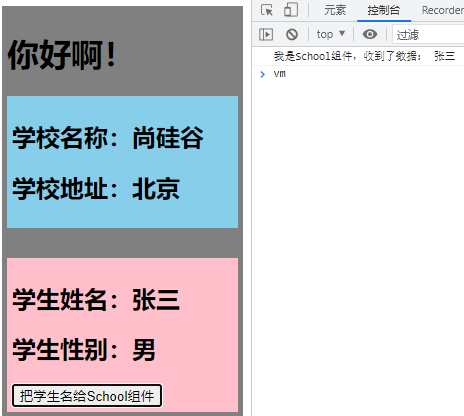
1 2 3 4 5 6 7 8 9 10 11 12 13 14 15 16 17 18 19 20 21 22 23 24 25 26 27 28 29 30 31 32 33 34 35 <template> <div class="student"> <h2>学生姓名:{{name}}</h2> <h2>学生性别:{{sex}}</h2> <button @click="sendStudentName">把学生名给School组件</button> </div> </template> <script> export default { name:'Student', data() { return { name:'张三', sex:'男', } }, mounted() { // console.log('Student',this.x) }, methods: { sendStudentName(){ this.$bus.$emit('hello',this.name) } }, } </script> <style lang="less" scoped> .student{ background-color: pink; padding: 5px; margin-top: 30px; } </style>
School.vue
1 2 3 4 5 6 7 8 9 10 11 12 13 14 15 16 17 18 19 20 21 22 23 24 25 26 27 28 29 30 31 32 33 34 <template> <div class="school"> <h2>学校名称:{{name}}</h2> <h2>学校地址:{{address}}</h2> </div> </template> <script> export default { name:'School', data() { return { name:'尚硅谷', address:'北京', } }, mounted() { // console.log('School',this) this.$bus.$on('hello',(data)=>{ console.log('我是School组件,收到了数据',data) }) }, beforeDestroy() { this.$bus.$off('hello') }, } </script> <style scoped> .school{ background-color: skyblue; padding: 5px; } </style>
App.vue
1 2 3 4 5 6 7 8 9 10 11 12 13 14 15 16 17 18 19 20 21 22 23 24 25 26 27 28 29 30 <template> <div class="app"> <h1>{{msg}}</h1> <School/> <Student/> </div> </template> <script> import Student from './components/Student' import School from './components/School' export default { name:'App', components:{School,Student}, data() { return { msg:'你好啊!', } } } </script> <style scoped> .app{ background-color: gray; padding: 5px; } </style>
2.10.2 使用全局事件总线优化Todo-List main.js
1 2 3 4 5 6 7 8 9 10 11 12 13 14 15 import Vue from 'vue' import App from './App.vue' Vue .config .productionTip = false new Vue ({ el :'#app' , render : h =>h (App ), beforeCreate ( Vue .prototype $bus = this }, })
MyItem.vue
1 2 3 4 5 6 7 8 9 10 11 12 13 14 15 16 17 18 19 20 21 22 23 24 25 26 27 28 29 30 31 32 33 34 35 36 37 38 39 40 41 42 43 44 45 46 47 48 49 50 51 52 53 54 55 56 57 58 59 60 61 62 63 64 65 66 67 68 69 70 71 72 73 74 75 76 77 78 79 80 <template> <li> <label> <input type="checkbox" :checked="todo.done" @change="handleCheck(todo.id)"/> <!-- 如下代码也能实现功能,但是不太推荐,因为有点违反原则,因为修改了props --> <!-- <input type="checkbox" v-model="todo.done"/> --> <span>{{todo.title}}</span> </label> <button class="btn btn-danger" @click="handleDelete(todo.id)">删除</button> </li> </template> <script> export default { name:'MyItem', //声明接收todo props:['todo'], methods: { //勾选or取消勾选 handleCheck(id){ //通知App组件将对应的todo对象的done值取反 // this.checkTodo(id) this.$bus.$emit('checkTodo',id) }, //删除 handleDelete(id){ if(confirm('确定删除吗?')){ //通知App组件将对应的todo对象删除 // this.deleteTodo(id) this.$bus.$emit('deleteTodo',id) } } }, } </script> <style scoped> /*item*/ li { list-style: none; height: 36px; line-height: 36px; padding: 0 5px; border-bottom: 1px solid #ddd; } li label { float: left; cursor: pointer; } li label li input { vertical-align: middle; margin-right: 6px; position: relative; top: -1px; } li button { float: right; display: none; margin-top: 3px; } li:before { content: initial; } li:last-child { border-bottom: none; } li:hover{ background-color: #ddd; } li:hover button{ display: block; } </style>
App.vue
1 2 3 4 5 6 7 8 9 10 11 12 13 14 15 16 17 18 19 20 21 22 23 24 25 26 27 28 29 30 31 32 33 34 35 36 37 38 39 40 41 42 43 44 45 46 47 48 49 50 51 52 53 54 55 56 57 58 59 60 61 62 63 64 65 66 67 68 69 70 71 72 73 74 75 76 77 78 79 80 81 82 83 84 85 86 87 88 89 90 91 92 93 94 95 96 97 98 99 100 101 102 103 104 105 106 107 108 109 110 111 112 <template> <div id="root"> <div class="todo-container"> <div class="todo-wrap"> <MyHeader @addTodo="addTodo"/> <MyList :todos="todos"/> <MyFooter :todos="todos" @checkAllTodo="checkAllTodo" @clearAllTodo="clearAllTodo"/> </div> </div> </div> </template> <script> import MyHeader from './components/MyHeader' import MyList from './components/MyList' import MyFooter from './components/MyFooter.vue' export default { name:'App', components:{MyHeader,MyList,MyFooter}, data() { return { //由于todos是MyHeader组件和MyFooter组件都在使用,所以放在App中(状态提升) todos:JSON.parse(localStorage.getItem('todos')) || [] } }, methods: { //添加一个todo addTodo(todoObj){ this.todos.unshift(todoObj) }, //勾选or取消勾选一个todo checkTodo(id){ this.todos.forEach((todo)=>{ if(todo.id === id) todo.done = !todo.done }) }, //删除一个todo deleteTodo(id){ this.todos = this.todos.filter( todo => todo.id !== id ) }, //全选or取消全选 checkAllTodo(done){ this.todos.forEach((todo)=>{ todo.done = done }) }, //清除所有已经完成的todo clearAllTodo(){ this.todos = this.todos.filter((todo)=>{ return !todo.done }) } }, watch: { todos:{ deep:true, handler(value){ localStorage.setItem('todos',JSON.stringify(value)) } } }, mounted() { this.$bus.$on('checkTodo',this.checkTodo) this.$bus.$on('deleteTodo',this.deleteTodo) }, beforeDestroy() { this.$bus.$off('checkTodo') this.$bus.$off('deleteTodo') }, } </script> <style> /*base*/ body { background: #fff; } .btn { display: inline-block; padding: 4px 12px; margin-bottom: 0; font-size: 14px; line-height: 20px; text-align: center; vertical-align: middle; cursor: pointer; box-shadow: inset 0 1px 0 rgba(255, 255, 255, 0.2), 0 1px 2px rgba(0, 0, 0, 0.05); border-radius: 4px; } .btn-danger { color: #fff; background-color: #da4f49; border: 1px solid #bd362f; } .btn-danger:hover { color: #fff; background-color: #bd362f; } .btn:focus { outline: none; } .todo-container { width: 600px; margin: 0 auto; } .todo-container .todo-wrap { padding: 10px; border: 1px solid #ddd; border-radius: 5px; } </style>
2.11 消息的订阅与发布(基本不用) 2.11.1 消息的订阅与发布 消息订阅与发布(pubsub)消息订阅与发布是一种组件间通信的方式,适用于任意组件间通信
使用步骤
安装pubsub:npm i pubsub-js
引入:import pubsub from 'pubsub-js'
接收数据:A组件想接收数据,则在A组件中订阅消息,订阅的回调留在A组件自身
1 2 3 4 5 6 7 8 9 export default { methods : { demo (msgName, data ) {...} } ... mounted ( this .pid = pubsub.subscribe ('xxx' ,this .demo ) } }
提供数据:pubsub.publish('xxx',data)
最好在beforeDestroy钩子中,使用pubsub.unsubscribe(pid)取消订阅
Student.vue
1 2 3 4 5 6 7 8 9 10 11 12 13 14 15 16 17 18 19 20 21 22 23 24 25 26 27 28 29 30 31 32 33 34 35 36 37 38 <template> <div class="student"> <h2>学生姓名:{{name}}</h2> <h2>学生性别:{{sex}}</h2> <button @click="sendStudentName">把学生名给School组件</button> </div> </template> <script> import pubsub from 'pubsub-js' export default { name:'Student', data() { return { name:'张三', sex:'男', } }, mounted() { // console.log('Student',this.x) }, methods: { sendStudentName(){ // this.$bus.$emit('hello',this.name) pubsub.publish('hello',666) } }, } </script> <style lang="less" scoped> .student{ background-color: pink; padding: 5px; margin-top: 30px; } </style>
School.vue
1 2 3 4 5 6 7 8 9 10 11 12 13 14 15 16 17 18 19 20 21 22 23 24 25 26 27 28 29 30 31 32 33 34 35 36 37 38 39 40 <template> <div class="school"> <h2>学校名称:{{name}}</h2> <h2>学校地址:{{address}}</h2> </div> </template> <script> import pubsub from 'pubsub-js' export default { name:'School', data() { return { name:'尚硅谷', address:'北京', } }, mounted() { // console.log('School',this) /* this.$bus.$on('hello',(data)=>{ console.log('我是School组件,收到了数据',data) }) */ this.pubId = pubsub.subscribe('hello',(msgName,data)=>{ console.log(this) // console.log('有人发布了hello消息,hello消息的回调执行了',msgName,data) }) }, beforeDestroy() { // this.$bus.$off('hello') pubsub.unsubscribe(this.pubId) }, } </script> <style scoped> .school{ background-color: skyblue; padding: 5px; } </style>
2.11.2 使用消息的订阅与发布优化Todo-List MyItem.vue
1 2 3 4 5 6 7 8 9 10 11 12 13 14 15 16 17 18 19 20 21 22 23 24 25 26 27 28 29 30 31 32 33 34 35 36 37 38 39 40 41 42 43 44 45 46 47 48 49 50 51 52 53 54 55 56 57 58 59 60 61 62 63 64 65 66 67 68 69 70 71 72 73 74 75 76 77 78 79 80 81 82 <template> <li> <label> <input type="checkbox" :checked="todo.done" @change="handleCheck(todo.id)"/> <!-- 如下代码也能实现功能,但是不太推荐,因为有点违反原则,因为修改了props --> <!-- <input type="checkbox" v-model="todo.done"/> --> <span>{{todo.title}}</span> </label> <button class="btn btn-danger" @click="handleDelete(todo.id)">删除</button> </li> </template> <script> import pubsub from 'pubsub-js' export default { name:'MyItem', //声明接收todo props:['todo'], methods: { //勾选or取消勾选 handleCheck(id){ //通知App组件将对应的todo对象的done值取反 // this.checkTodo(id) this.$bus.$emit('checkTodo',id) }, //删除 handleDelete(id){ if(confirm('确定删除吗?')){ //通知App组件将对应的todo对象删除 // this.deleteTodo(id) // this.$bus.$emit('deleteTodo',id) pubsub.publish('deleteTodo',id) } } }, } </script> <style scoped> /*item*/ li { list-style: none; height: 36px; line-height: 36px; padding: 0 5px; border-bottom: 1px solid #ddd; } li label { float: left; cursor: pointer; } li label li input { vertical-align: middle; margin-right: 6px; position: relative; top: -1px; } li button { float: right; display: none; margin-top: 3px; } li:before { content: initial; } li:last-child { border-bottom: none; } li:hover{ background-color: #ddd; } li:hover button{ display: block; } </style>
App.vue
1 2 3 4 5 6 7 8 9 10 11 12 13 14 15 16 17 18 19 20 21 22 23 24 25 26 27 28 29 30 31 32 33 34 35 36 37 38 39 40 41 42 43 44 45 46 47 48 49 50 51 52 53 54 55 56 57 58 59 60 61 62 63 64 65 66 67 68 69 70 71 72 73 74 75 76 77 78 79 80 81 82 83 84 85 86 87 88 89 90 91 92 93 94 95 96 97 98 99 100 101 102 103 104 105 106 107 108 109 110 111 112 113 <template> <div id="root"> <div class="todo-container"> <div class="todo-wrap"> <MyHeader @addTodo="addTodo"/> <MyList :todos="todos"/> <MyFooter :todos="todos" @checkAllTodo="checkAllTodo" @clearAllTodo="clearAllTodo"/> </div> </div> </div> </template> <script> import pubsub from 'pubsub-js' import MyHeader from './components/MyHeader' import MyList from './components/MyList' import MyFooter from './components/MyFooter' export default { name:'App', components:{MyHeader,MyList,MyFooter}, data() { return { //由于todos是MyHeader组件和MyFooter组件都在使用,所以放在App中(状态提升) todos:JSON.parse(localStorage.getItem('todos')) || [] } }, methods: { //添加一个todo addTodo(todoObj){ this.todos.unshift(todoObj) }, //勾选or取消勾选一个todo checkTodo(id){ this.todos.forEach((todo)=>{ if(todo.id === id) todo.done = !todo.done }) }, //删除一个todo deleteTodo(_,id){ this.todos = this.todos.filter( todo => todo.id !== id ) }, //全选or取消全选 checkAllTodo(done){ this.todos.forEach((todo)=>{ todo.done = done }) }, //清除所有已经完成的todo clearAllTodo(){ this.todos = this.todos.filter((todo)=>{ return !todo.done }) } }, watch: { todos:{ deep:true, handler(value){ localStorage.setItem('todos',JSON.stringify(value)) } } }, mounted() { this.$bus.$on('checkTodo',this.checkTodo) this.pubId = pubsub.subscribe('deleteTodo',this.deleteTodo) }, beforeDestroy() { this.$bus.$off('checkTodo') pubsub.unsubscribe(this.pubId) }, } </script> <style> /*base*/ body { background: #fff; } .btn { display: inline-block; padding: 4px 12px; margin-bottom: 0; font-size: 14px; line-height: 20px; text-align: center; vertical-align: middle; cursor: pointer; box-shadow: inset 0 1px 0 rgba(255, 255, 255, 0.2), 0 1px 2px rgba(0, 0, 0, 0.05); border-radius: 4px; } .btn-danger { color: #fff; background-color: #da4f49; border: 1px solid #bd362f; } .btn-danger:hover { color: #fff; background-color: #bd362f; } .btn:focus { outline: none; } .todo-container { width: 600px; margin: 0 auto; } .todo-container .todo-wrap { padding: 10px; border: 1px solid #ddd; border-radius: 5px; } </style>
2.12 $nextTick 这是一个生命周期钩子this.$nextTick(回调函数)在下一次DOM更新结束后执行其指定的回调DOM进行某些操作时,要在nextTick所指定的回调函数中执行
$nextTick 优化 Todo-List
App.vue
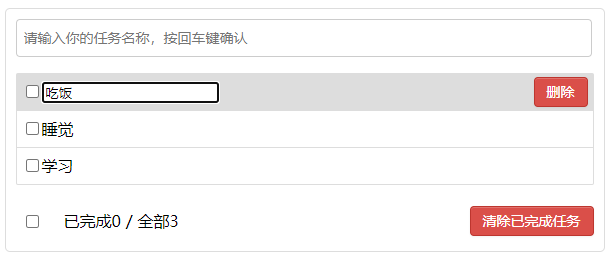
1 2 3 4 5 6 7 8 9 10 11 12 13 14 15 16 17 18 19 20 21 22 23 24 25 26 27 28 29 30 31 32 33 34 35 36 37 38 39 40 41 42 43 44 45 46 47 48 49 50 51 52 53 54 55 56 57 58 59 60 61 62 63 64 65 66 67 68 69 70 71 72 73 74 75 76 77 78 79 80 81 82 83 84 85 86 87 88 89 90 91 92 93 94 95 96 97 98 99 100 101 102 103 104 105 106 107 108 <template> <li> <label> <input type="checkbox" :checked="todo.done" @change="handleCheck(todo.id)"/> <!-- 如下代码也能实现功能,但是不太推荐,因为有点违反原则,因为修改了props --> <!-- <input type="checkbox" v-model="todo.done"/> --> <span v-show="!todo.isEdit">{{todo.title}}</span> <input type="text" v-show="todo.isEdit" :value="todo.title" @blur="handleBlur(todo,$event)" ref="inputTitle" > </label> <button class="btn btn-danger" @click="handleDelete(todo.id)">删除</button> <button v-show="!todo.isEdit" class="btn btn-edit" @click="handleEdit(todo)">编辑</button> </li> </template> <script> import pubsub from 'pubsub-js' export default { name:'MyItem', //声明接收todo props:['todo'], methods: { //勾选or取消勾选 handleCheck(id){ //通知App组件将对应的todo对象的done值取反 // this.checkTodo(id) this.$bus.$emit('checkTodo',id) }, //删除 handleDelete(id){ if(confirm('确定删除吗?')){ //通知App组件将对应的todo对象删除 // this.deleteTodo(id) // this.$bus.$emit('deleteTodo',id) pubsub.publish('deleteTodo',id) } }, //编辑 handleEdit(todo){ if(todo.hasOwnProperty('isEdit')){ todo.isEdit = true }else{ // console.log('@') this.$set(todo,'isEdit',true) } this.$nextTick(function(){ this.$refs.inputTitle.focus() }) }, //失去焦点回调(真正执行修改逻辑) handleBlur(todo,e){ todo.isEdit = false if(!e.target.value.trim()) return alert('输入不能为空!') this.$bus.$emit('updateTodo',todo.id,e.target.value) } }, } </script> <style scoped> /*item*/ li { list-style: none; height: 36px; line-height: 36px; padding: 0 5px; border-bottom: 1px solid #ddd; } li label { float: left; cursor: pointer; } li label li input { vertical-align: middle; margin-right: 6px; position: relative; top: -1px; } li button { float: right; display: none; margin-top: 3px; } li:before { content: initial; } li:last-child { border-bottom: none; } li:hover{ background-color: #ddd; } li:hover button{ display: block; } </style>
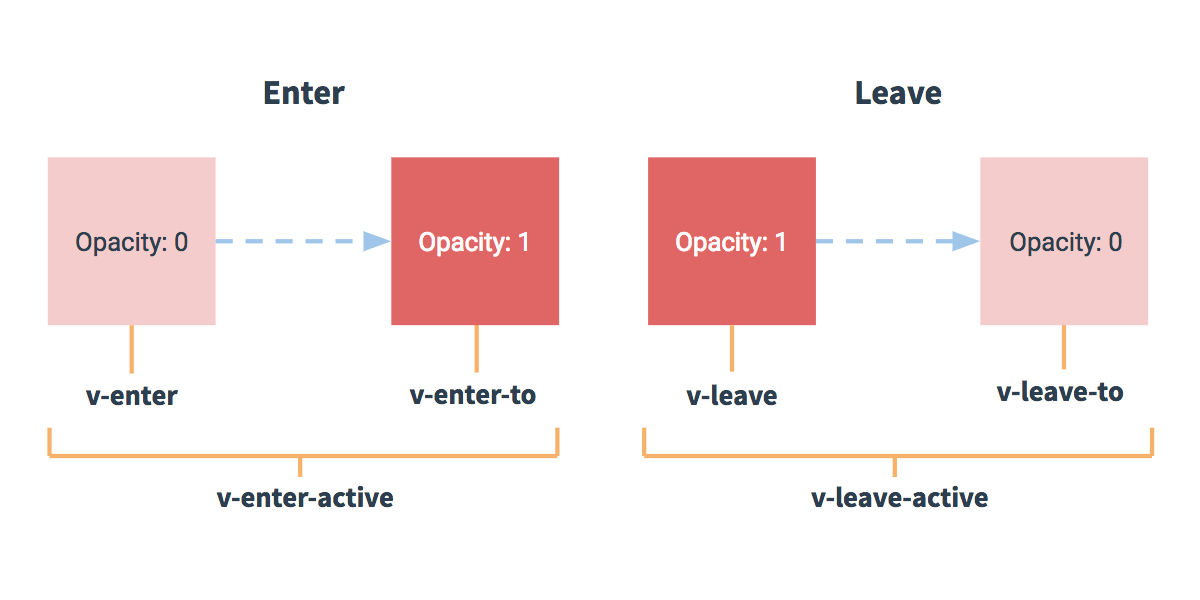
2.13 过渡与动画 2.13.1 过渡与动画 Vue封装的过度与动画:在插入、更新或移除DOM元素时,在合适的时候给元素添加样式类名
写法
准备好样式
元素进入的样式
v-enter 进入的起点v-enter-active 进入过程中v-enter-to 进入的终点
元素离开的样式
v-leave 离开的起点v-leave-active 离开过程中v-leave-to 离开的终点
使用<transition>包裹要过度的元素,并配置name属性,此时需要将上面样式名的v换为name
要让页面一开始就显示动画,需要添加appear
1 2 3 4 5 6 7 8 9 10 11 12 13 14 15 16 17 18 19 20 21 22 <transition name="hello" appear> <h1 v-show="isShow">你好啊!</h1> </transition> <style> .hello-enter-active{ animation: hello 0.5s linear; } .hello-leave-active{ animation: hello 0.5s linear reverse; } @keyframes hello { from{ transform: translateX(-100%); } to{ transform: translateX(0px); } } </style>
备注:若有多个元素需要过度,则需要使用<transition-group>,且每个元素都要指定key值
1 2 3 4 <transition-group name="hello" appear> <h1 v-show="!isShow" key="1">你好啊!</h1> <h1 v-show="isShow" key="2">尚硅谷!</h1> </transition-group>
第三方动画库Animate.css
1 2 3 4 5 6 7 <transition-group appear name="animate__animated animate__bounce" enter-active-class="animate__swing" leave-active-class="animate__backOutUp"> <h1 v-show="!isShow" key="1">你好啊!</h1> <h1 v-show="isShow" key="2">尚硅谷!</h1> </transition-group>
main.js
1 2 3 4 5 6 7 8 9 10 11 12 13 14 15 import Vue from 'vue' import App from './App.vue' Vue .config .productionTip = false new Vue ({ el :'#app' , render : h =>h (App ), beforeCreate ( Vue .prototype $bus = this }, })
Test.vue
1 2 3 4 5 6 7 8 9 10 11 12 13 14 15 16 17 18 19 20 21 22 23 24 25 26 27 28 29 30 31 32 33 34 35 36 37 38 39 40 41 42 <template> <div> <button @click="isShow = !isShow">显示/隐藏</button> <transition name="hello" appear> <h1 v-show="isShow">你好啊!</h1> </transition> </div> </template> <script> export default { name:'Test', data() { return { isShow:true } }, } </script> <style scoped> h1{ background-color: orange; } .hello-enter-active{ animation: atguigu 0.5s linear; } .hello-leave-active{ animation: atguigu 0.5s linear reverse; } @keyframes atguigu { from{ transform: translateX(-100%); } to{ transform: translateX(0px); } } </style>
Test2.vue
1 2 3 4 5 6 7 8 9 10 11 12 13 14 15 16 17 18 19 20 21 22 23 24 25 26 27 28 29 30 31 32 33 34 35 36 37 38 <template> <div> <button @click="isShow = !isShow">显示/隐藏</button> <transition-group name="hello" appear> <h1 v-show="!isShow" key="1">你好啊!</h1> <h1 v-show="isShow" key="2">尚硅谷!</h1> </transition-group> </div> </template> <script> export default { name:'Test', data() { return { isShow:true } }, } </script> <style scoped> h1{ background-color: orange; } /* 进入的起点、离开的终点 */ .hello-enter,.hello-leave-to{ transform: translateX(-100%); } .hello-enter-active,.hello-leave-active{ transition: 0.5s linear; } /* 进入的终点、离开的起点 */ .hello-enter-to,.hello-leave{ transform: translateX(0); } </style>
Test3.vue
1 2 3 4 5 6 7 8 9 10 11 12 13 14 15 16 17 18 19 20 21 22 23 24 25 26 27 28 29 30 31 32 33 34 <template> <div> <button @click="isShow = !isShow">显示/隐藏</button> <transition-group appear name="animate__animated animate__bounce" enter-active-class="animate__swing" leave-active-class="animate__backOutUp" > <h1 v-show="!isShow" key="1">你好啊!</h1> <h1 v-show="isShow" key="2">尚硅谷!</h1> </transition-group> </div> </template> <script> import 'animate.css' export default { name:'Test', data() { return { isShow:true } }, } </script> <style scoped> h1{ background-color: orange; } </style>
App.vue
1 2 3 4 5 6 7 8 9 10 11 12 13 14 15 16 17 18 <template> <div> <Test/> <Test2/> <Test3/> </div> </template> <script> import Test from './components/Test' import Test2 from './components/Test2' import Test3 from './components/Test3' export default { name:'App', components:{Test,Test2,Test3}, } </script>
2.13.2 使用动画优化 Todo-List MyItem.vue
1 2 3 4 5 6 7 8 9 10 11 12 13 14 15 16 17 18 19 20 21 22 23 24 25 26 27 28 29 30 31 32 33 34 35 36 37 38 39 40 41 42 43 44 45 46 47 48 49 50 51 52 53 54 55 56 57 58 59 60 61 62 63 64 65 66 67 68 69 70 71 72 73 74 75 76 77 78 79 80 81 82 83 84 85 86 87 88 89 90 91 92 93 94 95 96 97 98 99 100 101 102 103 104 105 106 107 108 <template> <li> <label> <input type="checkbox" :checked="todo.done" @change="handleCheck(todo.id)"/> <!-- 如下代码也能实现功能,但是不太推荐,因为有点违反原则,因为修改了props --> <!-- <input type="checkbox" v-model="todo.done"/> --> <span v-show="!todo.isEdit">{{todo.title}}</span> <input type="text" v-show="todo.isEdit" :value="todo.title" @blur="handleBlur(todo,$event)" ref="inputTitle" > </label> <button class="btn btn-danger" @click="handleDelete(todo.id)">删除</button> <button v-show="!todo.isEdit" class="btn btn-edit" @click="handleEdit(todo)">编辑</button> </li> </template> <script> import pubsub from 'pubsub-js' export default { name:'MyItem', //声明接收todo props:['todo'], methods: { //勾选or取消勾选 handleCheck(id){ //通知App组件将对应的todo对象的done值取反 // this.checkTodo(id) this.$bus.$emit('checkTodo',id) }, //删除 handleDelete(id){ if(confirm('确定删除吗?')){ //通知App组件将对应的todo对象删除 // this.deleteTodo(id) // this.$bus.$emit('deleteTodo',id) pubsub.publish('deleteTodo',id) } }, //编辑 handleEdit(todo){ if(todo.hasOwnProperty('isEdit')){ todo.isEdit = true }else{ // console.log('@') this.$set(todo,'isEdit',true) } this.$nextTick(function(){ this.$refs.inputTitle.focus() }) }, //失去焦点回调(真正执行修改逻辑) handleBlur(todo,e){ todo.isEdit = false if(!e.target.value.trim()) return alert('输入不能为空!') this.$bus.$emit('updateTodo',todo.id,e.target.value) } }, } </script> <style scoped> /*item*/ li { list-style: none; height: 36px; line-height: 36px; padding: 0 5px; border-bottom: 1px solid #ddd; } li label { float: left; cursor: pointer; } li label li input { vertical-align: middle; margin-right: 6px; position: relative; top: -1px; } li button { float: right; display: none; margin-top: 3px; } li:before { content: initial; } li:last-child { border-bottom: none; } li:hover{ background-color: #ddd; } li:hover button{ display: block; } </style>
2.14 Ajax 配置代理 本案例需要下载axios库npm install axios
配置参考文档 Vue-Cli devServer.proxy vue.config.js 是一个可选的配置文件,如果项目的 (和 package.json 同级的) 根目录中存在这个文件,那么它会被 @vue/cli-service 自动加载。你也可以使用 package.json 中的 vue 字段,但是注意这种写法需要你严格遵照 JSON 的格式来写
方法一
在vue.config.js中添加如下配置
1 2 3 4 5 module .exports = { devServer :{ proxy :"http://localhost:5000" } }
说明
优点:配置简单,请求资源时直接发给前端(8080)即可
缺点:不能配置多个代理,不能灵活的控制请求是否走代理
工作方式:若按照上述配置代理,当请求了前端不存在的资源时,才会将请求会转发给服务器 (优先匹配前端资源)
方法二
编写vue.config.js配置具体代理规则
1 2 3 4 5 6 7 8 9 10 11 12 13 14 15 16 17 18 19 20 21 22 23 module .exports = { devServer : { proxy : { '/api1' : { target : 'http://localhost:5000' , pathRewrite : {'^/api1' :'' }, ws : true , changeOrigin : true , }, '/api2' : { target : 'http://localhost:5001' , pathRewrite : {'^/api2' : '' }, changeOrigin : true } } } }
说明
优点:可以配置多个代理,且可以灵活的控制请求是否走代理
缺点:配置略微繁琐,请求资源时必须加前缀
vue.config.js
1 2 3 4 5 6 7 8 9 10 11 12 13 14 15 16 17 18 19 20 21 22 23 24 25 26 27 28 module .exports = { pages : { index : { entry : 'src/main.js' , }, }, lintOnSave :false , devServer : { proxy : { '/api1' : { target : 'http://localhost:5000' , pathRewrite :{'^/api1' :'' }, }, '/api2' : { target : 'http://localhost:5001' , pathRewrite :{'^/api2' :'' }, } } } }
MyItem.vue
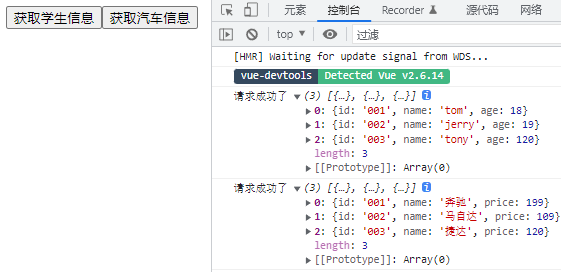
1 2 3 4 5 6 7 8 9 10 11 12 13 14 15 16 17 18 19 20 21 22 23 24 25 26 27 28 29 30 31 32 33 34 35 <template> <div> <button @click="getStudents">获取学生信息</button> <button @click="getCars">获取汽车信息</button> </div> </template> <script> import axios from 'axios' export default { name:'App', methods: { getStudents(){ axios.get('http://localhost:8080/students').then( response => { console.log('请求成功了',response.data) }, error => { console.log('请求失败了',error.message) } ) }, getCars(){ axios.get('http://localhost:8080/demo/cars').then( response => { console.log('请求成功了',response.data) }, error => { console.log('请求失败了',error.message) } ) } }, } </script>
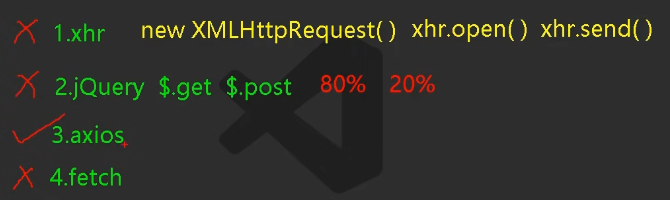
发送请求的几种方式:
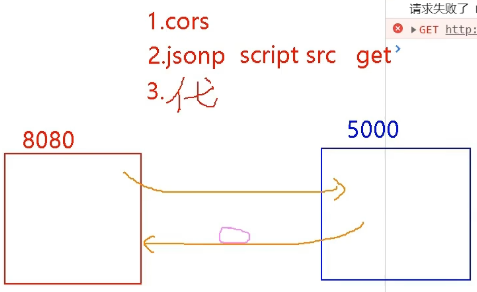
跨域的几种解决方法:
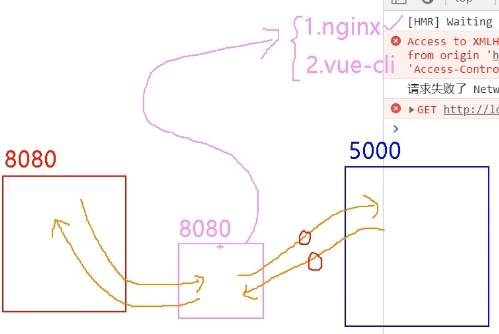
代理服务器的原理及方案:
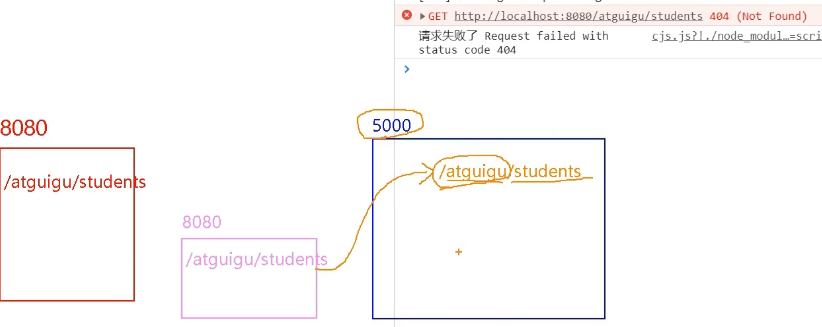
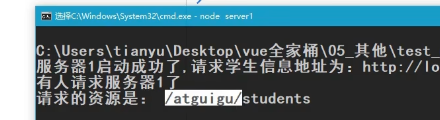
加了前缀后的问题:
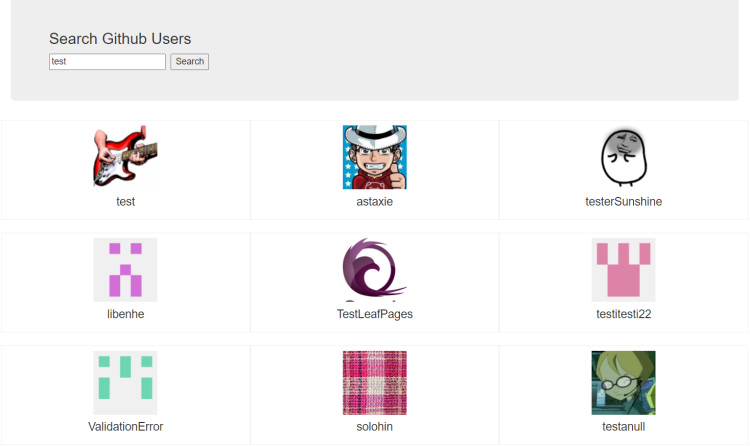
2.15 GitHub用户搜索案例 main.js
1 2 3 4 5 6 7 8 9 10 11 12 13 14 15 import Vue from 'vue' import App from './App.vue' Vue .config .productionTip = false new Vue ({ el :'#app' , render : h =>h (App ), beforeCreate ( Vue .prototype $bus = this }, })
index.html
1 2 3 4 5 6 7 8 9 10 11 12 13 14 15 16 17 18 19 20 21 22 <!DOCTYPE html > <html lang ="" > <head > <meta charset ="UTF-8" > <meta http-equiv ="X-UA-Compatible" content ="IE=edge" > <meta name ="viewport" content ="width=device-width, initial-scale=1.0" > <link rel ="icon" href ="<%= BASE_URL %>favicon.ico" > <link rel ="stylesheet" href ="<%= BASE_URL %>css/bootstrap.css" > <title > <%= htmlWebpackPlugin.options.title %></title > </head > <body > <div id ="app" > </div > </body > </html >
List.vue
1 2 3 4 5 6 7 8 9 10 11 12 13 14 15 16 17 18 19 20 21 22 23 24 25 26 27 28 29 30 31 32 33 34 35 36 37 38 39 40 41 42 43 44 45 46 47 48 49 50 51 52 53 54 55 56 57 58 59 60 61 62 63 64 65 <template> <div class="row"> <!-- 展示用户列表 --> <div v-show="info.users.length" class="card" v-for="user in info.users" :key="user.login"> <a :href="user.html_url" target="_blank"> <img :src="user.avatar_url" style='width: 100px'/> </a> <p class="card-text">{{user.login}}</p> </div> <!-- 展示欢迎词 --> <h1 v-show="info.isFirst">欢迎使用!</h1> <!-- 展示加载中 --> <h1 v-show="info.isLoading">加载中....</h1> <!-- 展示错误信息 --> <h1 v-show="info.errMsg">{{info.errMsg}}</h1> </div> </template> <script> export default { name:'List', data() { return { info:{ isFirst:true, isLoading:false, errMsg:'', users:[] } } }, mounted() { this.$bus.$on('updateListData',(dataObj)=>{ this.info = {...this.info,...dataObj} }) }, } </script> <style scoped> .album { min-height: 50rem; /* Can be removed; just added for demo purposes */ padding-top: 3rem; padding-bottom: 3rem; background-color: #f7f7f7; } .card { float: left; width: 33.333%; padding: .75rem; margin-bottom: 2rem; border: 1px solid #efefef; text-align: center; } .card > img { margin-bottom: .75rem; border-radius: 100px; } .card-text { font-size: 85%; } </style>
Search.vue
1 2 3 4 5 6 7 8 9 10 11 12 13 14 15 16 17 18 19 20 21 22 23 24 25 26 27 28 29 30 31 32 33 34 35 36 37 38 39 <template> <section class="jumbotron"> <h3 class="jumbotron-heading">Search Github Users</h3> <div> <input type="text" placeholder="enter the name you search" v-model="keyWord"/> <button @click="searchUsers">Search</button> </div> </section> </template> <script> import axios from 'axios' export default { name:'Search', data() { return { keyWord:'' } }, methods: { searchUsers(){ //请求前更新List的数据 this.$bus.$emit('updateListData',{isLoading:true,errMsg:'',users:[],isFirst:false}) axios.get(`https://api.github.com/search/users?q=${this.keyWord}`).then( response => { console.log('请求成功了') //请求成功后更新List的数据 this.$bus.$emit('updateListData',{isLoading:false,errMsg:'',users:response.data.items}) }, error => { //请求后更新List的数据 this.$bus.$emit('updateListData',{isLoading:false,errMsg:error.message,users:[]}) } ) } }, } </script>
App.vue
1 2 3 4 5 6 7 8 9 10 11 12 13 14 15 16 <template> <div class="container"> <Search/> <List/> </div> </template> <script> import Search from './components/Search' import List from './components/List' export default { name:'App', components:{Search,List} } </script>
2.16 vue-resource(目前已经弃用) vue项目常用的两个Ajax库
axios:通用的Ajax请求库,官方推荐,效率高vue-resource:vue插件库,vue 1.x使用广泛,官方已不维护
下载vue-resource库npm i vue-resource
main.js
1 2 3 4 5 6 7 8 9 10 11 12 13 14 15 16 17 18 19 import Vue from 'vue' import App from './App.vue' import vueResource from 'vue-resource' Vue .config .productionTip = false Vue .use (vueResource)new Vue ({ el :'#app' , render : h =>h (App ), beforeCreate ( Vue .prototype $bus = this }, })
List.vue
1 2 3 4 5 6 7 8 9 10 11 12 13 14 15 16 17 18 19 20 21 22 23 24 25 26 27 28 29 30 31 32 33 34 35 36 37 38 39 40 41 42 43 44 45 46 47 48 49 50 51 52 53 54 55 56 57 58 59 60 61 62 63 64 65 <template> <div class="row"> <!-- 展示用户列表 --> <div v-show="info.users.length" class="card" v-for="user in info.users" :key="user.login"> <a :href="user.html_url" target="_blank"> <img :src="user.avatar_url" style='width: 100px'/> </a> <p class="card-text">{{user.login}}</p> </div> <!-- 展示欢迎词 --> <h1 v-show="info.isFirst">欢迎使用!</h1> <!-- 展示加载中 --> <h1 v-show="info.isLoading">加载中....</h1> <!-- 展示错误信息 --> <h1 v-show="info.errMsg">{{info.errMsg}}</h1> </div> </template> <script> export default { name:'List', data() { return { info:{ isFirst:true, isLoading:false, errMsg:'', users:[] } } }, mounted() { this.$bus.$on('updateListData',(dataObj)=>{ this.info = {...this.info,...dataObj}//解构函数 }) }, } </script> <style scoped> .album { min-height: 50rem; /* Can be removed; just added for demo purposes */ padding-top: 3rem; padding-bottom: 3rem; background-color: #f7f7f7; } .card { float: left; width: 33.333%; padding: .75rem; margin-bottom: 2rem; border: 1px solid #efefef; text-align: center; } .card > img { margin-bottom: .75rem; border-radius: 100px; } .card-text { font-size: 85%; } </style>
Search.vue
1 2 3 4 5 6 7 8 9 10 11 12 13 14 15 16 17 18 19 20 21 22 23 24 25 26 27 28 29 30 31 32 33 34 35 36 37 <template> <section class="jumbotron"> <h3 class="jumbotron-heading">Search Github Users</h3> <div> <input type="text" placeholder="enter the name you search" v-model="keyWord"/> <button @click="searchUsers">Search</button> </div> </section> </template> <script> export default { name:'Search', data() { return { keyWord:'' } }, methods: { searchUsers(){ //请求前更新List的数据 this.$bus.$emit('updateListData',{isLoading:true,errMsg:'',users:[],isFirst:false}) this.$http.get(`https://api.github.com/search/users?q=${this.keyWord}`).then( response => { console.log('请求成功了') //请求成功后更新List的数据 this.$bus.$emit('updateListData',{isLoading:false,errMsg:'',users:response.data.items}) }, error => { //请求后更新List的数据 this.$bus.$emit('updateListData',{isLoading:false,errMsg:error.message,users:[]}) } ) } }, } </script>
App.vue
1 2 3 4 5 6 7 8 9 10 11 12 13 14 15 <template> <div class="container"> <Search/> <List/> </div> </template> <script> import Search from './components/Search' import List from './components/List' export default { name:'App', components:{Search,List} } </script>
2.17 slot 插槽 <slot>插槽:让父组件可以向子组件指定位置插入html结构,也是一种组件间通信的方式,
适用于 父组件 ===> 子组件
分类:默认插槽、具名插槽、作用域插槽
使用方式
默认插槽
1 2 3 4 5 6 7 8 9 10 11 父组件中: <Category> <div>html结构1</div> </Category> 子组件中:Category <template> <div> <!-- 定义插槽 --> <slot>插槽默认内容...</slot> </div> </template>
具名插槽
父组件指明放入子组件的哪个插槽slot="footer",如果是template可以写成v-slot:footer
1 2 3 4 5 6 7 8 9 10 11 12 13 14 15 16 17 18 父组件中: <Category> <template slot="center"> <div>html结构1</div> </template> <template v-slot:footer> <div>html结构2</div> </template> </Category> 子组件中: <template> <div> <!-- 定义插槽 --> <slot name="center">插槽默认内容...</slot> <slot name="footer">插槽默认内容...</slot> </div> </template>
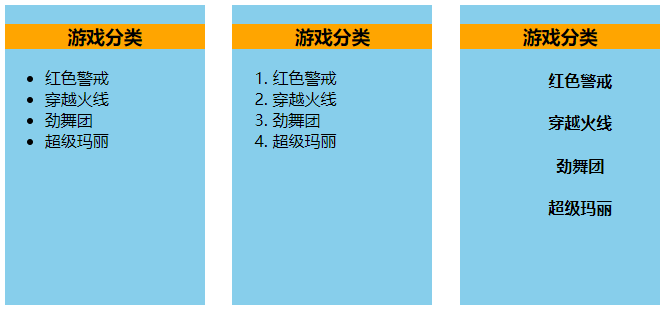
作用域插槽
scope用于父组件往子组件插槽放的html结构接收子组件的数据
理解:数据在组件的自身,但根据数据生成的结构需要组件的使用者来决定(games数据在Category组件中,但使用数据所遍历出来的结构由App组件决定)
1 2 3 4 5 6 7 8 9 10 11 12 13 14 15 16 17 18 19 20 21 22 23 24 25 26 27 28 29 30 31 32 33 34 35 父组件中: <Category> <template scope="scopeData"> <!-- 生成的是ul列表 --> <ul> <li v-for="g in scopeData.games" :key="g">{{g}}</li> </ul> </template> </Category> <Category> <template slot-scope="scopeData"> <!-- 生成的是h4标题 --> <h4 v-for="g in scopeData.games" :key="g">{{g}}</h4> </template> </Category> 子组件中: <template> <div> <slot :games="games"></slot> </div> </template> <script> export default { name:'Category', props:['title'], //数据在子组件自身 data() { return { games:['红色警戒','穿越火线','劲舞团','超级玛丽'] } }, } </script>
注意:关于样式,既可以写在父组件中,解析后放入子组件插槽;也可以放在子组件中,传给子组件再解析
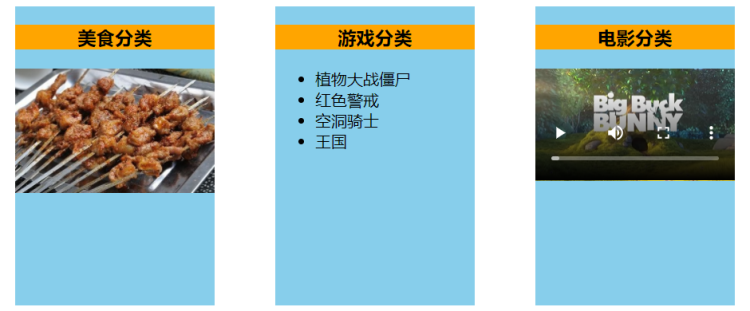
2.17.1 默认插槽 Category.vue
1 2 3 4 5 6 7 8 9 10 11 12 13 14 15 16 17 18 19 20 21 22 23 24 25 26 27 28 29 30 31 32 <template> <div class="category"> <h3>{{title}}分类</h3> <!-- 定义一个插槽(挖个坑,等着组件的使用者进行填充) --> <slot>我是一些默认值,当使用者没有传递具体结构时,我会出现</slot> </div> </template> <script> export default { name:'Category', props:['title'] } </script> <style scoped> .category{ background-color: skyblue; width: 200px; height: 300px; } h3{ text-align: center; background-color: orange; } video{ width: 100%; } img{ width: 100%; } </style>
App.vue
1 2 3 4 5 6 7 8 9 10 11 12 13 14 15 16 17 18 19 20 21 22 23 24 25 26 27 28 29 30 31 32 33 34 35 36 37 38 39 <template> <div class="container"> <Category title="美食" > <img src="https://s3.ax1x.com/2021/01/16/srJlq0.jpg" alt=""> </Category> <Category title="游戏" > <ul> <li v-for="(g,index) in games" :key="index">{{g}}</li> </ul> </Category> <Category title="电影"> <video controls src="http://clips.vorwaerts-gmbh.de/big_buck_bunny.mp4"></video> </Category> </div> </template> <script> import Category from './components/Category' export default { name:'App', components:{Category}, data() { return { foods:['火锅','烧烤','小龙虾','牛排'], games:['红色警戒','穿越火线','劲舞团','超级玛丽'], films:['《教父》','《拆弹专家》','《你好,李焕英》','《尚硅谷》'] } }, } </script> <style scoped> .container{ display: flex; justify-content: space-around; } </style>
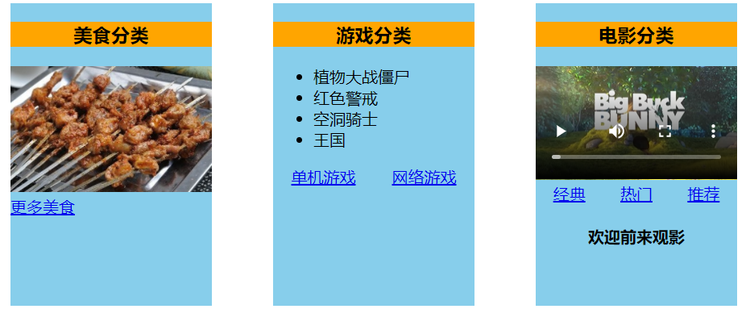
2.17.2 具名插槽 Category.vue
1 2 3 4 5 6 7 8 9 10 11 12 13 14 15 16 17 18 19 20 21 22 23 24 25 26 27 28 29 30 31 32 33 <template> <div class="category"> <h3>{{title}}分类</h3> <!-- 定义一个插槽(挖个坑,等着组件的使用者进行填充) --> <slot name="center">我是一些默认值,当使用者没有传递具体结构时,我会出现1</slot> <slot name="footer">我是一些默认值,当使用者没有传递具体结构时,我会出现2</slot> </div> </template> <script> export default { name:'Category', props:['title'] } </script> <style scoped> .category{ background-color: skyblue; width: 200px; height: 300px; } h3{ text-align: center; background-color: orange; } video{ width: 100%; } img{ width: 100%; } </style>
App.vue
1 2 3 4 5 6 7 8 9 10 11 12 13 14 15 16 17 18 19 20 21 22 23 24 25 26 27 28 29 30 31 32 33 34 35 36 37 38 39 40 41 42 43 44 45 46 47 48 49 50 51 52 53 54 55 <template> <div class="container"> <Category title="美食" > <img slot="center" src="https://s3.ax1x.com/2021/01/16/srJlq0.jpg" alt=""> <a slot="footer" href="http://www.atguigu.com">更多美食</a> </Category> <Category title="游戏" > <ul slot="center"> <li v-for="(g,index) in games" :key="index">{{g}}</li> </ul> <div class="foot" slot="footer"> <a href="http://www.atguigu.com">单机游戏</a> <a href="http://www.atguigu.com">网络游戏</a> </div> </Category> <Category title="电影"> <video slot="center" controls src="http://clips.vorwaerts-gmbh.de/big_buck_bunny.mp4"></video> <template v-slot:footer> <div class="foot"> <a href="http://www.atguigu.com">经典</a> <a href="http://www.atguigu.com">热门</a> <a href="http://www.atguigu.com">推荐</a> </div> <h4>欢迎前来观影</h4> </template> </Category> </div> </template> <script> import Category from './components/Category' export default { name:'App', components:{Category}, data() { return { foods:['火锅','烧烤','小龙虾','牛排'], games:['红色警戒','穿越火线','劲舞团','超级玛丽'], films:['《教父》','《拆弹专家》','《你好,李焕英》','《尚硅谷》'] } }, } </script> <style scoped> .container,.foot{ display: flex; justify-content: space-around; } h4{ text-align: center; } </style>
2.17.3 作用域插槽 Category.vue
1 2 3 4 5 6 7 8 9 10 11 12 13 14 15 16 17 18 19 20 21 22 23 24 25 26 27 28 29 30 31 32 33 34 35 36 <template> <div class="category"> <h3>{{title}}分类</h3> <slot :games="games" msg="hello">我是默认的一些内容</slot> </div> </template> <script> export default { name:'Category', props:['title'], data() { return { games:['红色警戒','穿越火线','劲舞团','超级玛丽'], } }, } </script> <style scoped> .category{ background-color: skyblue; width: 200px; height: 300px; } h3{ text-align: center; background-color: orange; } video{ width: 100%; } img{ width: 100%; } </style>
App.vue
1 2 3 4 5 6 7 8 9 10 11 12 13 14 15 16 17 18 19 20 21 22 23 24 25 26 27 28 29 30 31 32 33 34 35 36 37 38 39 40 41 42 43 44 45 46 <template> <div class="container"> <Category title="游戏"> <template scope="atguigu"> <ul> <li v-for="(g,index) in atguigu.games" :key="index">{{g}}</li> </ul> </template> </Category> <Category title="游戏"> <template scope="{games}"> <ol> <li style="color:red" v-for="(g,index) in games" :key="index">{{g}}</li> </ol> </template> </Category> <Category title="游戏"> <template slot-scope="{games}"> <h4 v-for="(g,index) in games" :key="index">{{g}}</h4> </template> </Category> </div> </template> <script> import Category from './components/Category' export default { name:'App', components:{Category}, } </script> <style scoped> .container,.foot{ display: flex; justify-content: space-around; } h4{ text-align: center; } </style>