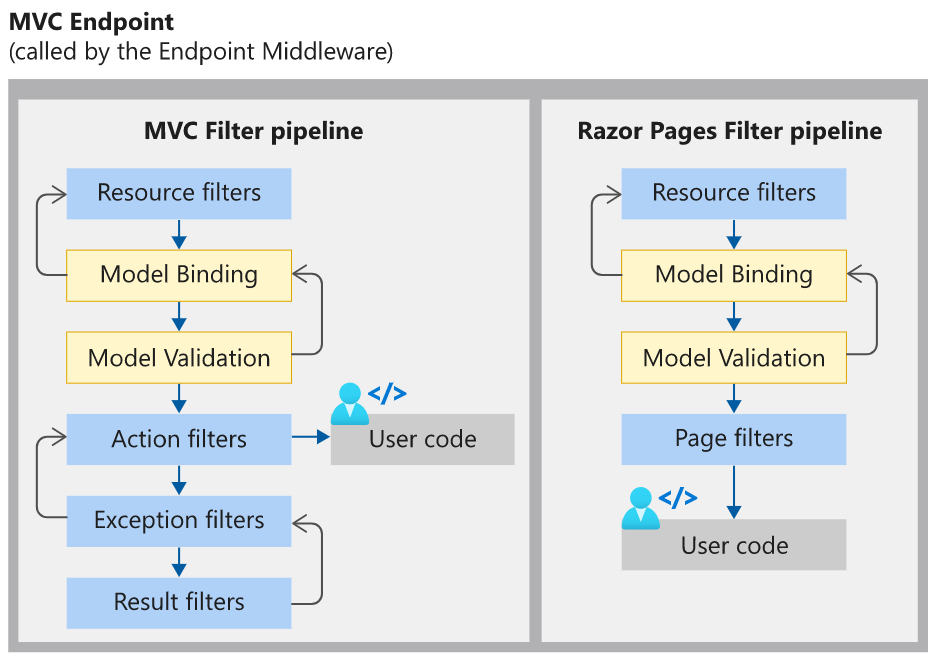
一、ASP.NET Core 中的过滤管道 1. 什么是过滤管道? **过滤管道(Filter Pipeline)**是 ASP.NET Core 请求处理流程中的一个核心机制,由一系列过滤器(Filters)按特定顺序组成。这些过滤器在 MVC 或 Razor Pages 的请求处理管道中,针对不同阶段(如授权、模型绑定、Action 执行等)插入自定义逻辑,实现横切关注点(Cross-Cutting Concerns)的集中处理。
过滤器的类型及执行顺序:
授权过滤器(Authorization Filters):最先执行,用于验证用户权限(如是否登录或具备访问权限)。
资源过滤器(Resource Filters):在授权后执行,常用于缓存或短路管道(如直接返回结果,跳过后续处理)。
操作过滤器(Action Filters):在 Action 执行前后运行,可修改输入参数或结果(如日志记录、参数校验)。
异常过滤器(Exception Filters):捕获未处理的异常,统一处理错误响应。
结果过滤器(Result Filters):在 Action 结果生成后执行,用于修改响应内容(如格式化输出)。
2. 为什么需要过滤管道? 过滤管道解决了以下核心问题:
横切关注点的解耦
灵活性和可扩展性
管道短路与性能优化 context.Result 提前终止请求处理,减少不必要的资源消耗。例如:
与中间件互补
3. 实际应用场景
权限控制:通过自定义AuthorizationFilter实现基于角色的访问限制。
日志记录:使用 Action 过滤器记录请求参数和执行时间。
缓存优化:资源过滤器缓存高频查询结果,减少数据库压力。
统一异常处理:异常过滤器捕获所有未处理错误,返回标准化错误响应。
4. 过滤管道与中间件的对比
特性 过滤管道 中间件
作用范围 MVC/Razor Pages 特定阶段
全局 HTTP 请求处理
常见用途 权限校验、模型绑定、结果格式化
身份认证、静态文件服务、CORS
执行顺序 按过滤器类型和作用域分层执行
按注册顺序执行
依赖关系 依赖于 MVC 或 Razor Pages 上下文
独立于业务逻辑,处理原始 HTTP 请求
总结 ASP.NET Core 的过滤管道通过分层、模块化的设计,将通用逻辑集中处理,显著提升代码的可维护性和扩展性。它允许开发者在请求处理的关键阶段插入自定义逻辑,同时通过短路机制优化性能。结合中间件,两者共同构建了一个高效、灵活的请求处理体系。
二、最小API模式Filter EmployeeCreateFilter.cs
1
2
3
4
5
6
7
8
9
10
11
12
13
14
15
16
17
18
19
20
21
22
23
24
25
26
27
28
29
30
31
32
33
34
35
using WebApi.Models; namespace WebApi.Filters { public class EmployeeCreateFilter : IEndpointFilter { public async ValueTask<object ?> InvokeAsync(EndpointFilterInvocationContext context, EndpointFilterDelegate next) { var employee = context.GetArgument<Employee>(0 ); if (employee is null || employee.Id < 0 ) { return Microsoft.AspNetCore.Http.Results.ValidationProblem(new Dictionary<string , string []> { {"id" , new [] { "Employee is not provided or is not valid." } } }, statusCode: 400 ); } return await next(context); } } }
EmployeeUpdateFilter.cs
1
2
3
4
5
6
7
8
9
10
11
12
13
14
15
16
17
18
19
20
21
22
23
24
25
26
27
28
29
30
31
32
33
34
35
36
37
38
39
using WebApi.Models; namespace WebApi.Filters { public class EmployeeUpdateFilter : IEndpointFilter { public async ValueTask<object ?> InvokeAsync(EndpointFilterInvocationContext context, EndpointFilterDelegate next) { var id = context.GetArgument<int >(0 ); var employee = context.GetArgument<Employee>(1 ); if (id != employee.Id) { return Microsoft.AspNetCore.Http.Results.ValidationProblem(new Dictionary<string , string []> { {"id" , new [] { "Employee id is not the same as id." } } }, statusCode: 400 ); } return await next(context); } } }
EnsureEmployeeExistsFilter.cs
1
2
3
4
5
6
7
8
9
10
11
12
13
14
15
16
17
18
19
20
21
22
23
24
25
26
27
28
29
30
31
32
33
34
35
36
37
38
39
40
41
42
43
44
45
using WebApi.Models; namespace WebApi.Filters { public class EnsureEmployeeExistsFilter : IEndpointFilter { private readonly IEmployeesRepository employeesRepository; public EnsureEmployeeExistsFilter (IEmployeesRepository employeesRepository ) { this .employeesRepository = employeesRepository; } public async ValueTask<object ?> InvokeAsync(EndpointFilterInvocationContext context, EndpointFilterDelegate next) { var id = context.GetArgument<int >(0 ); if (!this .employeesRepository.EmployeeExists(id)) { return Microsoft.AspNetCore.Http.Results.ValidationProblem(new Dictionary<string , string []> { {"id" , new [] { $"Employee with the id {id} doesn't exist." } } }, statusCode: 404 ); } return await next(context); } } }
EmployeeEndpoints.cs
1
2
3
4
5
6
7
8
9
10
11
12
13
14
15
16
17
18
19
20
21
22
23
24
25
26
27
28
29
30
31
32
33
34
35
36
37
38
39
40
41
42
43
44
45
46
47
48
49
50
51
52
53
54
55
56
57
58
59
60
61
62
63
64
65
66
67
68
69
70
71
72
73
using WebApi.Filters; using WebApi.Models; using WebApi.Results; using static System.Net.Mime.MediaTypeNames; namespace WebApi.Endpoints { public static class EmployeeEndpoints { public static void MapEmployeeEndpoints (this WebApplication app { app.MapGet("/" , HtmlResult () => { string html = "<h2>Welcome to our API</h2> Our API is used to learn ASP.NET CORE." ; return new HtmlResult(html); }); app.MapGet("/employees" , (IEmployeesRepository employeesRepository) => { var employees = employeesRepository.GetEmployees(); return TypedResults.Ok(employees); }); app.MapGet("/employees/{id:int}" , (int id, IEmployeesRepository employeesRepository) => { var employee = employeesRepository.GetEmployeeById(id); return TypedResults.Ok(employee); }).AddEndpointFilter<EnsureEmployeeExistsFilter>(); app.MapPost("/employees" , (Employee employee, IEmployeesRepository employeesRepository) => { employeesRepository.AddEmployee(employee); return TypedResults.Created($"/employees/{employee.Id} " , employee); }).AddEndpointFilter<EmployeeCreateFilter>() .WithParameterValidation(); app.MapPut("/employees/{id:int}" , (int id, Employee employee, IEmployeesRepository employeesRepository) => { return employeesRepository.UpdateEmployee(employee); }).AddEndpointFilter<EnsureEmployeeExistsFilter>() .AddEndpointFilter<EmployeeUpdateFilter>() .WithParameterValidation(); app.MapDelete("/employees/{id:int}" , (int id, IEmployeesRepository employeesRepository) => { var employee = employeesRepository.GetEmployeeById(id); return TypedResults.Ok(employee); }).AddEndpointFilter<EnsureEmployeeExistsFilter>(); } } }
Program.cs
1
2
3
4
5
6
7
8
9
10
11
12
13
14
15
16
17
18
19
20
21
22
23
24
25
26
27
28
29
30
31
32
33
34
35
36
using System.Text.Json; using WebApi.Endpoints; using WebApi.Models; using WebApi.Results; var builder = WebApplication.CreateBuilder(args );builder.Services.AddProblemDetails(); builder.Services.AddSingleton<IEmployeesRepository, EmployeesRepository>(); var app = builder.Build();if (!app.Environment.IsDevelopment()){ app.UseExceptionHandler(); } app.UseStatusCodePages(); app.MapEmployeeEndpoints(); app.Run();
三、MVC模式Filter ASP.NET Core MVC 的过滤器(Filter)是一种基于 AOP(面向切面编程) 的机制,允许开发者在请求处理管道的不同阶段插入自定义逻辑。以下是对五种过滤器的详细说明,涵盖其作用、执行顺序、实现方式及典型应用场景:
1.Authorization Filter(授权过滤器) 核心作用 :执行顺序 :最先执行 ,若未通过验证,直接短路后续管道。
实现方式:
内置特性 :[Authorize] 特性,支持全局、控制器或 Action 级别的权限控制:
1 2 [Authorize(Roles = "Admin" ) ] public class AdminController : Controller { ... }
自定义实现 :IAuthorizationFilter 或 IAsyncAuthorizationFilter 接口,编写逻辑:
1
2
3
4
5
6
7
public class CustomAuthFilter : IAuthorizationFilter { public void OnAuthorization (AuthorizationFilterContext context ) if (!IsUserAdmin(context.HttpContext.User)) { context.Result = new ForbidResult(); } } }
典型场景 :
2.Resource Filter(资源过滤器) 核心作用 :模型绑定前 或 结果生成后 执行逻辑,常用于性能优化或管道短路。执行顺序 :OnResourceExecuting(执行前)和 OnResourceExecuted(执行后)。
实现方式:
同步接口 :IResourceFilter
1
2
3
4
5
6
7
8
public class CacheResourceFilter : IResourceFilter { public void OnResourceExecuting (ResourceExecutingContext context ) } public void OnResourceExecuted (ResourceExecutedContext context ) } }
异步接口 :IAsyncResourceFilter
1
2
3
4
5
public class AsyncResourceFilter : IAsyncResourceFilter { public async Task OnResourceExecutionAsync (... ) } }
典型场景 :
请求结果缓存(减少数据库查询)
请求预处理(如压缩响应数据)
3.Action Filter(动作过滤器) 核心作用 :Action 方法执行前后 插入逻辑,适用于与业务逻辑密切相关的操作。执行顺序 :
实现方式:
特性继承 :ActionFilterAttribute,覆盖 OnActionExecuting 和 OnActionExecuted:
1
2
3
4
5
public class LogActionFilter : ActionFilterAttribute { public override void OnActionExecuting (ActionExecutingContext context ) LogRequestParams(context.HttpContext.Request); } }
直接接口实现 :
1 public class CustomActionFilter : IActionFilter { ... }
典型场景 :
请求参数校验(如验证模型合法性)
日志记录(记录请求耗时、参数)
4.Result Filter(结果过滤器) 核心作用 :Action 结果生成后 修改响应内容,如格式化输出或添加统一响应头。执行顺序 :
实现方式:
同步接口 :IResultFilter
1
2
3
4
5
public class AddHeaderFilter : IResultFilter { public void OnResultExecuting (ResultExecutingContext context ) context.HttpContext.Response.Headers.Add("X-Custom-Header" , "Value" ); } }
异步接口 :IAsyncResultFilter
1
2
3
public class AsyncResultFilter : IAsyncResultFilter { public async Task OnResultExecutionAsync (... ) }
典型场景 :
5.Exception Filter(异常过滤器) 核心作用 :未处理的异常 ,统一返回错误信息,避免敏感信息泄露。执行顺序 :
实现方式:
特性继承:继承ExceptionFilterAttribute,覆盖OnException:
1
2
3
4
5
6
public class CustomExceptionFilter : ExceptionFilterAttribute { public override void OnException (ExceptionContext context ) context.Result = new JsonResult(new { Error = "系统异常" }); context.ExceptionHandled = true ; } }
典型场景 :
全局异常处理(返回友好错误页)
日志记录(记录异常堆栈)
关键注意事项
执行顺序:整体顺序为 授权 → 资源 → 动作 → 结果,异常过滤器仅在出错时触发。
作用域优先级:Action 级别 > 控制器级别 > 全局级别(“就近原则”)。
生命周期配置:避免将DbContext等 Scoped 服务注册为 Singleton,否则可能导致线程安全问题。
通过合理组合这五类过滤器,开发者可以实现 横切关注点的解耦 ,提升代码复用率与可维护性。例如,一个电商系统可通过授权过滤器管理权限、动作过滤器记录操作日志、异常过滤器统一处理支付失败等场景。
6.Filter Scopes ASP.NET Core MVC 中的过滤器作用域(Filter Scopes)分为 Action(方法级) 、Controller(控制器级) 和 Global(全局级) ,它们决定了过滤器的应用范围和执行优先级。以下是三种作用域的详细说明及实际应用指导:
1. Action 作用域(方法级) 定义 :单个 Action 方法 ,仅对该方法的请求处理生效。特点 :
最细粒度 :精准控制某个具体方法的逻辑(如权限校验、日志记录)。优先级最高 :在同类型过滤器中,Action 级别的逻辑最先执行。
配置方式 :
1 2 3 4 5 [TypeFilter(typeof(CustomActionFilter)) ] public IActionResult GetUser (){ }
适用场景 :
特定方法需要独立逻辑(如某个接口需要额外权限)。
临时覆盖全局或控制器级别的过滤器行为。
注意事项 :
若同时存在多个同类型过滤器,按声明顺序执行。
避免滥用,否则可能导致代码冗余。
2. Controller 作用域(控制器级) 定义 :整个 Controller 类 ,对所有属于该控制器的 Action 方法生效。特点 :
批量管理 :统一处理多个方法的公共逻辑(如控制器级别的日志或权限)。优先级次之 :在同类型过滤器中,执行顺序位于全局过滤器和 Action 过滤器之间。
配置方式 :
1 2 3 4 5 [Authorize(Roles = "Admin" ) ] public class AdminController : Controller { }
适用场景 :
控制器内所有方法共享的权限控制(如管理员专属模块)。
统一处理模型验证或异常捕获(如整个订单模块的异常处理)。
注意事项 :
若某个 Action 需要排除控制器级过滤器,可使用 [AllowAnonymous] 等特性覆盖。
控制器级过滤器会影响所有派生类(除非子类显式重写)。
3. Global 作用域(全局级) 定义 :全局应用级别 ,对所有 Controller 和 Action 方法生效。特点 :
最广泛覆盖 :适用于全站通用逻辑(如全局异常处理、请求日志)。优先级最低 :在同类型过滤器中,全局过滤器最后执行。
配置方式 :Program.cs 或 Startup.cs 中全局注册:
1 2 3 4 5 builder.Services.AddControllersWithViews(options => { options.Filters.Add<GlobalExceptionFilter>(); });
适用场景 :
统一错误处理(返回标准化错误 JSON)。
全站请求日志记录(记录每个请求的耗时和参数)。
注意事项 :
谨慎注册全局过滤器,避免性能损耗(如频繁的日志写入)。
可通过 [AllowAnonymous] 或自定义逻辑跳过全局过滤器。
三者的执行顺序与优先级 在请求处理管道中,同类型过滤器的执行顺序为:
1 Global → Controller → Action
但实际顺序还受过滤器类型影响(如授权过滤器始终最先执行)。示例 :
若全局、控制器、Action 均注册了 ActionFilter,执行顺序为:Global → Controller → Action(OnActionExecuting)OnActionExecuted:Action → Controller → Global。
对比总结
作用域 应用范围 优先级 典型用途
Global 整个应用程序
最低
全局异常处理、日志记录、跨域配置
Controller 单个控制器及其所有 Action
中
模块化权限控制(如管理员专属控制器)
Action 单个 Action 方法
最高
精细校验(如特定接口的限流或参数校验)
实际应用建议
按需选择作用域 :
优先使用 Controller 或 Action 级别 ,避免全局过滤器过度侵入代码。
全局过滤器适用于必须全站生效的逻辑(如安全防护)。
灵活组合使用 :
例如,全局处理异常 + 控制器级权限控制 + Action 级日志记录。
注意生命周期 :
全局过滤器若依赖 Scoped 服务(如 DbContext),需显式配置作用域。
通过合理使用三种作用域,您可以高效管理横切关注点(Cross-Cutting Concerns),构建高内聚、低耦合的 ASP.NET Core MVC 应用。
7.代码实现 Filters/AddHeaderFilter.cs
1 2 3 4 5 6 7 8 9 10 11 12 13 14 15 16 17 18 19 20 21 22 23 24 25 26 27 28 29 30 31 32 33 34 35 36 37 38 39 40 41 42 43 44 using Microsoft.AspNetCore.Mvc.Filters;namespace WebApp.Filters { public class AddHeaderFilter : Attribute , IResultFilter { public string ? Name { get ; set ; } public string ? Value { get ; set ; } public void OnResultExecuted (ResultExecutedContext context ) { } public void OnResultExecuting (ResultExecutingContext context ) { if (context.HttpContext.Response != null && this .Name is not null && this .Value is not null && context.HttpContext.Response.Headers is not null && !context.HttpContext.Response.Headers.ContainsKey(this .Name)) { context.HttpContext.Response.Headers.Add(Name, Value); } } } }
EndpointExpiresFilter.cs Filters/EndpointExpiresFilter.cs
1 2 3 4 5 6 7 8 9 10 11 12 13 14 15 16 17 18 19 20 21 22 23 24 25 26 27 28 29 30 31 32 33 34 35 36 37 38 39 40 using Microsoft.AspNetCore.Mvc;using Microsoft.AspNetCore.Mvc.Filters;namespace WebApp.Filters { public class EndpointExpiresFilter : Attribute , IResourceFilter { public string ? ExpiryDate { get ; set ; } public void OnResourceExecuting (ResourceExecutingContext context ) { if (DateTime.TryParse(ExpiryDate, out DateTime expiryDate)) { if (DateTime.Now > expiryDate) { context.Result = new BadRequestResult(); } } } public void OnResourceExecuted (ResourceExecutedContext context ) { } } }
EnsureDepartmentExistsFilter.cs Filters/EnsureDepartmentExistsFilter.cs
1 2 3 4 5 6 7 8 9 10 11 12 13 14 15 16 17 18 19 20 21 22 23 24 25 26 27 28 29 30 31 32 33 34 35 36 37 38 39 40 41 42 43 44 45 46 47 48 49 50 51 52 53 54 55 56 57 58 using Microsoft.AspNetCore.Mvc;using Microsoft.AspNetCore.Mvc.Filters;using WebApp.Helpers;using WebApp.Models;namespace WebApp.Filters { public class EnsureDepartmentExistsFilter : ActionFilterAttribute { public override void OnActionExecuting (ActionExecutingContext context ) { base .OnActionExecuting(context); var departmentId = (int )context.ActionArguments["id" ]; var departmentsRepository = context.HttpContext.RequestServices.GetService<IDepartmentsRepository>(); if (!departmentsRepository.DepartmentExists(departmentId)) { context.ModelState.AddModelError("id" , "Department not found." ); var result = new ViewResult { ViewName = "Error" }; var controller = context.Controller as Controller; result.ViewData = controller.ViewData; result.ViewData.Model = ModelStateHelper.GetErrors(context.ModelState); context.Result = result; } } } }
EnsureEmployeeExistsPageFilter.cs Filters/EnsureEmployeeExistsPageFilter.cs
1 2 3 4 5 6 7 8 9 10 11 12 13 14 15 16 17 18 19 20 21 22 23 24 25 26 27 28 29 30 31 32 33 34 35 36 37 38 39 40 41 42 43 44 45 46 47 48 49 50 51 52 53 54 55 56 57 58 59 60 61 62 63 64 65 using Microsoft.AspNetCore.Mvc;using Microsoft.AspNetCore.Mvc.Filters;using WebApp.Helpers;using WebApp.Models;using WebApp.Pages.Employees;namespace WebApp.Filters { public class EnsureEmployeeExistsPageFilter : Attribute , IPageFilter { public void OnPageHandlerExecuted (PageHandlerExecutedContext context ) { } public void OnPageHandlerExecuting (PageHandlerExecutingContext context ) { if (context.HandlerMethod is not null && context.HandlerMethod.MethodInfo.Name == "OnGet" ) return ; var employeeRespository = context.HttpContext.RequestServices.GetService<IEmployeesRepository>(); object ? employeeId; if (context.HandlerArguments.ContainsKey("id" )) employeeId = context.HandlerArguments["id" ]; else employeeId = ((EditModel)context.HandlerInstance).EmployeeViewModel.Employee.Id; if (!employeeRespository.EmployeeExists((int )employeeId)) { context.ModelState.AddModelError("id" , "Employee not found." ); var errors = ModelStateHelper.GetErrors(context.ModelState); context.Result = new RedirectToPageResult("/Error" , new { errors }); } } public void OnPageHandlerSelected (PageHandlerSelectedContext context ) { } } }
EnsureValidModelStateFilter.cs Filters/EnsureValidModelStateFilter.cs
1 2 3 4 5 6 7 8 9 10 11 12 13 14 15 16 17 18 19 20 21 22 23 24 25 26 27 28 29 30 31 32 33 34 35 36 37 38 39 40 41 42 43 using Microsoft.AspNetCore.Mvc;using Microsoft.AspNetCore.Mvc.Filters;using WebApp.Helpers;using WebApp.Models;namespace WebApp.Filters { public class EnsureValidModelStateFilter : ActionFilterAttribute { public override void OnActionExecuting (ActionExecutingContext context ) { base .OnActionExecuting(context); if (!context.ModelState.IsValid) { var result = new ViewResult { ViewName = "Error" }; var controller = context.Controller as Controller; result.ViewData = controller.ViewData; result.ViewData.Model = ModelStateHelper.GetErrors(context.ModelState); context.Result = result; } } } }
EnsureValidModelStatePageFilter.cs Filters/EnsureValidModelStatePageFilter.cs
1 2 3 4 5 6 7 8 9 10 11 12 13 14 15 16 17 18 19 20 21 22 23 24 25 26 27 28 29 30 31 32 33 34 35 36 37 38 39 40 41 42 43 44 45 using Microsoft.AspNetCore.Mvc;using Microsoft.AspNetCore.Mvc.Filters;using WebApp.Helpers;using WebApp.Models;namespace WebApp.Filters { public class EnsureValidModelStatePageFilter : Attribute , IPageFilter { public void OnPageHandlerExecuted (PageHandlerExecutedContext context ) { } public void OnPageHandlerExecuting (PageHandlerExecutingContext context ) { if (!context.ModelState.IsValid) { var errors = ModelStateHelper.GetErrors(context.ModelState); context.Result = new RedirectToPageResult("/Error" , new { errors }); } } public void OnPageHandlerSelected (PageHandlerSelectedContext context ) { } } }
HandleExceptionsFilter.cs Filters/HandleExceptionsFilter.cs
1 2 3 4 5 6 7 8 9 10 11 12 13 14 15 16 17 18 19 20 21 22 23 24 25 26 27 28 29 30 31 32 33 34 35 36 37 38 using Microsoft.AspNetCore.Mvc;using Microsoft.AspNetCore.Mvc.Filters;namespace WebApp.Filters { public class HandleExceptionsFilter : ExceptionFilterAttribute { public override void OnException (ExceptionContext context ) { base .OnException(context); var error = new ProblemDetails { Title = "An error occurred" , Detail = context.Exception.ToString(), Status = 500 }; context.Result = new ObjectResult(error) { StatusCode = 500 }; context.ExceptionHandled = true ; } } }
SpecialAuthorizationFilter.cs Filters/SpecialAuthorizationFilter.cs
1 2 3 4 5 6 7 8 9 10 11 12 13 14 15 16 17 18 19 20 21 22 23 24 25 26 27 28 29 30 31 32 33 34 35 36 37 using Microsoft.AspNetCore.Mvc;using Microsoft.AspNetCore.Mvc.Filters;namespace WebApp.Filters { public class SpecialAuthorizationFilter : Attribute , IAuthorizationFilter { public void OnAuthorization (AuthorizationFilterContext context ) { var user = context.HttpContext.User; if (user is null || user.Identity is null || !user.Identity.IsAuthenticated) { context.Result = new UnauthorizedResult(); } if (!user.HasClaim(c => c.Type == "CustomClaim" && c.Value == "CustomValue" )) { context.Result = new ForbidResult(); } } } }
WriteToConsoleResourceFilter.cs Filters/WriteToConsoleResourceFilter.cs
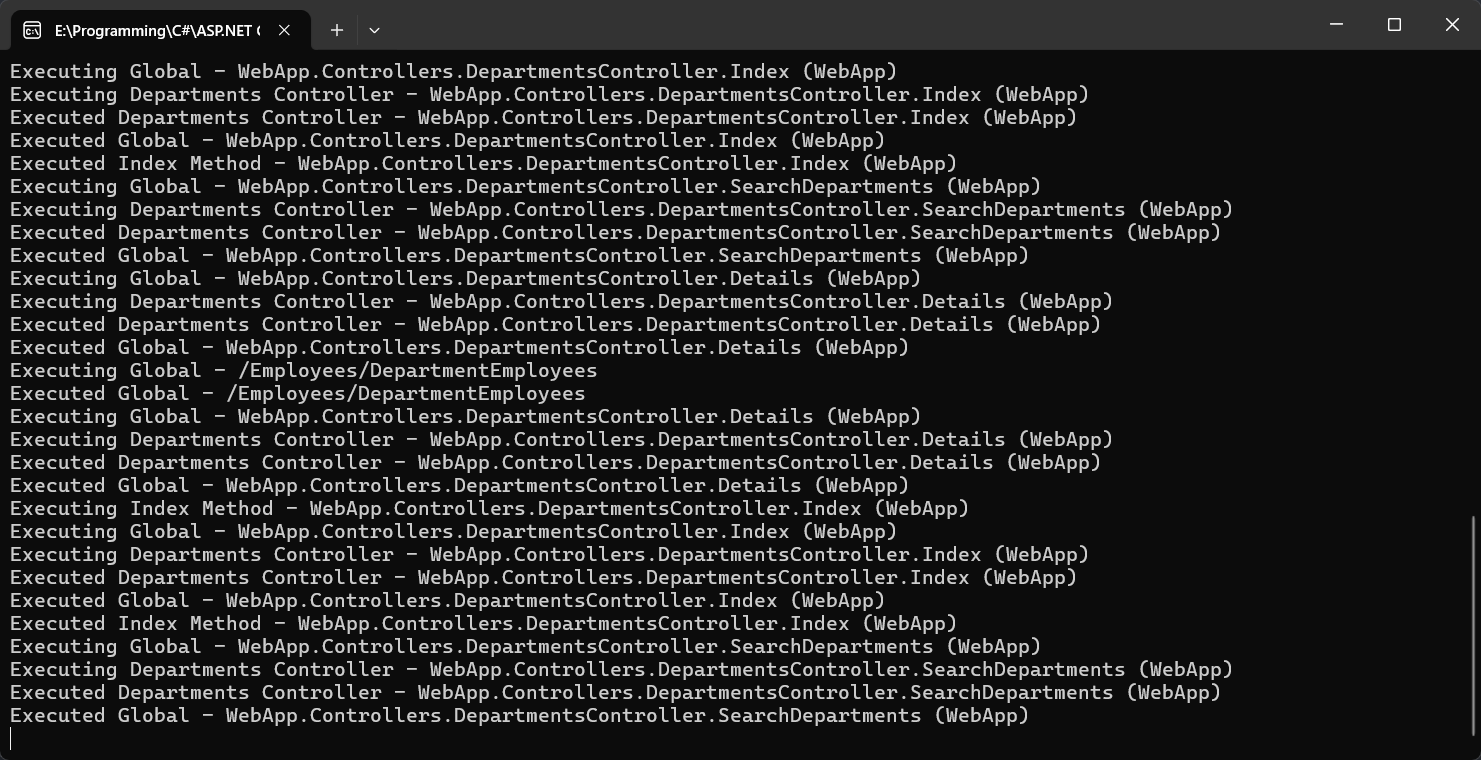
1 2 3 4 5 6 7 8 9 10 11 12 13 14 15 16 17 18 19 20 21 22 23 24 25 26 27 28 29 30 31 32 33 34 35 36 37 38 39 40 41 42 using Microsoft.AspNetCore.Mvc.Filters;namespace WebApp.Filters { public class WriteToConsoleResourceFilter : Attribute , IResourceFilter , IOrderedFilter { public string ? Description { get ; set ; } public int Order { get ; set ; } public WriteToConsoleResourceFilter () { this .Description = "Global" ; } public void OnResourceExecuting (ResourceExecutingContext context ) { Console.WriteLine($"Executing {Description} - {context.ActionDescriptor.DisplayName} " ); } public void OnResourceExecuted (ResourceExecutedContext context ) { Console.WriteLine($"Executed {Description} - {context.ActionDescriptor.DisplayName} " ); } } }
DepartmentsController.cs Controllers/DepartmentsController.cs
1 2 3 4 5 6 7 8 9 10 11 12 13 14 15 16 17 18 19 20 21 22 23 24 25 26 27 28 29 30 31 32 33 34 35 36 37 38 39 40 41 42 43 44 45 46 47 48 49 50 51 52 53 54 55 56 57 58 59 60 61 62 63 64 65 66 67 68 69 70 71 72 73 74 75 76 77 78 79 80 81 82 83 84 85 86 87 88 89 90 91 92 93 94 95 96 97 98 99 100 101 102 103 104 105 106 107 108 109 110 111 112 113 114 115 116 117 118 119 120 121 122 123 124 125 126 127 128 129 130 131 132 133 134 135 136 137 138 using Microsoft.AspNetCore.Authorization;using Microsoft.AspNetCore.Mvc;using WebApp.Filters;using WebApp.Helpers;using WebApp.Models;using static System.Net.Mime.MediaTypeNames;namespace WebApp.Controllers { [WriteToConsoleResourceFilter(Description = "Departments Controller" ) ] public class DepartmentsController : Controller { private readonly IDepartmentsRepository departmentsRepository; public DepartmentsController (IDepartmentsRepository departmentsRepository ) { this .departmentsRepository = departmentsRepository; } [HttpGet ] [WriteToConsoleResourceFilter(Description = "Index Method" , Order = -1) ] public IActionResult Index () { return View(); } [Route("/department-list/{filter?}" ) ] public IActionResult SearchDepartments (string ? filter { return ViewComponent("DepartmentList" , new { filter }); } [HttpGet ] [EndpointExpiresFilter(ExpiryDate = "2028-01-18" ) ] [EnsureDepartmentExistsFilter ] public IActionResult Details (int id { var department = departmentsRepository.GetDepartmentById(id); return View(department); } [HttpPost ] [EnsureValidModelStateFilter ] public IActionResult Edit (Department department ) { departmentsRepository.UpdateDepartment(department); return RedirectToAction(nameof (Index)); } [HttpGet ] public IActionResult Create () { return View(new Department()); } [HttpPost ] [EnsureValidModelStateFilter ] public IActionResult Create (Department department ) { departmentsRepository.AddDepartment(department); return RedirectToAction(nameof (Index)); } [HttpPost ] [EnsureDepartmentExistsFilter ] public IActionResult Delete (int id { var department = departmentsRepository.GetDepartmentById(id); departmentsRepository.DeleteDepartment(department); return RedirectToAction(nameof (Index)); } [HttpGet ] [HandleExceptionsFilter ] public IActionResult GetDepartments () { var departments = departmentsRepository.GetDepartments(); return Json(departments); } } }
HomeController.cs Controllers/HomeController.cs
1 2 3 4 5 6 7 8 9 10 11 12 13 14 15 16 17 18 19 20 using Microsoft.AspNetCore.Mvc;using WebApp.Filters;namespace WebApp.Controllers { [AddHeaderFilter(Name = "MyHeader" , Value = "MyValue" ) ] public class HomeController : Controller { public IActionResult Index () { return View(); } } }
Program.cs Program.cs
1 2 3 4 5 6 7 8 9 10 11 12 13 14 15 16 17 18 19 20 21 22 23 24 25 26 27 28 29 30 31 32 33 34 35 36 37 38 39 40 41 42 43 44 45 46 47 48 49 50 51 52 53 54 55 56 57 58 59 using WebApp.Filters;using WebApp.Models;var builder = WebApplication.CreateBuilder(args );builder.Services.AddControllersWithViews(); builder.Services.AddRazorPages().AddMvcOptions(options => { options.Filters.Add<WriteToConsoleResourceFilter>(); }); builder.Services.AddSingleton<IDepartmentsRepository, DepartmentsRepository>(); builder.Services.AddSingleton<IEmployeesRepository, EmployeesRepository>(); var app = builder.Build();app.UseStaticFiles(new StaticFileOptions { OnPrepareResponse = ctx => { ctx.Context.Response.Headers.Append("Cache-Control" , "public,max-age=600" ); ctx.Context.Response.Headers.Append("Expires" , DateTime.UtcNow.AddMinutes(10 ).ToString()); } }); app.UseRouting(); app.UseEndpoints(endpoints => { endpoints.MapControllerRoute( name: "default" , pattern: "{controller=Home}/{action=Index}/{id?}" ); endpoints.MapRazorPages(); }); app.Run();