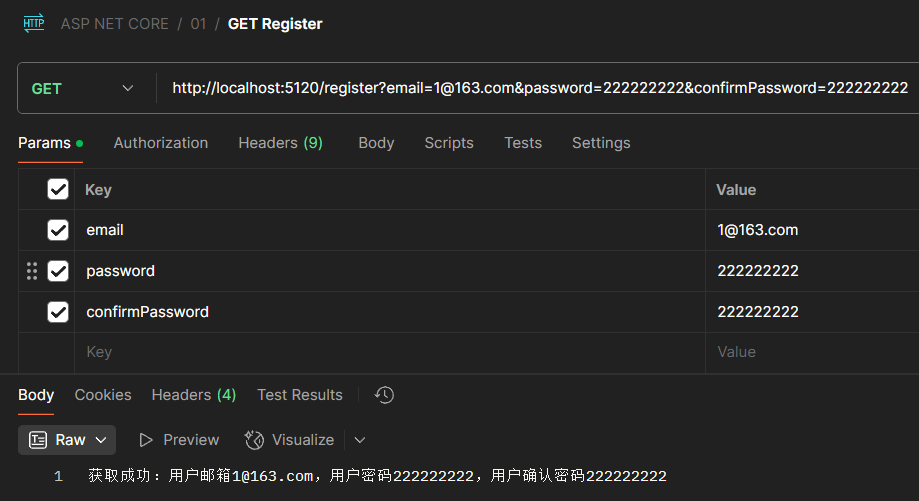
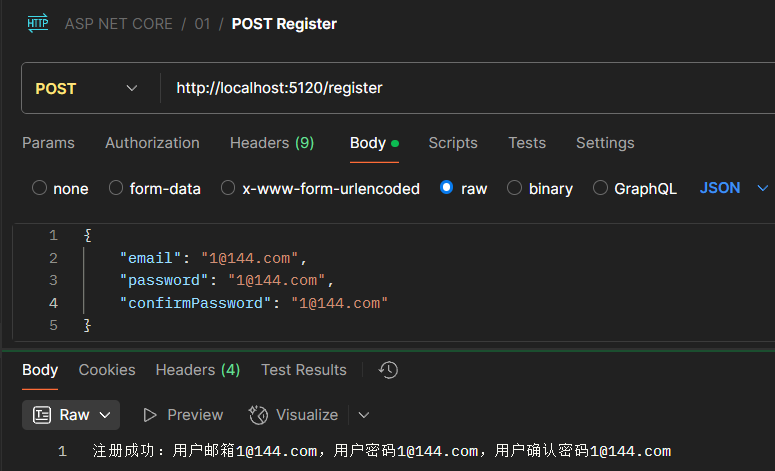
1、模型绑定定义
模型绑定是ASP.NET Core中将HTTP请求数据自动映射到方法参数或对象属性的机制。其核心工作流程:
数据来源:
- 路由参数(URL片段)
- 查询字符串(?key=value)
- 请求体(表单/JSON/XML)
- 请求头
- 文件上传
典型应用:
1
2
3
4
5
6
7
8
9
10
11
12
13
|
[HttpGet("/products/{id}")]
public IActionResult GetProduct(int id, [FromQuery] string category)
{
}
[HttpPost]
public IActionResult Create([FromBody] Product product)
{
}
|
处理流程:
- 接收HTTP请求
- 根据参数名称/类型识别目标模型
- 从预定义数据源提取对应值
- 执行类型转换(字符串→目标类型)
- 验证数据有效性
- 填充到控制器方法参数
优势特点:
- 消除手动数据解析代码
- 支持复杂对象嵌套绑定
- 内置类型安全验证
- 可扩展自定义绑定逻辑
简单实现
1
2
3
4
5
6
7
8
9
10
11
12
13
14
15
16
17
18
19
20
21
22
23
24
25
26
27
28
29
30
31
32
33
34
35
36
37
38
39
| using Microsoft.AspNetCore.Mvc;
using System.Text.Json;
using WebApp.Models;
var builder = WebApplication.CreateBuilder(args);
var app = builder.Build();
app.UseRouting();
app.UseEndpoints(endpoints =>
{
endpoints.MapGet("/employees/{id:int?}",
([FromRoute(Name = "id")] int? id) =>
{
if (id.HasValue)
{
var employee = EmployeesRepository.GetEmployeeById(id.Value);
return employee;
}
return null;
});
});
app.Run();
|
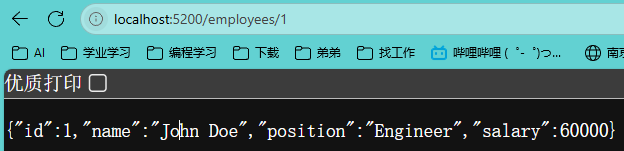
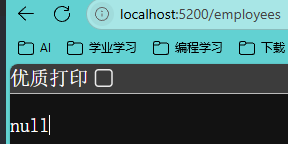 # 2、**路由参数绑定**
1
2
3
4
5
6
7
8
9
10
11
12
13
14
15
16
17
18
19
20
21
22
23
24
25
26
27
28
29
30
31
32
| using Microsoft.AspNetCore.Mvc;
using System.Text.Json;
using WebApp.Models;
var builder = WebApplication.CreateBuilder(args);
var app = builder.Build();
app.UseRouting();
app.UseEndpoints(endpoints =>
{
endpoints.MapGet("/employees", (int id) =>
{
var employee = EmployeesRepository.GetEmployeeById(id);
return employee;
});
});
app.Run();
|
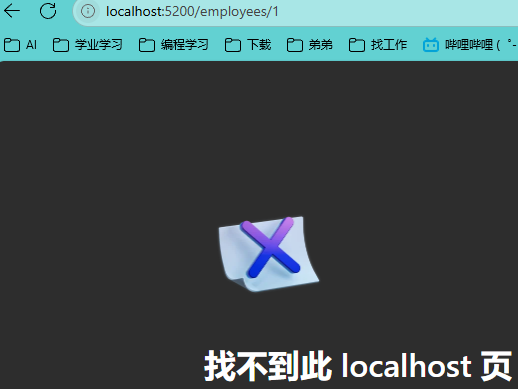
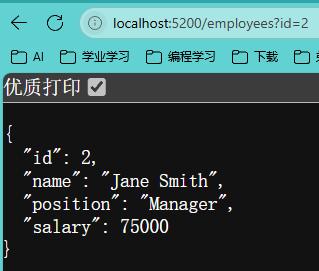
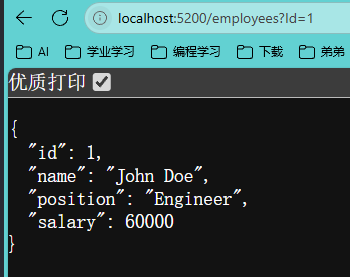 但如果查询参数名称与路由参数名称一致,仍然可以使用隐式绑定实现查询结果,否则就要使用显示绑定,例如:
1
2
3
4
5
6
7
8
9
10
11
12
13
14
15
|
app.UseEndpoints(endpoints =>
{
endpoints.MapGet("/employees", (int id) =>
{
var employee = EmployeesRepository.GetEmployeeById(id);
return employee;
});
});
|
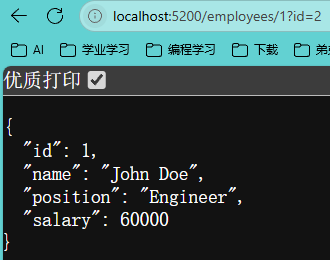
且如果同时出现查询参数与路由参数,那么会仅使用路由参数,例如:
1
2
3
4
5
6
7
8
9
10
11
12
13
14
15
16
17
18
19
20
21
22
|
app.UseEndpoints(endpoints =>
{
endpoints.MapGet("/employees/{id:int?}", ([FromRoute(Name = "id")] int? id) =>
{
if (id.HasValue)
{
var employee = EmployeesRepository.GetEmployeeById(id.Value);
return employee;
}
return null;
});
});
|
3、请求头参数绑定
1
2
3
4
5
6
7
8
9
10
11
12
13
14
15
16
17
18
19
20
21
22
23
24
25
26
27
28
29
30
31
32
33
34
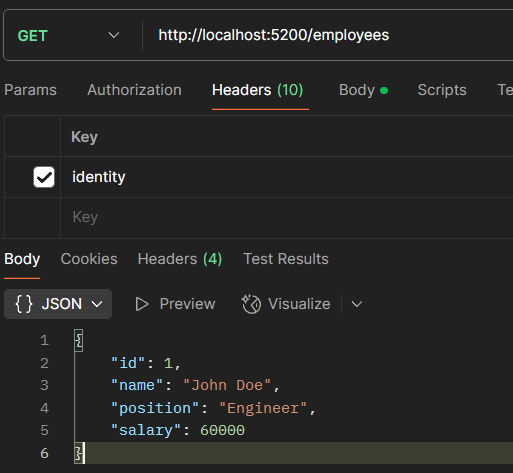
| using Microsoft.AspNetCore.Mvc;
using System.Text.Json;
using WebApp.Models;
var builder = WebApplication.CreateBuilder(args);
var app = builder.Build();
app.UseRouting();
app.UseEndpoints(endpoints =>
{
endpoints.MapGet("/employees",
([FromHeader(Name = "identity")] int id) =>
{
var employee = EmployeesRepository.GetEmployeeById(id);
return employee;
});
});
app.Run();
|
4、使用[AsParameters]特性实现参数分组
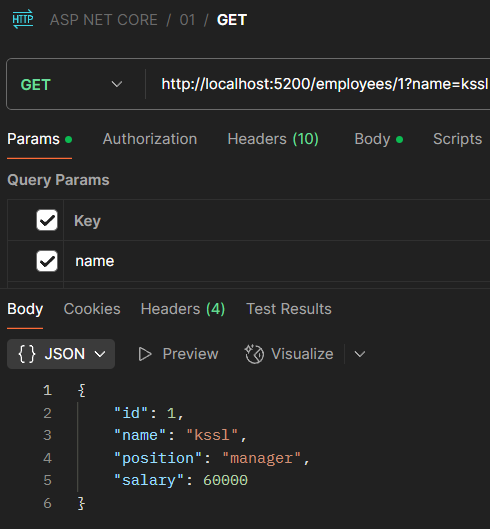
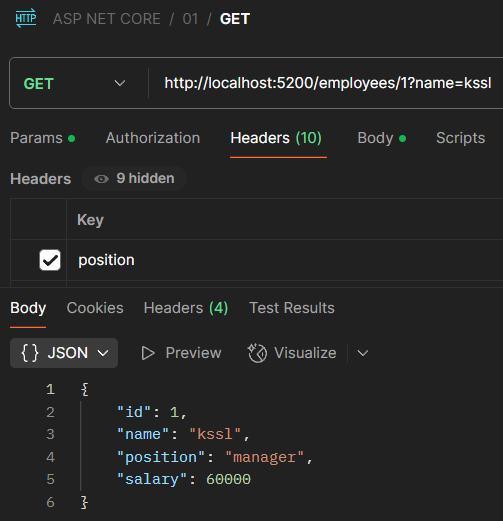
模拟多条件下使用
1
2
3
4
5
6
7
8
9
10
11
12
13
14
15
16
17
18
19
20
21
22
23
24
25
26
27
28
29
30
31
32
33
34
35
36
37
38
39
| using Microsoft.AspNetCore.Mvc;
using System.Text.Json;
using WebApp.Models;
var builder = WebApplication.CreateBuilder(args);
var app = builder.Build();
app.UseRouting();
app.UseEndpoints(endpoints =>
{
endpoints.MapGet("/employees/{id:int}", (int id, [FromQuery] string name, [FromHeader] string position) =>
{
var employee = EmployeesRepository.GetEmployeeById(id);
employee.Name = name;
employee.Position = position;
return employee;
});
});
app.Run();
|
1
2
3
4
5
6
7
8
9
10
11
12
13
14
15
16
17
18
19
20
21
22
23
24
25
26
27
28
29
30
31
32
33
34
35
36
37
38
39
40
41
42
43
44
45
46
47
48
49
50
51
52
53
54
55
56
57
58
59
60
61
| using Microsoft.AspNetCore.Mvc;
using System.Text.Json;
using WebApp.Models;
var builder = WebApplication.CreateBuilder(args);
var app = builder.Build();
app.UseRouting();
app.UseEndpoints(endpoints =>
{
endpoints.MapGet("/employees/{id:int}", ([AsParameters] GetEmployeeParameters param) =>
{
var employee = EmployeesRepository.GetEmployeeById(param.Id);
employee.Name = param.Name;
employee.Position = param.Position;
return employee;
});
});
app.Run();
class GetEmployeeParameters
{
[FromRoute]
public int Id { get; set; }
[FromQuery]
public string Name { get; set; }
[FromHeader]
public string Position { get; set; }
}
|
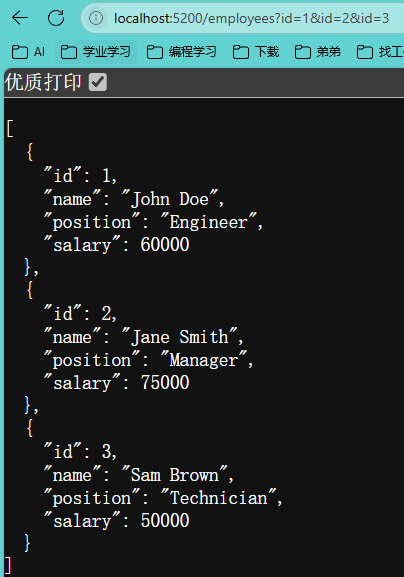
5、实现数组参数与查询字符串或请求头的绑定
1
2
3
4
5
6
7
8
9
10
11
12
13
14
15
16
17
18
19
20
21
22
23
24
25
26
27
28
29
30
31
32
33
| using Microsoft.AspNetCore.Mvc;
using System.Text.Json;
using WebApp.Models;
var builder = WebApplication.CreateBuilder(args);
var app = builder.Build();
app.UseRouting();
app.UseEndpoints(endpoints =>
{
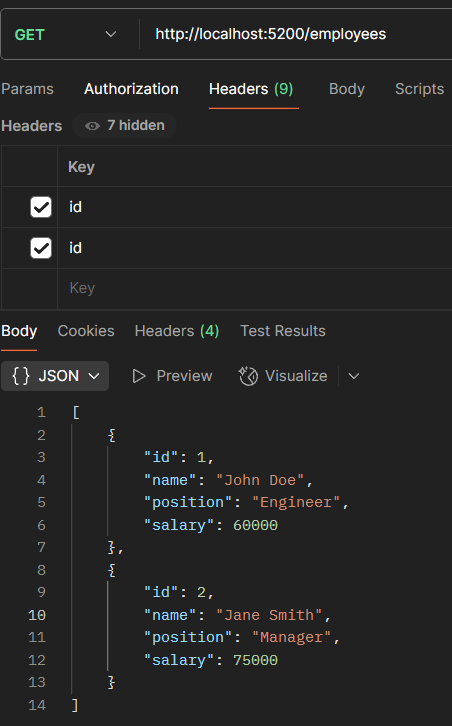
endpoints.MapGet("/employees", ([FromQuery(Name = "id")] int[] ids) =>
{
var employees = EmployeesRepository.GetEmployees();
var emps = employees.Where(x => ids.Contains(x.Id)).ToList();
return emps;
});
});
app.Run();
|
1
2
3
4
5
6
7
8
9
10
11
12
13
14
15
16
17
18
19
20
21
22
23
24
25
26
27
28
29
30
31
32
33
34
| using Microsoft.AspNetCore.Mvc;
using System.Text.Json;
using WebApp.Models;
var builder = WebApplication.CreateBuilder(args);
var app = builder.Build();
app.UseRouting();
app.UseEndpoints(endpoints =>
{
endpoints.MapGet("/employees", ([FromHeader(Name = "id")] int[] ids) =>
{
var employees = EmployeesRepository.GetEmployees();
var emps = employees.Where(x => ids.Contains(x.Id)).ToList();
return emps;
});
});
app.Run();
|
6、实现参数与请求体绑定
1
2
3
4
5
6
7
8
9
10
11
12
13
14
15
16
17
18
19
20
21
22
23
24
25
26
27
28
29
30
31
32
33
34
35
36
37
38
39
40
41
42
43
44
| using Microsoft.AspNetCore.Mvc;
using System.Text.Json;
using WebApp.Models;
var builder = WebApplication.CreateBuilder(args);
var app = builder.Build();
app.UseRouting();
app.UseEndpoints(endpoints =>
{
endpoints.MapPost("/employees", (Employee employee) =>
{
if (employee is null || employee.Id <= 0)
{
return "Employee is not provided or is not valid.";
}
EmployeesRepository.AddEmployee(employee);
return "Employee added successfully.";
});
});
app.Run();
|
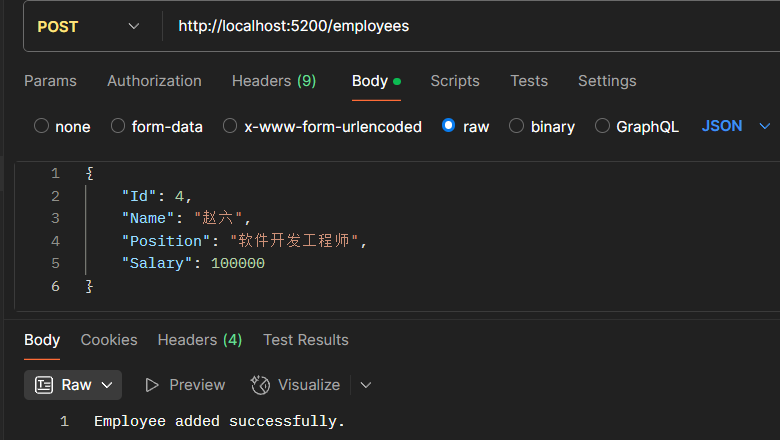
但该种方式仍有缺点:
- 在Mini API下,默认为JSON格式传递,不支持其他格式,例如XML格式。
- 在Mini API下,传递的JSON不能有不同类型的多个数据,例如无法同时传递Employee和Company
7、实现参数与异步方法自定义绑定
1
2
3
4
5
6
7
8
9
10
11
12
13
14
15
16
17
18
19
20
21
22
23
24
25
26
27
28
29
30
31
32
33
34
35
36
37
38
39
40
41
42
43
44
45
46
47
48
49
50
51
52
53
54
| using Microsoft.AspNetCore.Mvc;
using System;
using System.Text.Json;
using WebApp.Models;
var builder = WebApplication.CreateBuilder(args);
var app = builder.Build();
app.UseRouting();
app.UseEndpoints(endpoints =>
{
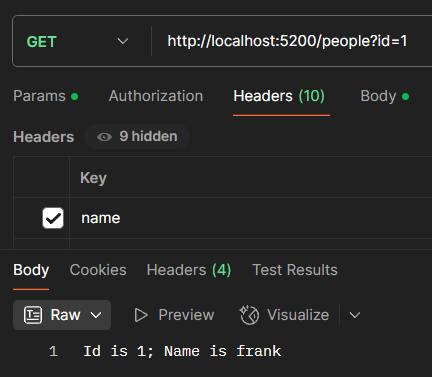
endpoints.MapGet("/people", (Person? p) =>
{
return $"Id is {p?.Id}; Name is {p?.Name}";
});
});
app.Run();
class Person
{
public int Id { get; set; }
public string? Name { get; set; }
public static ValueTask<Person?> BindAsync(HttpContext context)
{
var idStr = context.Request.Query["id"];
var nameStr = context.Request.Headers["name"];
if (int.TryParse(idStr, out var id))
{
return new ValueTask<Person?>(new Person { Id = id, Name = nameStr });
}
return new ValueTask<Person?>(Task.FromResult<Person?>(null));
}
}
|
8、绑定优先级
在 ASP.NET Core 中,模型绑定会从多个数据源(路由、查询字符串、表单、请求正文等)中提取数据。当这些来源中可能存在相同名称的数据时,框架需要依据内部的“Binding source priorities”(绑定源优先级)来决定最终使用哪一个值。与此同时,开发者也可以通过“显式绑定”(Explicit Binding)的方式来明确规定数据的获取过程,其中最典型的做法就是利用类型中定义的 BindAsync 静态方法。
显式绑定(Explicit Binding)
显式绑定指的是开发者明确告知 ASP.NET Core 从哪个数据来源绑定数据,而不依赖模型绑定系统的默认查找机制。通常有两种方式实现显式绑定:
- 通过特性声明:在控制器参数或模型属性上使用
[FromQuery]、[FromBody]、[FromRoute] 等特性。
- 通过自定义绑定逻辑:实现自定义模型绑定器或在模型类型中定义一个静态的
BindAsync 方法。
这两种方式都属于“显式”告诉框架如何获取数据,从而绕过或预设默认的绑定源优先级顺序。
BindAsync 方法的角色
在 ASP.NET Core(尤其是 Minimal API 和一些高级场景中),如果一个模型类型定义了静态的 BindAsync 方法,那么 ASP.NET Core 在绑定时会优先调用这个方法。
为什么使用 BindAsync?BindAsync 提供了一种显式的绑定机制,使得类型的绑定过程完全由开发者定义。这种方式具有如下优势:
控制权更高:你可以在方法内部检查请求上下文,从多个数据源中提取数据,自行决定如何合并或选择。
简化参数声明:无需在每个参数上反复声明 [FromXxx] 特性,只需在类型内部编写一次 BindAsync 方法,所有使用该类型的参数都将采用自定义逻辑。
优先级覆盖:由于显式绑定逻辑总是优先于默认绑定源优先级,当类型实现了 BindAsync 后,框架不会再依靠路由、查询字符串、表单等默认顺序来寻找数据,而是直接调用 BindAsync 进行绑定。
BindAsync 的基本签名(可能因 ASP.NET Core 版本不同有细微变化,但大致如下):
当 ASP.NET Core 在处理请求到相关终结点(endpoint)时,会检测参数类型是否有 BindAsync 方法。如果存在,则调用这个方法,完全绕过默认的绑定源查找顺序。这就是一种非常“显式”的绑定策略,能确保绑定行为与默认优先级无关,而完全由开发者控制。
1
2
3
4
5
| public static async ValueTask BindAsync(HttpContext context, ParameterInfo parameter) {
}
|
定源优先级的基础
ASP.NET Core 模型绑定默认会按照一定的顺序搜索数据来源。一个常见的优先级顺序如下:
| 1. Route(路由数据) |
| 2. Query String(查询字符串) |
| 3. Form Data(表单数据) |
| 4. Body(请求正文) |
| 5. Header(请求头) |
这种默认顺序确保了当同一参数在多个数据源存在值时,框架能有条不紊地进行选择。如果不希望走这种默认的优先级模型,可以利用绑定属性(如 [FromQuery]、[FromBody] 等)来显式指定绑定来源。
模型绑定的基本流程
当 ASP.NET 处理请求时,会根据请求中的数据自动将传入数据映射到控制器方法的参数或模型属性上。这些数据可能来源于:
- 路由数据(Route Data):URL 路径中提取的信息,如
api/products/5 中的 5。
- 查询字符串(Query String):URL 中
?key=value 部分的数据。
- 表单数据(Form Data):POST 请求中通过表单提交的数据。
- 请求正文(Body):例如 JSON 或 XML 格式的数据(常用于 Web API)。
- 请求头(Header):HTTP 头中的数据。
如果相同的键在多个来源中都有值,模型绑定系统将依据“绑定源优先级”来决定最终使用哪一个值。
显式指定绑定源与默认优先级
为了避免歧义,ASP.NET Core 提供了用于明确声明数据来源的特性,如:
[FromRoute]:指示数据应从路由数据中绑定。[FromQuery]:指示数据应从查询字符串中绑定。[FromForm]:指示数据应从表单数据中绑定。[FromBody]:指示数据应从请求正文中绑定。
如果没有明确指定,框架会根据参数的数据类型等特性采用默认规则,这就涉及到默认的绑定源优先级。例如:
- 简单类型(如 int、string 等)通常会从路由数据、查询字符串或表单中查找匹配的值。
- 复杂类型默认往往预期来自请求正文(特别是在 Web API 场景下),但也可能从其它来源(例如表单)中获取数据,具体取决于请求方法和配置。
这种优先级的设置确保了当同一参数在多个数据源中都有数据时,系统能有一个明确的决策规则,从而避免不确定的行为。例如:如果在 URL 中既有路由参数 id,又在查询字符串中传递了 id,而未显式标明绑定属性,那么通常路由数据将具有更高优先级,最终 id 的值就会采用路由数据中的那个。
显式绑定与绑定源优先级的对比
默认过程(依靠绑定源优先级):
- 参数未标明具体绑定方式时,框架会按照内部的优先级顺序(路由 > 查询 > 表单 > 请求正文等)查找数据。
- 当多个数据源存在同名的键时,就会依据优先级选择先出现的数据源。
显式绑定(通过 [FromXxx] 或 BindAsync):
因此,当你在模型中使用 BindAsync 进行显式绑定时,这个显式逻辑的优先级会高于内置的多数据源优先查找顺序,相当于告诉框架,“我知道数据该从哪里来,按我的规则处理”。
- 一个简化的示意图
| 流程类型 |
执行逻辑 |
详细说明 |
| 参数显式标识 |
|
|
使用 [FromXxx] 特性 |
指定单一数据源(如 [FromQuery]、[FromRoute]) |
强制模型绑定仅从指定源获取数据,忽略其他源(例如 [FromHeader] 从请求头中取值) |
实现 BindAsync 方法 |
自定义绑定逻辑,覆盖默认行为 |
在类型中定义 BindAsync(HttpContext, ParameterInfo) 方法,处理复杂或特殊场景(如自定义格式解析) |
| 参数无显式绑定 |
|
|
| 1. 检查 Route 数据 |
从 URL 路径中提取路由参数(如 /user/{id}) |
优先匹配路由模板中的参数名称,适用于简单类型和部分复杂类型 |
| 2. 检查 Query 数据 |
从 URL 的查询字符串中获取参数(如 ?name=John) |
通过键值对形式传递,支持简单类型和集合类型(需同名参数) |
| 3. 检查 Form 数据 |
从 HTTP 请求的正文中获取表单数据(如 application/x-www-form-urlencoded) |
适用于 POST 请求的表单提交,支持复杂类型绑定(需属性名称匹配) |
| 4. 检查 Body 数据 |
从请求正文中解析 JSON/XML 等结构化数据(如 application/json) |
默认使用 JSON 输入格式化器,需用 [FromBody] 显式指定;复杂类型优先从此处绑定 |
总结
- Binding source priorities 定义了 ASP.NET Core 如何从多个数据源中拉取数据的默认顺序;
- 默认的模型绑定会依赖这种顺序,但开发者可以显式指定数据源,比如使用
[FromXxx] 特性;
- 如果模型类型定义了静态的
BindAsync 方法,则 ASP.NET Core 会调用该方法来执行自定义绑定,从而覆盖默认优先级,实现更高控制精度的显式绑定。
这种设计使得 ASP.NET Core 的模型绑定既灵活又强大,既能满足简单场景下轻松映射传统数据,又能支持复杂需求下的定制数据处理逻辑。
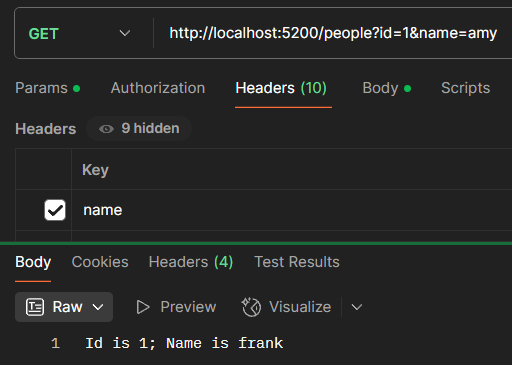
依照7中的代码,在路由中添加的数据无法起到作用,因为指定了从Header中获取name,从而使得在获取name时显示查询Header的优先级最高。
9、使用数据注解进行模型数据验证
需要安装“MinimalApis.Extensions”
1
2
3
4
5
6
7
8
9
10
11
12
13
14
15
16
17
18
19
20
21
22
23
24
25
26
27
28
29
30
31
32
33
34
35
36
37
38
39
40
41
42
43
44
45
46
47
48
49
50
51
52
53
54
55
56
57
58
59
60
61
62
63
64
65
66
67
68
69
70
71
72
73
74
75
76
77
78
79
80
81
82
83
84
85
86
87
88
89
90
91
92
93
94
95
96
97
98
99
100
101
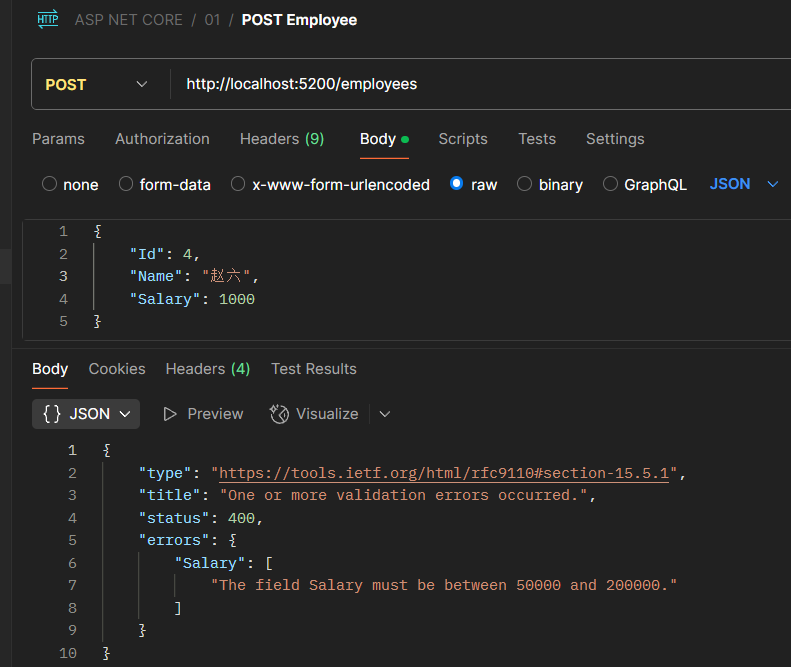
| using System.ComponentModel.DataAnnotations;
var builder = WebApplication.CreateBuilder(args);
var app = builder.Build();
app.MapPost("/employees", (Employee employee) =>
{
EmployeesRepository.AddEmployee(employee);
return "Employee is added successfully.";
}).WithParameterValidation();
app.Run();
public static class EmployeesRepository
{
private static List<Employee> employees = new List<Employee>
{
new Employee(1, "John Doe", "Engineer", 60000),
new Employee(2, "Jane Smith", "Manager", 75000),
new Employee(3, "Sam Brown", "Technician", 50000)
};
public static List<Employee> GetEmployees() => employees;
public static Employee? GetEmployeeById(int id)
{
return employees.FirstOrDefault(x => x.Id == id);
}
public static void AddEmployee(Employee? employee)
{
if (employee is not null)
{
employees.Add(employee);
}
}
public static bool UpdateEmployee(Employee? employee)
{
if (employee is not null)
{
var emp = employees.FirstOrDefault(x => x.Id == employee.Id);
if (emp is not null)
{
emp.Name = employee.Name;
emp.Position = employee.Position;
emp.Salary = employee.Salary;
return true;
}
}
return false;
}
public static bool DeleteEmployee(int id)
{
var employee = employees.FirstOrDefault(x => x.Id == id);
if (employee is not null)
{
employees.Remove(employee);
return true;
}
return false;
}
}
public class Employee
{
public int Id { get; set; }
[Required]
public string Name { get; set; }
public string Position { get; set; }
[Required]
[Range(50000, 200000)]
public double Salary { get; set; }
public Employee(int id, string name, string position, double salary)
{
Id = id;
Name = name;
Position = position;
Salary = salary;
}
}
|
10、自定义模型数据验证
Employee_EnsureSalary.cs
1
2
3
4
5
6
7
8
9
10
11
12
13
14
15
16
17
18
19
20
21
22
23
24
25
26
27
28
29
30
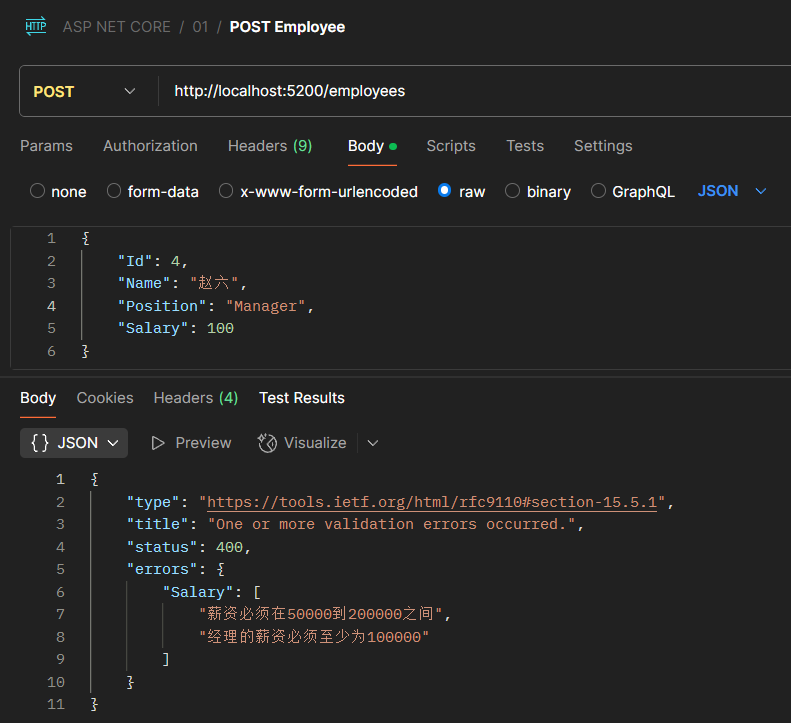
| using System.ComponentModel.DataAnnotations;
namespace WebApp
{
public class Employee_EnsureSalary : ValidationAttribute
{
protected override ValidationResult? IsValid(object? value, ValidationContext validationContext)
{
var employee = validationContext.ObjectInstance as Employee;
if (employee is not null &&
!string.IsNullOrWhiteSpace(employee.Position) &&
employee.Position.Equals("Manager", StringComparison.OrdinalIgnoreCase))
{
if (employee.Salary < 100000)
{
return new ValidationResult("经理的薪资必须至少为100000");
}
}
return ValidationResult.Success;
}
}
}
|
Program.cs
1
2
3
4
5
6
7
8
9
10
11
12
13
14
15
16
17
18
19
20
21
22
23
24
25
26
27
28
29
30
31
32
33
34
35
36
37
38
39
40
41
42
43
44
45
46
47
48
49
50
51
52
53
54
55
56
57
58
59
60
61
62
63
64
65
66
67
68
69
70
71
72
73
74
75
76
77
78
79
80
81
82
83
84
85
86
87
88
89
90
91
92
93
94
95
96
97
98
99
100
101
102
103
104
105
| using System.ComponentModel.DataAnnotations;
using WebApp;
var builder = WebApplication.CreateBuilder(args);
var app = builder.Build();
app.MapPost("/employees", (Employee employee) =>
{
EmployeesRepository.AddEmployee(employee);
return "员工添加成功";
}).WithParameterValidation();
app.Run();
public static class EmployeesRepository
{
private static List<Employee> employees = new List<Employee>
{
new Employee(1, "张三", "工程师", 60000),
new Employee(2, "李四", "经理", 75000),
new Employee(3, "王五", "技术员", 50000)
};
public static List<Employee> GetEmployees() => employees;
public static Employee? GetEmployeeById(int id)
{
return employees.FirstOrDefault(x => x.Id == id);
}
public static void AddEmployee(Employee? employee)
{
if (employee is not null)
{
employees.Add(employee);
}
}
public static bool UpdateEmployee(Employee? employee)
{
if (employee is not null)
{
var emp = employees.FirstOrDefault(x => x.Id == employee.Id);
if (emp is not null)
{
emp.Name = employee.Name;
emp.Position = employee.Position;
emp.Salary = employee.Salary;
return true;
}
}
return false;
}
public static bool DeleteEmployee(int id)
{
var employee = employees.FirstOrDefault(x => x.Id == id);
if (employee is not null)
{
employees.Remove(employee);
return true;
}
return false;
}
}
public class Employee
{
public int Id { get; set; }
[Required(ErrorMessage = "员工姓名不能为空")]
public string Name { get; set; }
public string Position { get; set; }
[Required(ErrorMessage = "薪资不能为空")]
[Range(50000, 200000, ErrorMessage = "薪资必须在50000到200000之间")]
[Employee_EnsureSalary(ErrorMessage = "经理薪资不能低于100000")]
public double Salary { get; set; }
public Employee(int id, string name, string position, double salary)
{
Id = id;
Name = name;
Position = position;
Salary = salary;
}
}
|
11、注册信息验证
1
2
3
4
5
6
7
8
9
10
11
12
13
14
15
16
17
18
19
20
21
22
23
24
25
26
27
28
29
30
31
32
33
34
35
36
37
38
39
40
41
42
43
44
45
| using Microsoft.AspNetCore.Mvc;
using System.ComponentModel.DataAnnotations;
var builder = WebApplication.CreateBuilder(args);
var app = builder.Build();
app.UseRouting();
app.UseEndpoints(endpoints => {
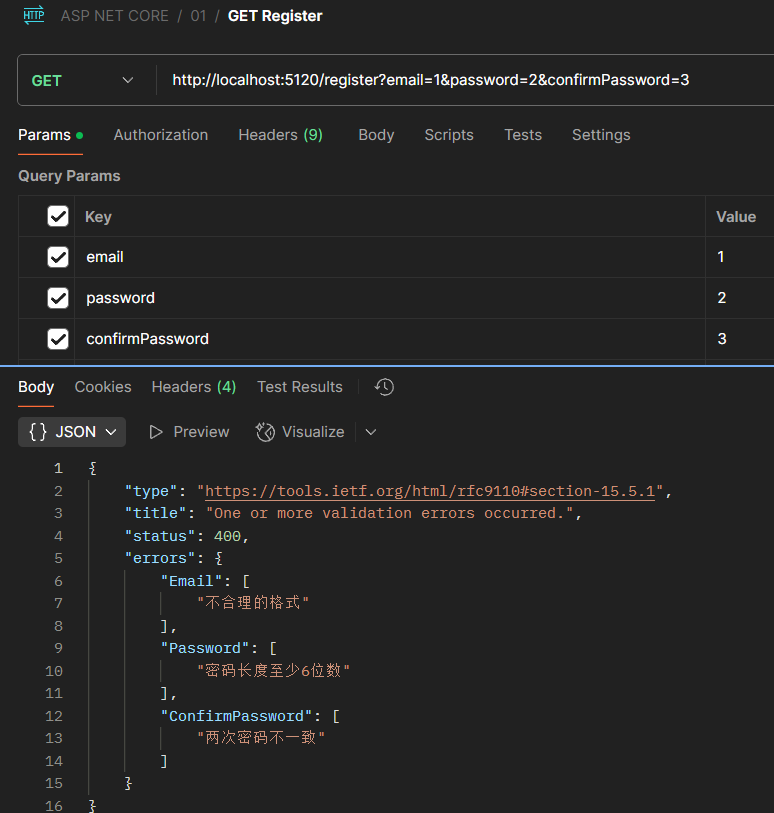
endpoints.MapGet("/register", (Registration reg) =>
{
return $"获取成功:用户邮箱{reg.Email},用户密码{reg.Password},用户确认密码{reg.ConfirmPassword}";
}).WithParameterValidation();
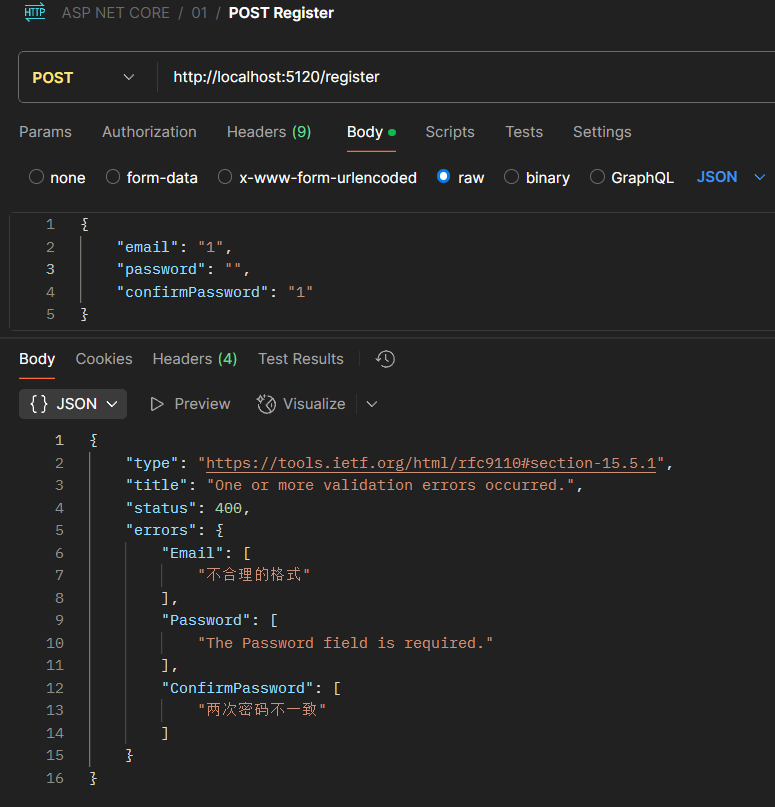
endpoints.MapPost("/register", ([FromBody] Registration reg) =>
{
return $"注册成功:用户邮箱{reg.Email},用户密码{reg.Password},用户确认密码{reg.ConfirmPassword}";
}).WithParameterValidation();
});
app.Run();
public class Registration
{
[Required]
[EmailAddress(ErrorMessage = "不合理的格式")]
public string? Email { get; set; }
[Required]
[StringLength(100, MinimumLength = 6, ErrorMessage = "密码长度至少6位数")]
public string? Password { get; set; }
[Required(ErrorMessage = "请输入确认密码")]
[Compare(nameof(Password), ErrorMessage = "两次密码不一致")]
public string? ConfirmPassword { get; set; }
public static ValueTask<Registration?> BindAsync(HttpContext context)
{
var email = context.Request.Query["email"];
var password = context.Request.Query["password"];
var confirmPassword = context.Request.Query["confirmPassword"];
return new ValueTask<Registration?>(new Registration { Email = email, Password = password, ConfirmPassword = confirmPassword });
}
}
|
错误演示:
正确演示: