本次学习基础代码如下:
Employee.cs
1
2
3
4
5
6
7
8
9
10
11
12
13
14
15
16
17
18
19
20
21
22
23
24
25
26
27
28
29
30
31
32
33
34
35
36
37
38
39
40
41
42
43
44
45
46
using System.ComponentModel.DataAnnotations;namespace WebApi.Models { public class Employee { public int Id { get ; set ; } public string Name { get ; set ; } [Required ] public string Position { get ; set ; } public double Salary { get ; set ; } public Employee (int id, string name, string position, double salary { Id = id; Name = name; Position = position; Salary = salary; } } }
EmployeesRepository.cs
1
2
3
4
5
6
7
8
9
10
11
12
13
14
15
16
17
18
19
20
21
22
23
24
25
26
27
28
29
30
31
32
33
34
35
36
37
38
39
40
41
42
43
44
45
46
47
48
49
50
51
52
53
54
55
56
57
58
59
60
61
62
63
64
65
66
67
68
69
70
71
72
73
74
75
76
77
78
79
80
81
82
83
84
85
86
87
namespace WebApi.Models { public static class EmployeesRepository { private static List<Employee> employees = new List<Employee> { new Employee(1 , "John Doe" , "Engineer" , 60000 ), new Employee(2 , "Jane Smith" , "Manager" , 75000 ), new Employee(3 , "Sam Brown" , "Technician" , 50000 ) }; public static List<Employee> GetEmployees () public static Employee? GetEmployeeById(int id) { return employees.FirstOrDefault(x => x.Id == id); } public static void AddEmployee (Employee? employee ) { if (employee is not null ) { employees.Add(employee); } } public static bool UpdateEmployee (Employee? employee ) { if (employee is not null ) { var emp = employees.FirstOrDefault(x => x.Id == employee.Id); if (emp is not null ) { emp.Name = employee.Name; emp.Position = employee.Position; emp.Salary = employee.Salary; return true ; } } return false ; } public static bool DeleteEmployee (int id { var employee = employees.FirstOrDefault(x => x.Id == id); if (employee is not null ) { employees.Remove(employee); return true ; } return false ; } } }
Program.cs
1
2
3
4
5
6
7
8
9
10
11
12
13
14
15
16
17
18
19
20
21
22
23
24
25
26
27
28
29
30
31
32
33
34
35
36
37
38
using System.Text.Json;using WebApi.Models;var builder = WebApplication.CreateBuilder(args );var app = builder.Build();app.MapGet("/" , () => "Hello World!" ); app.MapGet("/employees" , () => { var employees = EmployeesRepository.GetEmployees(); return employees; }); app.MapPost("/employees" , (Employee employee) => { if (employee is null || employee.Id <= 0 ) { return "Employee is not provided or is not valid." ; } EmployeesRepository.AddEmployee(employee); return "Employee added successfully." ; }).WithParameterValidation(); app.Run();
1、IResult 在 ASP.NET Core 中,IResult返回结果 。它是 Minimal API 模型的重要部分,设计目的是提供一种简化的方式来定义 HTTP 响应。
核心功能
抽象化 HTTP 响应 :IResult 封装了控制器或终结点(endpoint)返回的 HTTP 响应,使代码更加简洁和可维护。灵活性 :允许开发者使用内置方法或创建自定义结果来生成 HTTP 响应。
示例
以下是一个使用 IResult 的基本示例:
app.MapGet("/hello", () => Results.Ok("Hello, World!"));
在这个例子中,Results.Ok 是一个实现了 IResult 的方法,用于返回一个 HTTP 200 状态码的响应。
常见的 Results 方法
ASP.NET Core 提供了多个内置的 IResult 实现,可用于构建不同类型的响应,例如:
Results.Ok():返回 200 状态码。Results.BadRequest():返回 400 状态码。Results.NotFound():返回 404 状态码。Results.Redirect():用于重定向。Results.Json():返回 JSON 格式的响应。
优势
代码更简洁 :适合 Minimal API,使得定义终结点和响应逻辑变得直接明了。可测试性高 :通过 IResult 抽象,可以更方便地测试终结点逻辑。高度灵活 :支持自定义实现,满足复杂响应需求。
1
2
3
4
5
6
7
8
9
10
11
12
13
14
15
16
17
18
19
20
21
22
23
24
25
26
27
28
29
30
31
32
33
34
35
36
37
38
using System.Text.Json;using WebApi.Models;var builder = WebApplication.CreateBuilder(args );var app = builder.Build();app.MapGet("/" , () => "Hello World!" ); app.MapGet("/employees" , () => { var employees = EmployeesRepository.GetEmployees(); return TypedResults.Ok(employees); }); app.MapPost("/employees" , (Employee employee) => { if (employee is null || employee.Id <= 0 ) { return Results.BadRequest("Employee is not provided or is not valid." ); } EmployeesRepository.AddEmployee(employee); return Results.Ok("Employee added successfully." ); }).WithParameterValidation(); app.Run();
2、混合匹配Results和TypedResults 当使用TypedResults时,方法中所有的返回类型必须一致,如果不一致则会出现错误。所以需混合使用Results和TypedResults
1 2 3 4 5 6 7 8 9 10 11 app.MapPost("/employees" , (Employee employee) => { if (employee is null || employee.Id <= 0 ) { return Results.BadRequest("Employee is not provided or is not valid." ); } EmployeesRepository.AddEmployee(employee); return Results.Ok("Employee added successfully." ); }).WithParameterValidation();
3、问题详情标准 在 ASP.NET 中,“Problem Details standard”(问题详情标准)是一种用于表达 API 错误响应的规范化格式。它遵循 RFC 7807 ,为 HTTP API 提供了一种一致的方式来描述错误的详细信息。这种标准化格式旨在帮助客户端更轻松地处理错误响应,并且能更清晰地了解错误的原因和上下文。
核心内容
Problem Details 定义了一个 JSON 对象结构,用于传递错误信息。以下是该标准推荐的字段:
typetitlestatusdetailinstance
例如,一个典型的 Problem Details 响应可能是这样的:
1
2
3
4
5
6
7
{ "type" : "https://example.com/probs/out-of-credit" , "title" : "You do not have enough credit." , "status" : 403 , "detail" : "Your account balance is too low to proceed." , "instance" : "/account/12345/transactions/67890" }
在 ASP.NET 中的应用
ASP.NET Core 提供了对 Problem Details 标准的内置支持。使用 ProblemDetails 类可以方便地创建符合 RFC 7807 的错误响应。例如,在控制器中,可以这样使用:
1
2
3
4
5
return Problem( detail: "Your account balance is too low to proceed." , title: "Not enough credit" , statusCode: 403 );
或者,如果你需要自定义 Problem Details,可以直接实例化 ProblemDetails 对象并返回:
1
2
3
4
5
6
7
8
9
var problemDetails = new ProblemDetails{ Type = "https://example.com/probs/out-of-credit" , Title = "Insufficient Credit" , Detail = "Your balance is $0." , Status = StatusCodes.Status403Forbidden }; return new ObjectResult(problemDetails) { StatusCode = problemDetails.Status };
优势
统一的错误响应结构 :使 API 客户端可以一致地处理不同类型的错误。可扩展性 :可以添加自定义字段,以便提供更多错误相关的信息。易于调试 :清晰描述问题所在,减少开发者调试时间。
通过 Problem Details 标准,ASP.NET Core 的 API 错误处理变得更加规范化和可读。如果你希望进一步了解如何扩展 ProblemDetails 或结合中间件处理错误,我们可以继续探讨!希望这些信息对你有帮助。
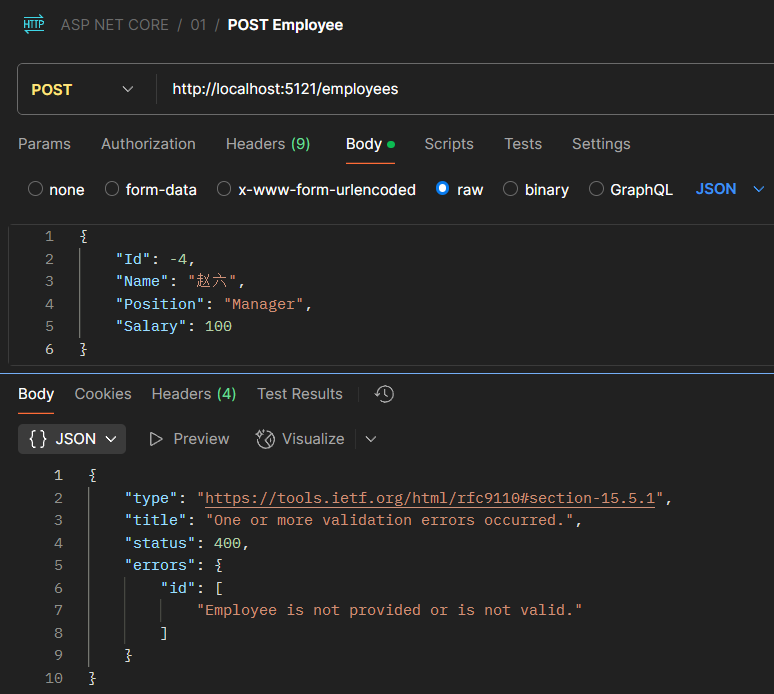
1 2 3 4 5 6 7 8 9 10 11 12 13 14 app.MapPost("/employees" , (Employee employee) => { if (employee is null || employee.Id < 0 ) { return Results.ValidationProblem(new Dictionary<string , string []> { {"id" , new [] { "Employee is not provided or is not valid." } } }); } EmployeesRepository.AddEmployee(employee); return TypedResults.Created($"/employees/{employee.Id} " , employee); }).WithParameterValidation();
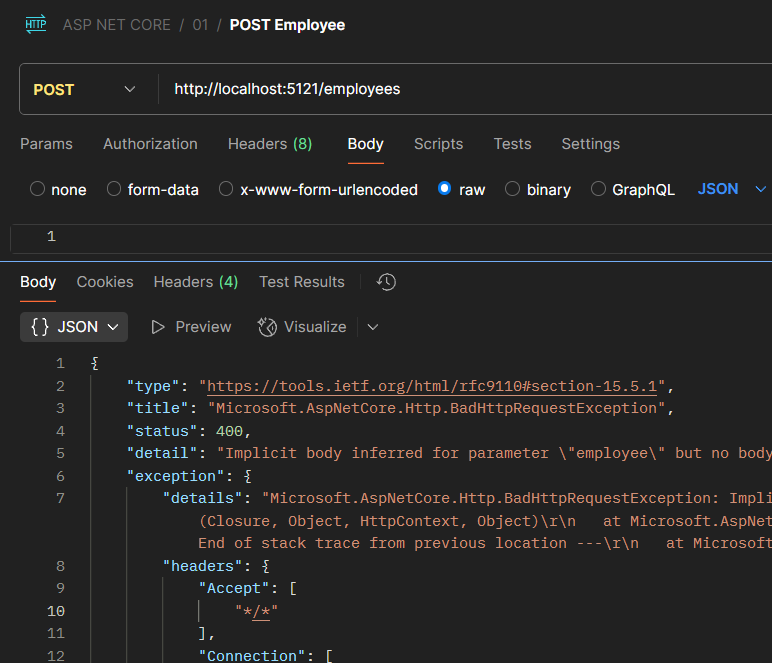
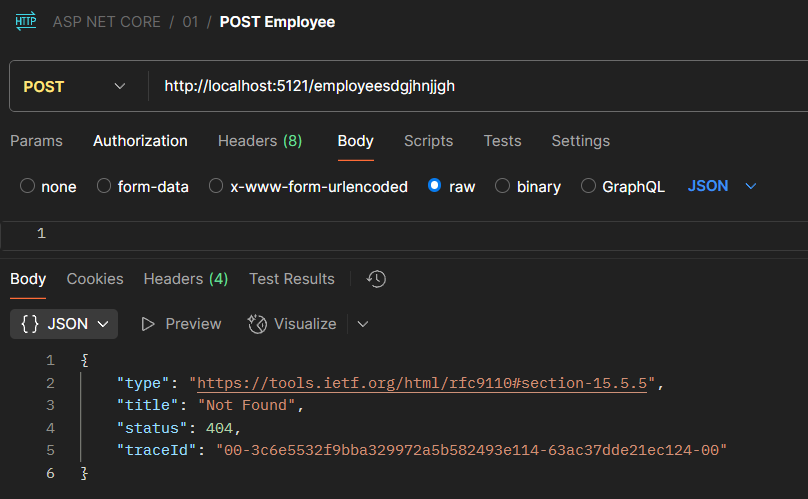
4、标准化所有输出 1 2 3 4 5 6 7 8 9 10 11 12 13 14 15 16 17 18 19 20 21 22 23 24 25 26 27 28 29 30 31 32 33 34 35 36 37 38 39 40 41 42 43 44 45 46 47 48 49 50 51 52 53 54 55 56 using System.Text.Json;using WebApi.Models;var builder = WebApplication.CreateBuilder(args );builder.Services.AddProblemDetails(); var app = builder.Build();if (!app.Environment.IsDevelopment()){ app.UseExceptionHandler(); } app.UseStatusCodePages(); app.MapGet("/" , () => "Hello World!" ); app.MapGet("/employees" , () => { var employees = EmployeesRepository.GetEmployees(); return TypedResults.Ok(employees); }); app.MapPost("/employees" , (Employee employee) => { if (employee is null || employee.Id < 0 ) { return Results.ValidationProblem(new Dictionary<string , string []> { {"id" , new [] { "必须提供有效的员工信息" } } }); } EmployeesRepository.AddEmployee(employee); return TypedResults.Created($"/employees/{employee.Id} " , employee); }).WithParameterValidation(); app.Run();
5、自定义实现IResult HtmlResult.cs
1
2
3
4
5
6
7
8
9
10
11
12
13
14
15
16
17
18
19
20
21
22
23
24
25
26
27
28
29
30
31
32
33
34
35
36
37
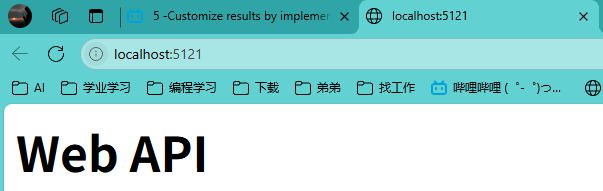
using System.Text;namespace WebApi.Results { public class HtmlResult : IResult { private readonly string html; public HtmlResult (string html { this .html = html; } public async Task ExecuteAsync (HttpContext httpContext ) { httpContext.Response.ContentType = "text/html" ; httpContext.Response.ContentLength = Encoding.UTF8.GetByteCount(html); await httpContext.Response.WriteAsync(html); } } }
Program.cs
1 2 3 4 5 app.MapGet("/" , HtmlResult() => { string html = "<html><body><h1>Web API</h1></body></html>" ; return new HtmlResult(html); });
6、重构员工相关代码 1 2 3 4 5 6 7 8 9 10 11 12 13 14 15 16 17 18 19 20 21 22 23 24 25 26 27 28 29 30 31 32 33 34 35 36 37 38 39 40 41 42 43 44 45 46 47 48 49 50 51 52 53 54 55 56 57 58 59 60 61 62 63 64 65 66 67 68 69 70 71 72 73 74 75 76 77 78 79 80 81 82 83 84 85 86 87 88 89 90 91 92 93 94 95 96 97 98 99 100 101 102 103 104 105 106 107 108 109 110 111 using System.Text.Json;using WebApi.Models;using WebApi.Results;var builder = WebApplication.CreateBuilder(args );builder.Services.AddProblemDetails(); var app = builder.Build();if (!app.Environment.IsDevelopment()){ app.UseExceptionHandler(); } app.UseStatusCodePages(); app.MapGet("/" , () => { string html = "<html><body><h1>Web API</h1></body></html>" ; return new HtmlResult(html); }); app.MapGet("/employees" , () => { var employees = EmployeesRepository.GetEmployees(); return TypedResults.Ok(employees); }); app.MapGet("/employees/{id:int}" , (int id) => { var employee = EmployeesRepository.GetEmployeeById(id); return employee is not null ? TypedResults.Ok(employee) : Results.ValidationProblem(new Dictionary<string , string []> { {"id" , new [] { $"员工{id} 并不存在" } } }, statusCode: 404 ); }); app.MapPost("/employees" , (Employee employee) => { if (employee is null || employee.Id < 0 ) { return Results.ValidationProblem(new Dictionary<string , string []> { {"id" , new [] { "必须提供有效的员工信息" } } }, statusCode: 400 ); } EmployeesRepository.AddEmployee(employee); return TypedResults.Created($"/employees/{employee.Id} " , employee); }).WithParameterValidation(); app.MapPut("/employees/{id:int}" , (int id, Employee employee) => { if (employee.Id != id) { return Results.ValidationProblem(new Dictionary<string , string []> { {"id" , new [] { $"{id} 与员工id不一致" } } }, statusCode: 400 ); } return EmployeesRepository.UpdateEmployee(employee) ? TypedResults.NoContent() : Results.ValidationProblem(new Dictionary<string , string []> { {"id" , new [] { $"员工{id} 并不存在" } } }, statusCode: 404 ); }); app.MapDelete("/employees/{id:int}" , (int id) => { var employee = EmployeesRepository.GetEmployeeById(id); return EmployeesRepository.DeleteEmployee(id) ? TypedResults.Ok(employee) : Results.ValidationProblem(new Dictionary<string , string []> { {"id" , new [] { $"员工{id} 并不存在" } } }, statusCode: 404 ); }); app.Run();