1、MVC Pattern
ASP.NET中的MVC(Model-View-Controller)模式是一种软件架构设计模式,它将应用程序分为三个核心组件:模型(Model)、视图(View)和控制器(Controller),以实现关注点分离,提升代码可维护性和可扩展性。
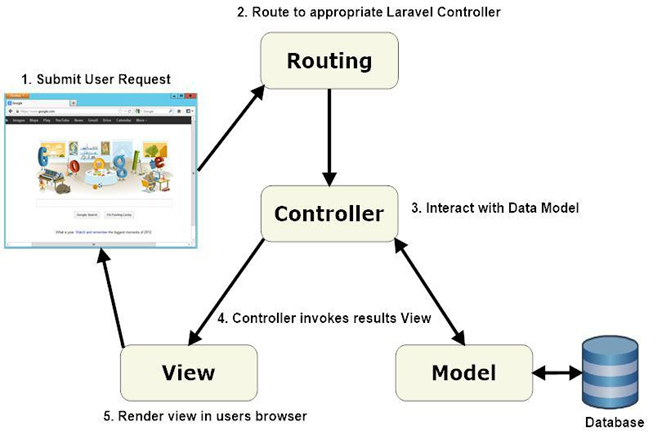
以下是其具体内涵及在ASP.NET中的应用特点:
1. MVC的核心组件
模型(Model)
负责处理应用程序的数据逻辑和业务规则。模型直接与数据库交互,执行数据的存取、验证及业务逻辑处理,例如定义商品信息的属性及操作(如增删改查)。在ASP.NET中,模型可以是简单的数据传输对象(DTO),也可以是包含复杂业务逻辑的领域模型。
视图(View)
负责用户界面的展示。视图通过HTML、CSS和JavaScript动态渲染模型传递的数据,例如生成商品列表页面或订单详情页面。ASP.NET支持Razor视图引擎,允许在视图中嵌入C#代码,实现灵活的数据绑定。
控制器(Controller)
作为用户请求的中转站,接收输入(如HTTP请求),调用模型处理数据,并选择合适的视图返回响应。例如,用户点击“购买”按钮时,控制器会调用业务逻辑验证库存,再跳转到支付页面或错误提示。
2. MVC在ASP.NET中的优势
关注点分离
业务逻辑(Model)、界面(View)和流程控制(Controller)的解耦使代码更清晰,便于团队协作开发。例如,前端开发者可独立设计视图,后端开发者专注模型和控制器。
增强可测试性
各组件独立设计,支持单元测试和测试驱动开发(TDD)。例如,控制器可通过Mock模型进行测试,无需启动完整Web服务。
灵活的URL路由
ASP.NET MVC提供强大的路由系统,允许自定义URL规则(如/products/details/123映射到控制器动作),提升SEO友好性。
无ViewState与服务器控件
相比传统Web Forms,MVC不依赖ViewState和服务器控件,开发者可更精细地控制HTML和HTTP请求行为,减少页面性能开销。
4. 实际应用场景
总结
ASP.NET MVC通过分层架构优化了Web应用的结构,尤其适用于需要高可维护性、可测试性和灵活性的项目。其核心思想是通过分离职责,让开发者能够专注于不同层面的逻辑实现,从而提升开发效率和代码质量。
2、Razor
ASP.NET中的Razor是一种基于C#或VB.NET的服务器端标记语法,用于在HTML中嵌入动态代码以生成Web页面内容。它最初随ASP.NET MVC 3发布,现已成为ASP.NET Core的核心组件之一,广泛应用于MVC和Razor Pages等开发模式中。以下是其核心特性及功能:
1. Razor的核心设计理念
2. Razor语法的主要特性
3. Razor在ASP.NET技术栈中的应用
与ASP.NET Core MVC集成
Razor是MVC视图引擎的标准选择,通过控制器(Controller)传递模型(Model)数据到视图(View),动态渲染页面 。例如,使用@Html.ActionLink生成超链接,关联控制器动作。
Razor Pages模型
在ASP.NET Core中,Razor Pages将页面逻辑与UI绑定,每个.cshtml文件可包含@page指令和直接处理HTTP请求的代码块,简化小型应用的开发。
跨平台支持
Razor与ASP.NET Core深度集成,可在Windows、Linux和macOS上运行,并支持Docker容器化部署。
4. Razor的优势与适用场景
开发效率高:通过智能提示和简洁语法减少代码量,支持Visual Studio的强类型检查和调试。
安全性强:自动编码输出内容,减少XSS风险。
灵活性:可与JavaScript框架(如React)结合,或通过Html.Raw()输出原始HTML。
适用场景:适用于动态内容渲染(如电商产品列表)、表单处理、以及需要服务器端逻辑的复杂UI生成。
总结
Razor通过其简洁的语法、强大的模板功能和与ASP.NET生态的深度集成,成为构建动态Web应用的高效工具。无论是传统的MVC项目还是现代化的Razor Pages,它都能提供灵活且安全的服务器端渲染方案。
3、主页面实现
DepartsCRUD\WebApp\Controllers\HomeController.cs
1
2
3
4
5
6
7
8
9
10
11
12
13
14
15
16
17
18
19
20
21
22
23
24
25
26
27
28
29
30
31
32
33
34
35
36
37
38
39
40
41
42
43
44
45
46
47
48
49
50
51
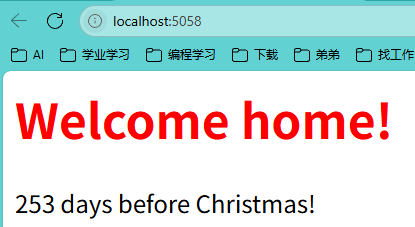
| @using WebApp.Models @* 引入应用程序模型命名空间 *@
@* 声明Razor代码块开始 *@
@{
// 计算当前日期到今年圣诞节的天数差
var days = new DateTime(DateTime.Today.Year, 12, 25) - DateTime.Today;
// 处理跨年情况:如果今年圣诞已过,计算到明年圣诞的天数
if (DateTime.Today > new DateTime(DateTime.Today.Year, 12, 25))
{
days = new DateTime(DateTime.Today.Year + 1, 12, 25) - DateTime.Today;
}
// 根据天数奇偶性设置文字颜色(交替显示红绿)
string color = days.Days % 2 == 0 ? "green" : "red";
}
<html>
<head>
<title>Home page</title>
</head>
<body>
@* 条件渲染:当剩余天数≤35天时显示节日提示 *@
@if (days.Days <= 35)
{
@* 直接输出HTML元素 *@
<h1>Christmas is around the corner!</h1>
@* 使用@:输出纯文本内容 *@
@:Happy holidays!
}
else
{
@* 根据颜色变量切换标题样式 *@
switch (color)
{
case "green":
<h1 style="color:green">Welcome home!</h1>
break;
case "red":
<h1 style="color:red">Welcome home!</h1>
break;
}
@* 混合输出:C#表达式 + 纯文本内容 *@
@days.Days
<text> days before Christmas!</text>
}
</body>
</html>
|
DepartsCRUD\WebApp\Views\Home\Index.cshtml
1
2
3
4
5
6
7
8
9
10
11
12
13
14
15
16
17
18
19
|
using Microsoft.AspNetCore.Mvc;
namespace WebApp.Controllers
{
public class HomeController : Controller
{
public IActionResult Index()
{
return new ViewResult { ViewName = "Index" };
}
}
}
|
DepartsCRUD\WebApp\Program.cs
1
2
3
4
5
6
7
8
9
10
11
12
13
14
15
16
17
18
19
20
21
22
23
24
|
var builder = WebApplication.CreateBuilder(args);
builder.Services.AddControllersWithViews();
var app = builder.Build();
app.UseRouting();
app.UseEndpoints(endpoints =>
{
endpoints.MapControllerRoute(
name: "default",
pattern: "{controller=Home}/{action=Index}/{id?}"
);
});
app.Run();
|
4、Department相关实现
1.Department
DepartsCRUD\WebApp\Model\Department.cs
1
2
3
4
5
6
7
8
9
10
11
12
13
14
15
16
17
18
19
20
21
22
23
24
25
26
27
28
29
30
31
32
|
using Microsoft.AspNetCore.Mvc;
using System.ComponentModel.DataAnnotations;
namespace WebApp.Models
{
public class Department
{
public Department()
{
}
public Department(int id, string name, string? description = "")
{
this.Id = id;
this.Name = name;
this.Description = description;
}
public int Id { get; set; }
[Required]
public string? Name { get; set; }
[StringLength(500)]
public string? Description { get; set; }
}
}
|
2.DepartmentsRepository
DepartsCRUD\WebApp\Model\DepartmentsRepository.cs
1
2
3
4
5
6
7
8
9
10
11
12
13
14
15
16
17
18
19
20
21
22
23
24
25
26
27
28
29
30
31
32
33
34
35
36
37
38
39
40
41
42
43
44
45
46
47
48
49
50
51
52
53
54
55
56
57
58
59
60
61
62
63
64
| using System.Xml.Linq;
namespace WebApp.Models
{
public static class DepartmentsRepository
{
private static List<Department> Departments = new List<Department>
{
new Department(1, "Sales", "Sales Department"),
new Department(2, "Engineering", "Engineering Department"),
new Department(3, "QA", "Quanlity Assurance")
};
public static List<Department> GetDepartments() => Departments;
public static Department? GetDepartmentById(int id)
{
return Departments.FirstOrDefault(x => x.Id == id);
}
public static void AddDepartment(Department? department)
{
if (department is not null)
{
int maxId = Departments.Max(x => x.Id);
department.Id = maxId + 1;
Departments.Add(department);
}
}
public static bool UpdateDepartment(Department? department)
{
if (department is not null)
{
var emp = Departments.FirstOrDefault(x => x.Id == department.Id);
if (emp is not null)
{
emp.Name = department.Name;
emp.Description = department.Description;
return true;
}
}
return false;
}
public static bool DeleteDepartment(Department? department)
{
if (department is not null)
{
Departments.Remove(department);
return true;
}
return false;
}
}
}
|
3.DepartmentsController
DepartsCRUD\WebApp\Controllers\DepartmentsController.cs
1
2
3
4
5
6
7
8
9
10
11
12
13
14
15
16
17
18
19
20
21
22
23
24
25
26
27
28
29
30
31
32
33
34
35
36
37
38
39
40
41
42
43
44
45
46
47
48
49
50
51
52
53
54
55
56
57
58
59
60
61
62
63
64
65
66
67
68
69
70
71
72
73
74
75
76
77
78
79
80
|
using Microsoft.AspNetCore.Mvc;
using WebApp.Models;
namespace WebApp.Controllers
{
public class DepartmentsController : Controller
{
[HttpGet]
public IActionResult Index()
{
var departments = DepartmentsRepository.GetDepartments();
return View(departments);
}
[HttpGet]
public IActionResult Details(int id)
{
var department = DepartmentsRepository.GetDepartmentById(id);
if (department == null)
{
return View("Error", new List<string>() { "Department not found." });
}
return View(department);
}
[HttpPost]
public IActionResult Edit(Department department)
{
if (!ModelState.IsValid)
{
return View("Error", GetErrors());
}
DepartmentsRepository.UpdateDepartment(department);
return RedirectToAction(nameof(Index));
}
[HttpGet]
public IActionResult Create()
{
return View(new Department());
}
[HttpPost]
public IActionResult Create(Department department)
{
if (!ModelState.IsValid)
{
return View("Error", GetErrors());
}
DepartmentsRepository.AddDepartment(department);
return RedirectToAction(nameof(Index));
}
[HttpPost]
public IActionResult Delete(int id)
{
var department = DepartmentsRepository.GetDepartmentById(id);
if (department == null)
{
ModelState.AddModelError("id", "Department not found.");
return View("Error", GetErrors());
}
DepartmentsRepository.DeleteDepartment(department);
return RedirectToAction(nameof(Index));
}
private List<string> GetErrors()
{
return ModelState.Values
.SelectMany(v => v.Errors)
.Select(e => e.ErrorMessage)
.ToList();
}
}
}
|
4.Create
DepartsCRUD\WebApp\Views\Departments\Create.cshtml
1
2
3
4
5
6
7
8
9
10
11
12
13
14
15
16
17
18
19
20
21
22
23
24
25
26
27
28
29
30
31
32
33
34
35
36
37
38
39
40
41
42
43
44
45
46
47
48
49
50
51
52
53
54
55
| @using WebApp.Models @* 引入应用程序模型命名空间 *@
@model Department @* 声明视图使用的模型类型为Department *@
<html>
<head>
@* 引入Bootstrap CSS样式表 *@
<link href="https://cdn.jsdelivr.net/npm/bootstrap@5.3.3/dist/css/bootstrap.min.css" rel="stylesheet" integrity="sha384-QWTKZyjpPEjISv5WaRU9OFeRpok6YctnYmDr5pNlyT2bRjXh0JMhjY6hW+ALEwIH" crossorigin="anonymous">
</head>
<body>
<div class="container"> @* Bootstrap容器布局 *@
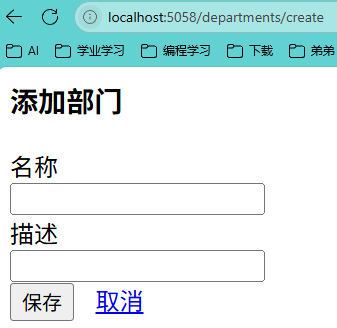
<h3>添加部门</h3> @* 页面标题 *@
@* 表单定义:提交到/departments/create路径 *@
<form method='post' action='/departments/create'>
@* 部门名称输入行 *@
<div class="row mb-3"> @* Bootstrap行布局 *@
<div class="col-2"> @* 左侧标签列 *@
<label class="col-form-label">名称</label>
</div>
<div class="col-6"> @* 右侧输入框列 *@
@* 绑定模型Name属性 *@
<input type='text' name='Name' value='@Model.Name' class="form-control" />
</div>
</div>
@* 部门描述输入行 *@
<div class="row mb-3">
<div class="col-2">
<label class="col-form-label">描述</label>
</div>
<div class="col-6">
@* 绑定模型Description属性 *@
<input type='text' name='Description' value='@Model.Description' class="form-control" />
</div>
</div>
@* 按钮操作行 *@
<div class="row mb-3">
<div class="col-2">
@* 提交按钮 *@
<button type='submit' class="btn btn-primary">保存</button>
@* 按钮间距 *@
@* 取消按钮(返回部门列表) *@
<a href="/departments" class="btn btn-primary">取消</a>
</div>
<div class="col-4">
@* 预留空白列 *@
</div>
</div>
</form>
</div>
</body>
</html>
|
5.Details
DepartsCRUD\WebApp\Views\Departments\Details.cshtml
1
2
3
4
5
6
7
8
9
10
11
12
13
14
15
16
17
18
19
20
21
22
23
24
25
26
27
28
29
30
31
32
33
34
35
36
37
38
39
40
41
42
43
44
45
46
47
48
49
50
51
52
53
54
55
56
57
58
59
60
61
62
63
| @using WebApp.Models @* 引入应用程序模型命名空间 *@
@model Department @* 声明视图使用的模型类型为Department *@
<html>
<head>
@* 引入Bootstrap CSS样式表 *@
<link href="https://cdn.jsdelivr.net/npm/bootstrap@5.3.3/dist/css/bootstrap.min.css" rel="stylesheet" integrity="sha384-QWTKZyjpPEjISv5WaRU9OFeRpok6YctnYmDr5pNlyT2bRjXh0JMhjY6hW+ALEwIH" crossorigin="anonymous">
</head>
<body>
<div class="container"> @* Bootstrap容器布局 *@
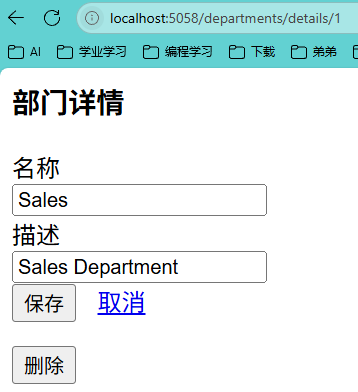
<h3>部门详情</h3> @* 页面标题 *@
@* 编辑表单:提交到/departments/edit路径 *@
<form method='post' action='/departments/edit'>
@* 隐藏字段:部门ID *@
<input type='hidden' name='Id' value='@Model.Id' />
@* 部门名称输入行 *@
<div class="row mb-3"> @* Bootstrap行布局 *@
<div class="col-2"> @* 左侧标签列 *@
<label class="col-form-label">名称</label>
</div>
<div class="col-6"> @* 右侧输入框列 *@
@* 绑定模型Name属性 *@
<input type='text' name='Name' value='@Model.Name' class="form-control" />
</div>
</div>
@* 部门描述输入行 *@
<div class="row mb-3">
<div class="col-2">
<label class="col-form-label">描述</label>
</div>
<div class="col-6">
@* 绑定模型Description属性 *@
<input type='text' name='Description' value='@Model.Description' class="form-control" />
</div>
</div>
@* 按钮操作行 *@
<div class="row mb-3">
<div class="col-2">
@* 提交按钮 *@
<button type='submit' class="btn btn-primary">保存</button>
@* 按钮间距 *@
@* 取消按钮(返回部门列表) *@
<a href="/departments" class="btn btn-primary">取消</a>
</div>
<div class="col-4">
@* 预留空白列 *@
</div>
</div>
</form>
@* 删除表单:提交到/departments/delete/{id}路径 *@
<form method='post' action='/departments/delete/@Model.Id'>
@* 删除按钮(红色危险样式) *@
<button type='submit' class="btn btn-danger">删除</button>
</form>
</div>
</body>
</html>
|
6.Error
DepartsCRUD\WebApp\Views\Departments\Error.cshtml
1
2
3
4
5
6
7
8
9
10
11
12
13
14
15
16
17
18
19
20
21
22
23
24
| @model List<string> @* 声明视图模型为字符串列表,用于显示错误信息集合 *@
<html>
<head>
<title>Error</title> @* 页面标题设置为"Error" *@
</head>
<body>
@* 红色错误标题 *@
<h1 style="color:red">Errors:</h1>
@* 错误信息列表容器 *@
<ul>
@* 检查模型数据是否存在且非空 *@
@if (Model is not null && Model.Count > 0)
{
@* 遍历所有错误信息并显示为列表项 *@
foreach (var errorMessage in Model)
{
<li>@errorMessage</li> @* 显示单条错误信息 *@
}
}
</ul>
</body>
</html>
|
7.Index
DepartsCRUD\WebApp\Views\Departments\Index.cshtml
1
2
3
4
5
6
7
8
9
10
11
12
13
14
15
16
17
18
19
20
21
22
23
24
25
26
27
28
29
30
31
32
33
34
35
36
37
38
39
40
41
42
43
44
45
46
47
48
49
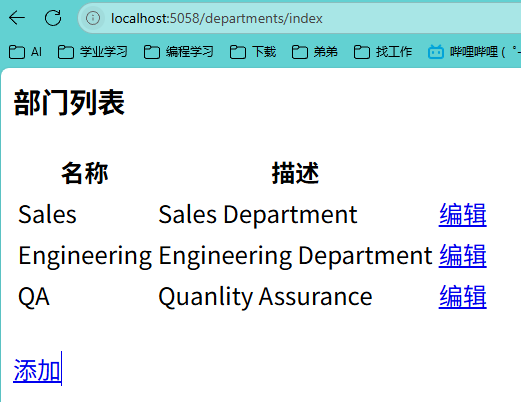
| @using WebApp.Models
@* 声明视图模型为Department列表 *@
@model List<Department>
<html>
<head>
@* 引入Bootstrap CSS样式表 *@
<link href="https://cdn.jsdelivr.net/npm/bootstrap@5.3.3/dist/css/bootstrap.min.css" rel="stylesheet" integrity="sha384-QWTKZyjpPEjISv5WaRU9OFeRpok6YctnYmDr5pNlyT2bRjXh0JMhjY6hW+ALEwIH" crossorigin="anonymous">
</head>
<body>
<div class="container"> @* Bootstrap容器布局 *@
<h3>部门列表</h3> @* 页面标题 *@
@* 检查部门数据是否存在且非空 *@
@if (Model is not null && Model.Count > 0)
{
<table class="table table-striped"> @* 条纹表格样式 *@
<thread> @* 表头部分 *@
<tr>
<th>名称</th> @* 部门名称列标题 *@
<th>描述</th> @* 部门描述列标题 *@
<th></th> @* 操作列标题 *@
</tr>
</thread>
<tbody> @* 表格内容部分 *@
@* 遍历所有部门数据 *@
@foreach(var department in Model)
{
<tr>
<td>@department.Name</td> @* 显示部门名称 *@
<td>@department.Description</td> @* 显示部门描述 *@
<td>
@* 编辑按钮,链接到部门详情页 *@
<a class="btn btn-link" href="/departments/details/@department.Id">编辑</a>
</td>
</tr>
}
</tbody>
</table>
}
<br/>
@* 添加部门按钮 *@
<a class="btn btn-primary" href='/departments/create'>添加</a>
</div>
</body>
</html>
|
5、依赖注入方式
在 ASP.NET Core 中,依赖注入的实现方式主要分为以下两类,涵盖服务注册与具体注入技术:
一、服务注册的实现方式
内置依赖注入容器
ASP.NET Core 自带的轻量级容器是默认方案,通过 Startup.cs 或 Program.cs 的 ConfigureServices 方法注册服务,支持三种生命周期(AddTransient、AddScoped、AddSingleton)。开发者无需额外配置即可完成基本依赖管理。
第三方依赖注入库
如 Autofac、Ninject 等,提供更高级功能(如属性注入、模块化注册)。例如,Autofac 支持基于条件的注册和复杂的生命周期管理,需通过替换默认容器实现集成。
自定义依赖注入容器
继承 ServiceProvider 类并重写方法,适用于需要深度定制容器行为的场景(如特殊实例化逻辑),但开发复杂度较高。
服务定位器模式
通过全局 IServiceProvider 手动解析服务(如 GetService<T>()),虽能解决某些特殊需求,但会导致代码耦合,官方明确不推荐使用。
二、依赖注入的应用方式
构造函数注入
推荐方式:在类的构造函数中声明依赖项,容器自动解析并注入。例如,控制器的构造函数接收服务接口参数,实现高可测试性和松耦合 。
特点:
应用场景:
控制器(Controller):在 MVC 中,控制器的构造函数中注入服务(如数据库上下文、日志服务)。
中间件(Middleware):中间件类的构造函数中可注入自定义服务。
服务层:业务逻辑层的服务类通过构造函数接收其他服务依赖。
示例:
1
2
3
4
5
6
7
8
| public class WeatherForecastController : ControllerBase
{
private readonly ILogger<WeatherForecastController> _logger;
public WeatherForecastController(ILogger<WeatherForecastController> logger)
{
_logger = logger;
}
}
|
属性注入
通过属性标记(如 [FromServices])注入依赖项。ASP.NET Core 原生不支持此方式,需借助第三方库(如 Autofac)或手动在 Startup 中赋值。
特点:
- 灵活性:允许依赖项在对象初始化后动态注入,适用于可选依赖或复杂对象图。
- 耦合风险:属性可被修改,可能破坏对象状态一致性。
应用场景:
- 扩展框架组件:当无法通过构造函数注入时(如某些框架限制或遗留代码改造)。
- 动态配置:需要运行时根据条件动态切换依赖实现。
示例(Autofac 实现):
1
2
3
4
5
| public class MyService
{
[Autowired]
public ILogger Logger { get; set; }
}
|
方法注入
在方法参数中使用 [FromServices] 特性动态获取服务实例,适用于临时依赖的场景(如中间件或特定业务逻辑方法)。
特点:
- 按需使用:仅在特定方法中需要依赖时注入,减少类整体耦合。
- 灵活性:支持在运行时动态解析依赖项。
应用场景:
- 中间件的
Invoke/InvokeAsync 方法:处理 HTTP 请求时动态获取服务。
- Startup 类的
Configure 方法:注册中间件时直接注入服务。
示例:
1
2
3
4
5
6
7
8
| public void Configure(IApplicationBuilder app, IWebHostEnvironment env, ILoggerFactory loggerFactory)
{
if (env.IsDevelopment())
{
app.UseDeveloperExceptionPage();
}
}
|
三、服务生命周期管理
注册服务时需指定生命周期,直接影响实例的创建与共享:
Transient:每次请求创建新实例,适用于无状态服务(如工具类)。
Scoped:同一请求内共享实例,常见于数据库上下文(如DbContext)。
Singleton:全局单例,适用于配置、缓存等全局共享资源。
